iGage X9x User Manual page 49 of 53
Click on ‘Back’, then ‘Exit’ to close the program.
X9xRadioFrequency Tool
Note: it is a violation of US Federal law to operate on an unlicensed frequency or without enabling ‘Call Sign’
transmission.
The X9xRadioFrequency tool is a single file executable that you can download from:
http://x9gps.com/
click on ‘Tools: Utilities: RadioFrequency; iGageChannelTool’ then right-click on ‘X9xRadioFreq.exe’ and save to your
desktop.
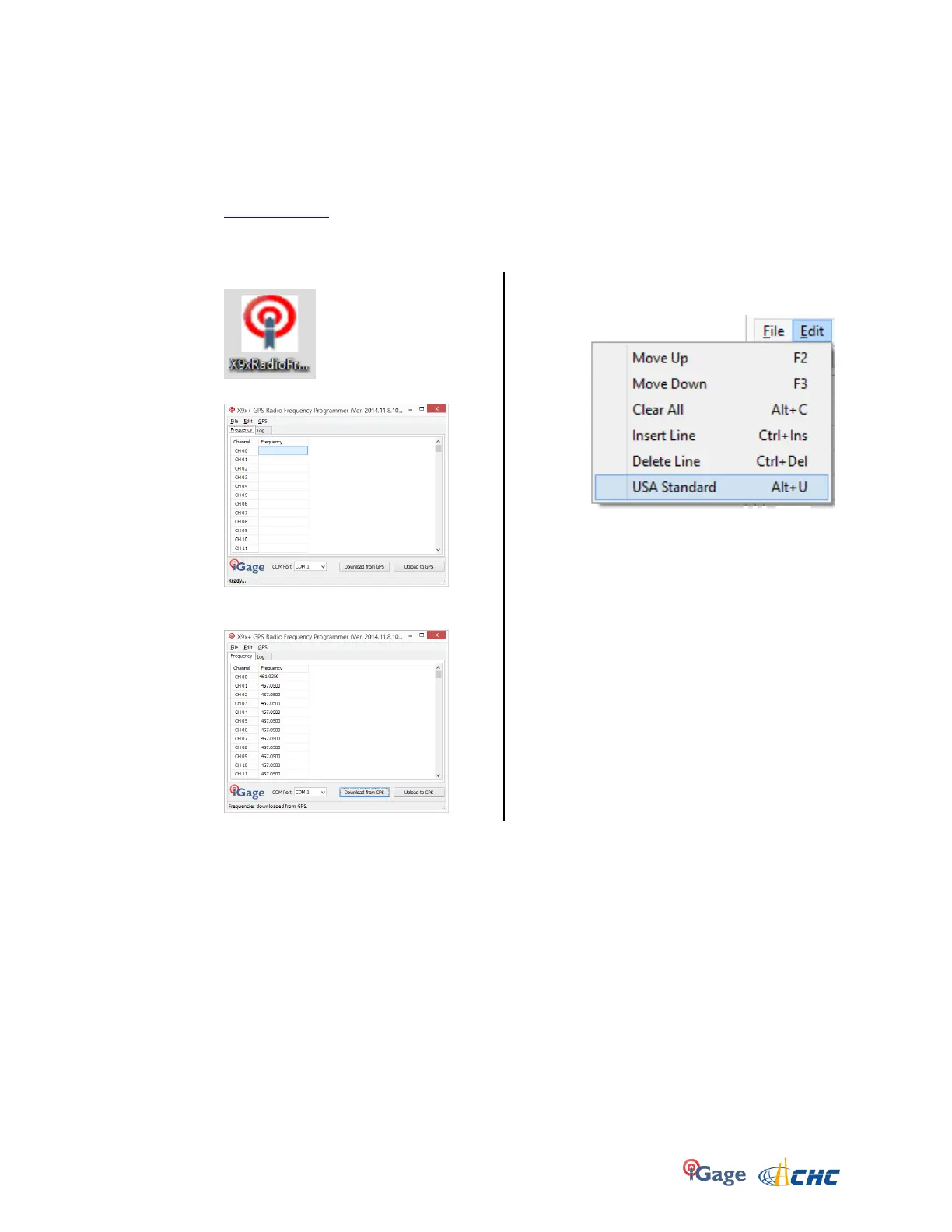
Double-click on the program icon on your desktop:
The channel programming tool will start:
Select the correct ‘COM Port’, then click ‘Download
from GPS’ and the current channel list will be shown:
This tool includes an option to automatically stuff the
most common GPS frequency list:
With the editing tools (Insert, Delete, Move) you can
quickly configure your channel list. The File menu
allows you to replicate settings across multiple
receivers quickly.
After configuring the channels how you want them,
don’t forget to click the ‘Upload to GPS’ button to
transfer the channel settings.



 To Next Page