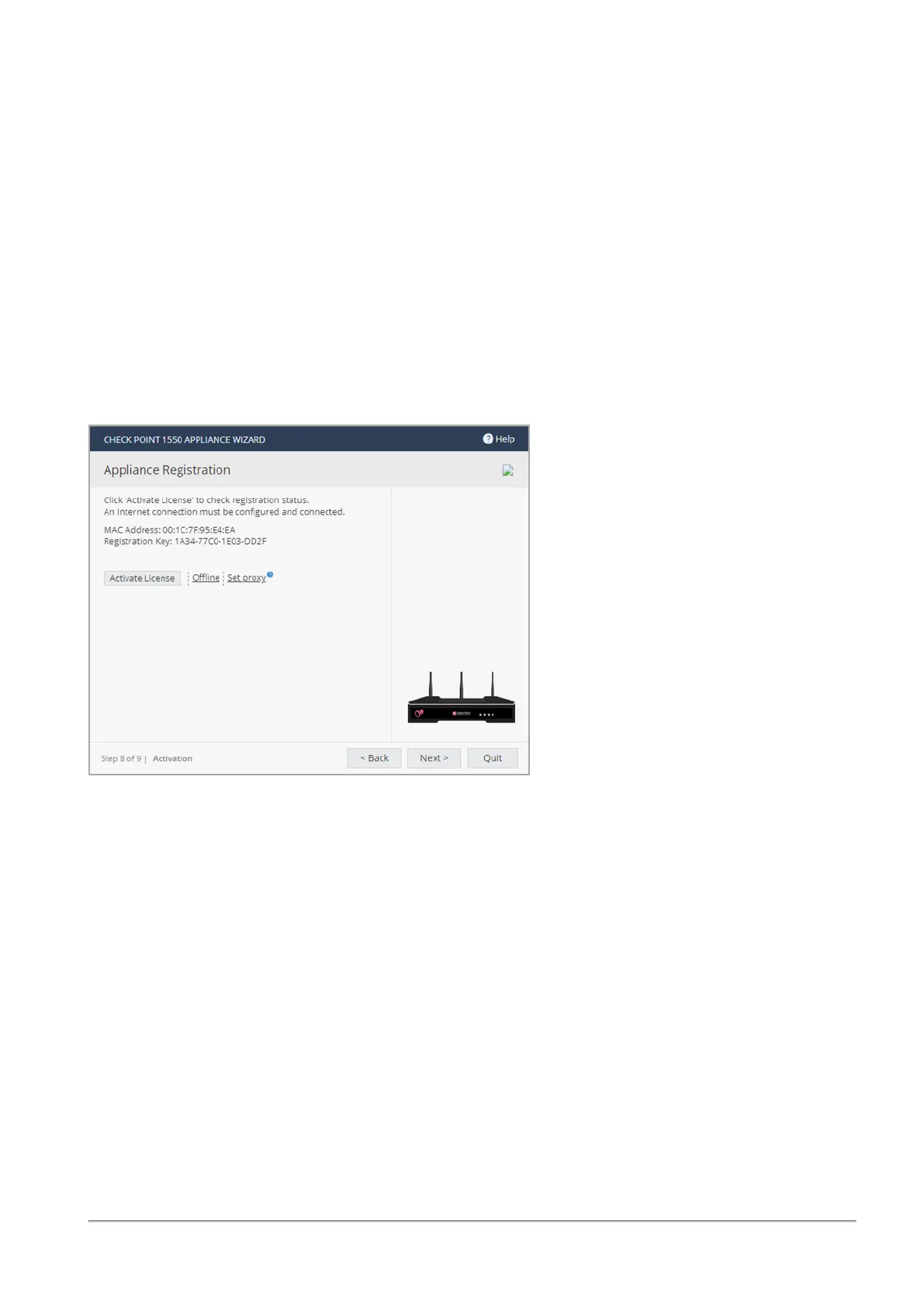
Using the First Time Configuration Wizard
Quantum Spark 1530 / 1550 Appliance R80.20.XX Getting Started Guide|29
3. Click Apply.
4. Click Activate License.
You are notified that you successfully activated the appliance and you are shown the status of your license
for each blade.
To postpone appliance registration and get a 30-day trial license:
1. Click Next.
The License activation was not complete notification message is shown.
2. Click OK.
The appliance uses a 30-day trial license for all blades. You can register the appliance later in the
WebUI from the Device > License page.
If your device is not paired with a User Center account, you must create an account or ask your company
administrator to create one for you.
To create a new User Center account (for Locally Managed appliances only):
1. Click Activate License.
The Appliance Registration window opens.
2. Select Create a new User Center account and click Next.
3.
In the new window, enter:
n
First name
n
Last Name
n
Email. You must enter this a second time to confirm.
n
Company - This is the Account Name to which the appliance is paired.
4. Click Next.



 To Next Page