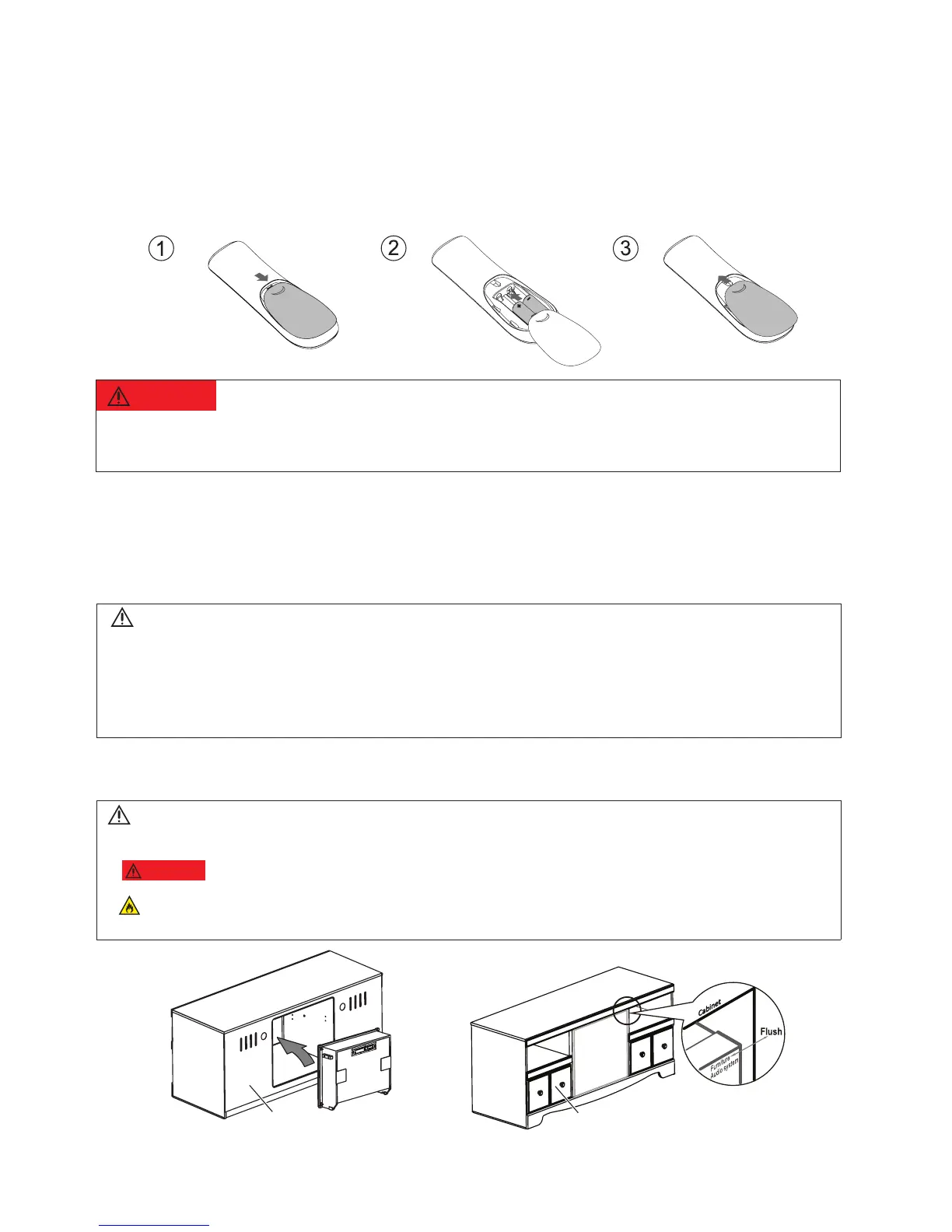
4.2.1 Replace battery
a Open the battery compartment.
b Insert “2 x AAA-R03-1.5 V” batteries, with the polarity (+/-) as indicated.
c Close the battery compartment.
5 Connect and set up
This section guide you to connect to TV and other signal device for set up.
5.1 Position the product
Note
• For identication and supply ratings, see the type plate at the back or bottom of the product.
• Before you make or change any connections, make sure that all devices are disconnected from the power
outlet.
• If the product is transported in temperatures below 43
C), unpack the product and wait until its
temperature matches room temperature before connecting it to the power outlet.
BACK
FRONT
Warning
• Danger of explosion included serious bodily injury, property damage, death or damage, if battery is incorrectly
replaced. Replace only with the same or equivalent type.
Note
• Please gently push the product from the back of the furniture, until the surface is ush with furniture.
•
WARNING
Never install this product in a conned space. Always leave a space of at least 4 inches back the
product for ventilation. Ensure other objects never cover the ventilation slots on the product.
Failure to ensure at least 4 inches of space back the product may cause re, property damage, serious bodily
injury, or death.
MODEL#: W100-41 Page 12 of 19


 To Next Page