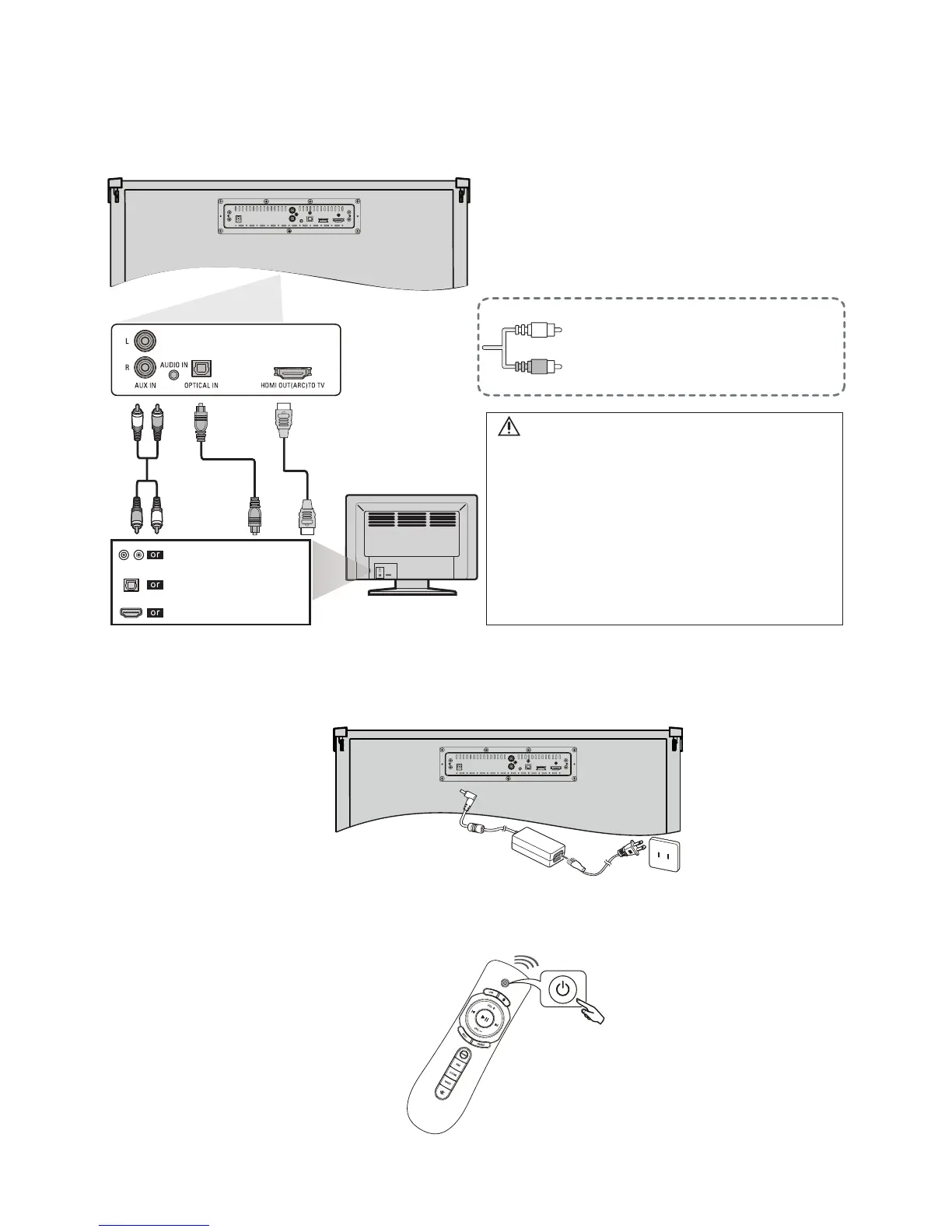
5.2 Connections
5.2.1 Connect To TV
5.2.2 Connect AC plug into AC outlet.
5.2.3 Turn on the product.
Please refer to “Play audio through
Bluetooth” on 6.4 when you use
Bluetooth.
HDMI Cable
OPTICAL Cable
AUDIO Cable
AUDIO OUTPUT
HDMI IN
OPTICAL OUTPUT
DIGITAL AUDIO OUT (OPTICAL)
If your TV does not have audio outputs
shown left, to connect the product
directly to your other devices (Blu-Ray
player, game system, etc.) see your
device’ s user manual.
Note
• Make sure the unit is Turned Off when connecting.
• Check whether the connection for all cables are
connected tightly.
• If you connect with a Audio in cable, make sure the
volume for the headphone output is appropriate for
the product input.
• If the Audio in volume is too soft, the product may
not output sounds with appropriate volume.
• If the TV provides an ARC port, connect the HDMI
cable to the HDMI IN (ARC) port.
MODEL#: W100-41 Page 13 of 19


 To Next Page