21
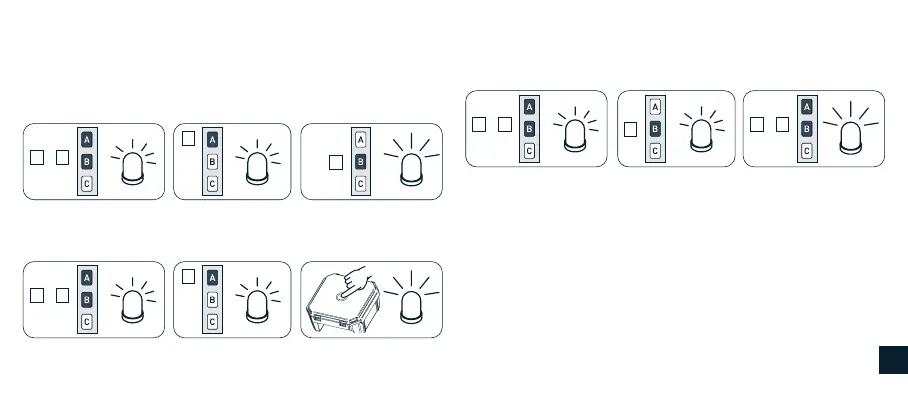
REMOTE CONTROL MEMORY CLEARING
It is possible to delete singly all the memorized remote controls. When
the last one is deleted the receiver initial condition is restored. The
same applies to the single channels of a multichannel remote control:
just select the channel to cancel. Tn: Remote control to be cleared.
Tn short
Tn short
Tn short
Tn short
Tn (2 sec) long
(2 sec) long
+
A B
+
A B
B
A
A
This sequence deletes the remote control from all the associated
receivers.
This sequence deletes the remote control from a single receiver.
FULL MEMORY CLEARING
The full memory clearing can be performed in two ways:
1) WITH THE REMOTE CONTROL
Tn short
+
A B
Tn short
B
+
A B
Tn (4 sec) long
2) WITH THE SET BUTTON
Use this option only in case of emergency or when no working remote
control is available. Use the SET button on the device to clear the
memory.
The procedure sequence is as follows:
1) Disconnect the power from the receiver, for example at the main
breaker switch, and wait at least 5 seconds.
2) Reconnect the power to the receiver holding down the SET
button; the Led will blinking briey.
GB


 To Next Page