27
1 1
2 2
2 2
1 1
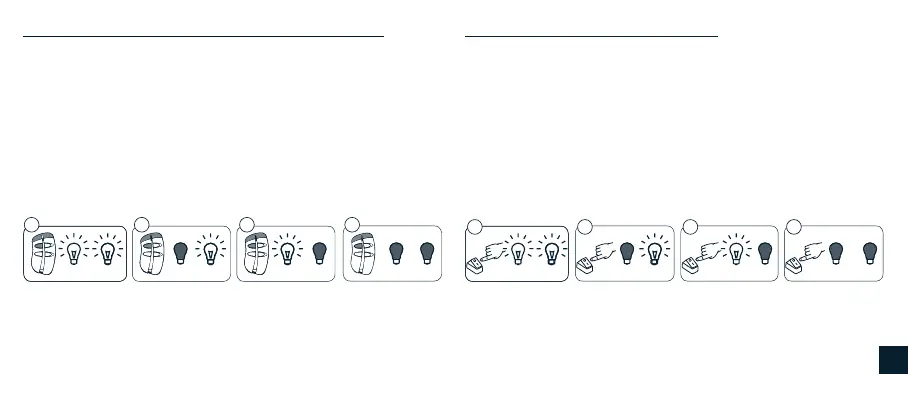
Command sequence example: Command sequence example:
With the outputs switched on, each time the programmed button is
pressed long (>1 sec), outputs 1 and 2 both change in brightness: the
rst time they increase in intensity, the next time they decrease and so
on, alternating. The switched off outputs do not change.
With the outputs switched on, each time the button is pressed long
(>1 sec), outputs 1 and 2 both change in brightness: the rst time
they increase in intensity, the next time they decrease and so on,
alternating. The switched off outputs do not change.
ON 1-2 ON 1-2OFF 1 ON 2 OFF 1 ON 2ON 1 OFF 2 ON 1 OFF 2OFF 1-2 OFF 1-2
1 2 3 4
A530058 remote control with 4 independent channels Button connected to the wired switch
Each time the programmed button is pressed briey (<1 sec), outputs
1 and 2 are turned on and off, as indicated in the sequence:
• The rst time the button is pressed it turns on both outputs.
• The second time the button is pressed it turns off output 1 and on
output 2.
• The third time the button is pressed it turns on output 1 and turns
off output 2.
• The fourth time the button is pressed it turns off both outputs.
Each time the button is pressed briey (<1 sec), outputs 1 and 2 are
turned on and off, as indicated in the sequence.
• The rst time the button is pressed it turns on both outputs.
• The second time the button is pressed it turns off output 1 and on
output 2.
• The third time the button is pressed it turns on output 1 and turns
off output 2.
• The fourth time the button is pressed it turns off both outputs.
2 2
1 1
2
2
1 1
1 2 3 4
GB


 To Next Page