22
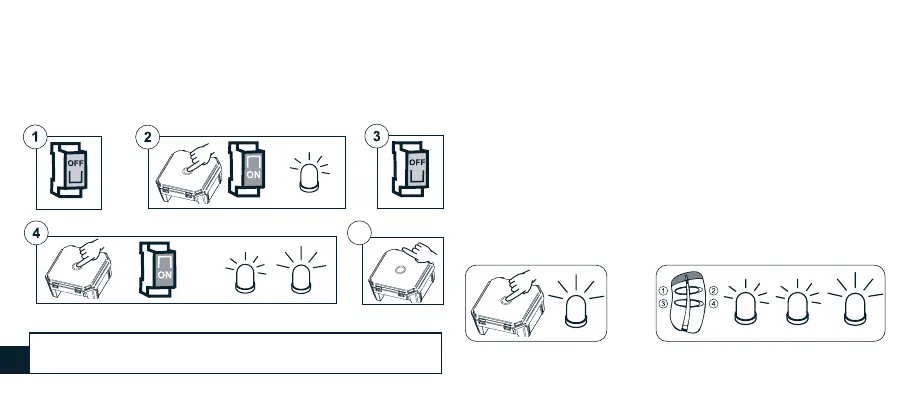
3) Disconnect the power from the receiver.
4) Reconnect the power to the receiver holding down the SET button;
after 4 seconds the Led will blinking briey followed by a longer
blinking.
5) Release the SET button.
short long
5
short
10 sec
...
4 sec
A530058 REMOTE CONTROL
WITH 4 INDEPENDENT CHANNELS
It is possible to associate a remote control with 4 independent
channels with a receiver. The receiver should be programmed on a
button that is not associated with another device.
• Press the SET button for at least 4 seconds.
• The Led lights on to indicate that it is ready for programming.
• Within 4 seconds press the button to be programmed on the
A530058 remote control for at least 2 seconds.
• The programming Led will respond with three ashes (short, short,
long).
4 sec
within
4 sec
Tx (2 sec)
short short long
SETTING THE REMOTE CONTROL DIRECTLY ON THE RECEIVER
The procedure also automatically deletes the associated remote
control A530058.
GB


 To Next Page