In Brief 1-17
* : Press to disengage cruise
control without erasing the set
speed from memory.
See Cruise Control on page 9‑32.
Driver Information
Center (DIC)
The DIC display is in the instrument
panel cluster. It shows the status of
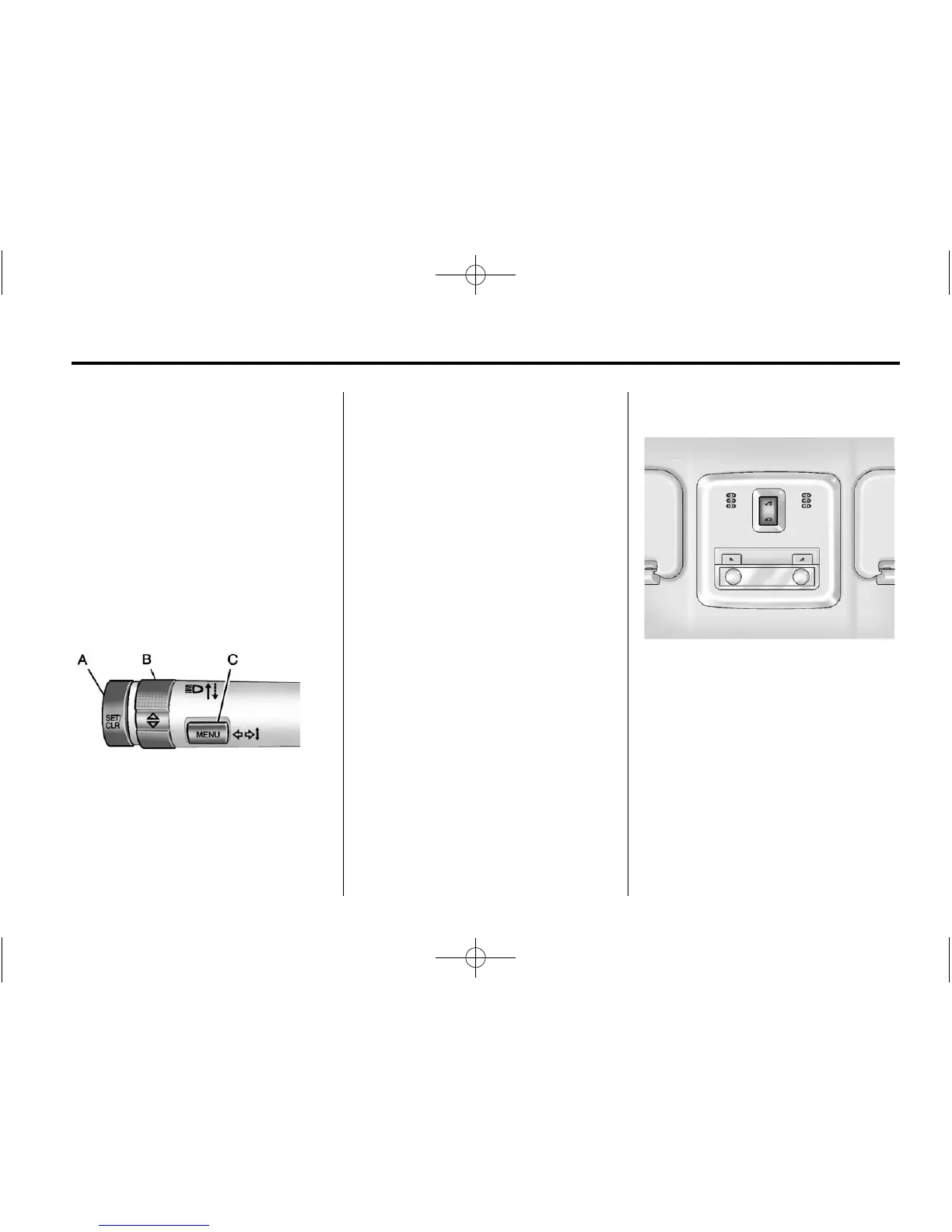
many vehicle systems. The controls
for the DIC are located on the turn
signal lever.
A. SET/CLR: Press to set or clear
the menu item when it is
displayed.
B.
w x: Use the thumbwheel to
scroll through the items in
each menu.
C. MENU: Press to display the DIC
menu items. This button is also
used to return to or exit the last
screen displayed on the DIC.
For more information, see Driver
Information Center (DIC) on
page 5‑23.
Power Outlets
The accessory power outlets can be
used to plug in electrical equipment,
such as a cell phone or MP3 player.
The vehicle has an accessory
power outlet located in front of the
cupholders on the center floor
console.
See Power Outlets on page 5‑5.
Sunroof
On vehicles with this feature, the
sunroof only operates when the
ignition is turned to ON/RUN or
Retained Accessory Power (RAP) is
active.












 To Next Page