E2
(Surrounding condition)
• Away from strong noise, static electricity, and electric field and
magnetic field etc.
• Surrounding temperature within -10 to 50 C (Less than 40 C in case
of closed instrumentation), surrounding humidity within 20 to 90%
RH.
• Variation in temperature is less.
• Away from corrosive gas, explosive gas, ignition gas and
combustible gas.
• Away from salt, iron and conductive material (Carbon, iron etc.).
• Away from steam, oil and chemicals etc.
• Away from dust etc.
• Away from the surroundings where high temperature is generated.
• Away from places where temperature remains stored (To avoid
increase in internal temperature, ensure the ventilation space.
However, avoid direct wind to the terminals, it may cause unstable
indication.)
• Lot of space above the upper part of the instrument.
• Place where display screen can be easily seen. (This instrument
uses LCD therefore if it is seen from ‘above’, ‘below’, ‘left’, ‘right’
and ‘at an angle’ it may be difficult to see the display screen).
• Screen burn-in may be developed in LCD if same screen is
displayed (Lights ON all the time etc.) for long period of time. If
continuously operating the instrument for long period of time (under
reference operating condition for 3 months or more), display
different screen regularly or turn OFF the power to prevent screen
burn-in.
• Specifications of common mode voltage of all input output terminal
except for power supply and relay output terminal are max. 30V
r.m.s., max. 42.4V peak, and max. 60V DC.
Mounting conditions
• Installation altitude is less than 2,000m above the sea level.
• Mounting posture longitudinal tilting is less than 10 lateral tilting is
less than 10.
Others
• Do not wipe the instrument with an organic solvent (like alcohol).
• To avoid malfunctioning of the instrument, do not use cell phones in
its vicinity.
• An obstacle may be created for television and radio sets placed
near the instrument.
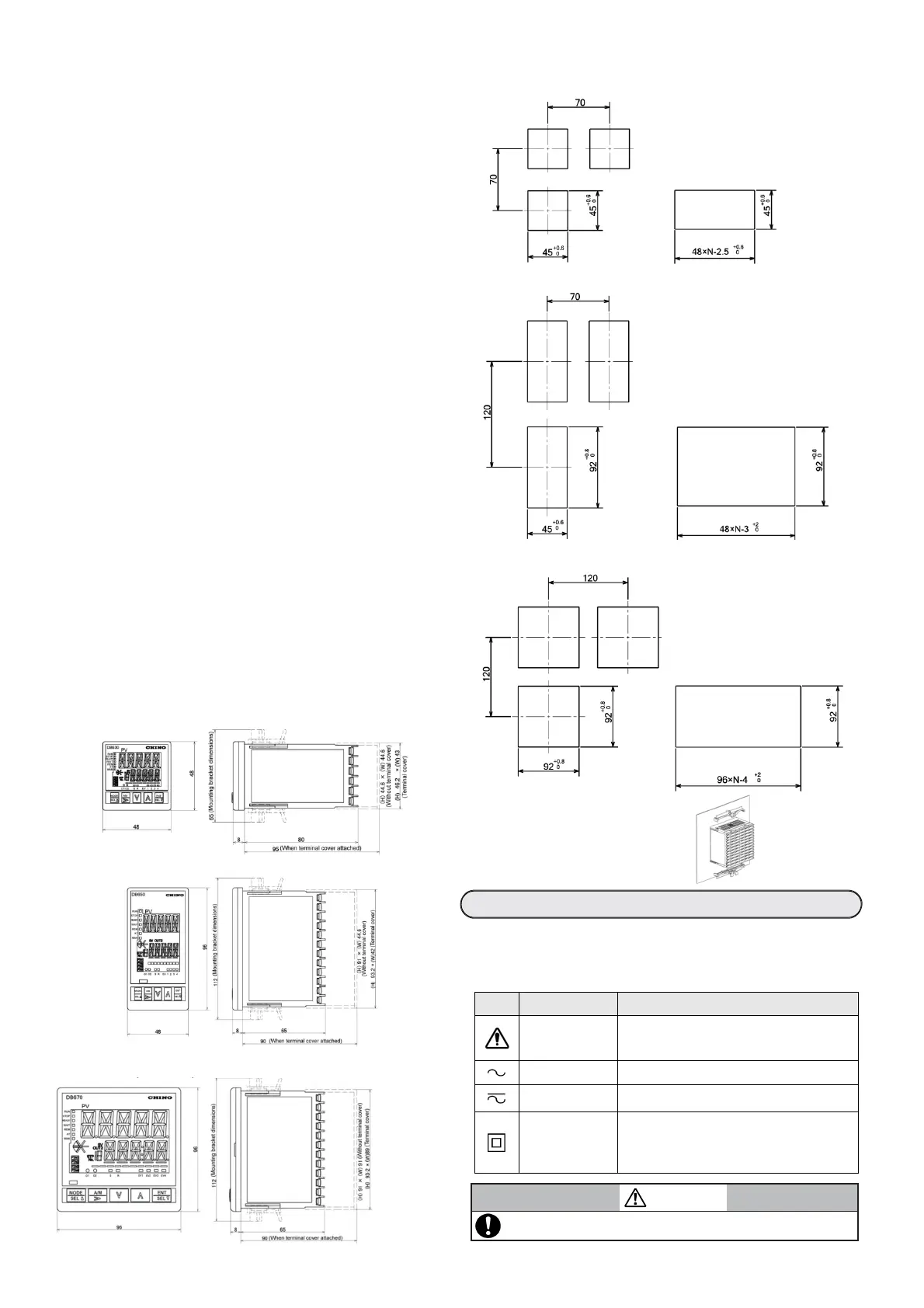
External Dimensions
• DB63 (unit: mm)
• DB65 (unit: mm)
• DB67 (unit: mm)
Panel cutout and mounting dimensions
• DB63
Panel cutout Closed installation
• DB65
• DB67
Panel mounting
1.
Confirm the mounting slot
2. Assemble into the panel
3.
Fix the instrument
Step 2. Wiring
Symbol mark
The following symbol marks are used in this product itself and in this
instruction manual hence understand the meaning of these symbol
marks properly.
Label Name Meaning
Alert symbol mark
Place to refer to the instruction manual to avoid
“electric shock” and “injuries”, etc.
AC Indicate an alternating current.
DC/AC Indicate both of direct and alternating current.
Outline protection
Indicate the device which entire outline is
protected by double insulation or reinforced
insulation.
WARNING
Electric shock may occur, make sure to turn OFF the power
and
erform the
anel mountin
and/or wirin
o
eration.
N: Number of the Instrument
N: Number of the Instrument
( )
( )
( )
N: Number of the Instrument



 To Next Page