

EasyManua.ls Logo

ChiQ B8U - User Manual

ChiQ B8U
30 pages
Print Icon
To Next Page IconTo Next Page
Loading...
Question and Answer IconNeed help?

Do you have a question about the ChiQ B8U and is the answer not in the manual?

Summary

Product Introduction

Product Specifications

Lists detailed technical specifications including display, resolution, power supply, and port details.

Main Unit Appearance

Details the physical structure and external features of the main unit, including ventilation, ports, and keys.

Port Functions

Explains the function and connection details of various input/output ports on the projector.

Remote Control Operation

Describes the keys and functions of the remote control for operating the projector.

Installation and Commissioning

Installation Methods

Covers different installation methods like desktop front/back projection and lifting projection.

Screen Size and Installation Distance

Provides guidance on screen size and optimal distances for projector placement.

Picture Position Adjustment

Explains how to adjust the image position and size using the projector's height adjustment mechanism.

Focus Adjustment Procedure

Guides users on how to achieve a clear image by adjusting the focus using the remote control.

Image Calibration

Explains how to calibrate and adjust the picture using the on-screen menu and remote control.

Operating Instructions

Initial Boot Guidance

Outlines the initial setup process including language selection, network configuration, and account login.

System Home Page

Describes the main interface, common apps, and navigation shortcuts on the projector's home screen.

Application Management (AI PONT)

Explains the AI PONT feature for managing installed applications, including opening, sorting, and uninstalling.

Help and Support Features

Introduces the Help application, covering interface, homepage, application management, and troubleshooting.

TV Manager Functions

Details the TV Manager app for system optimization, cleaning, memory boost, and intelligent diagnosis.

Media Player Usage

Guides on using the Media Player for audio/video playback, file browsing, and supported storage devices.

Accessing System Settings

Explains how to access and navigate the projector's settings menu for various configurations.

Safety Precautions

Laser Safety Guidelines

Crucial safety guidelines for operating the laser projector, including eye protection and avoiding disassembly.

Operational Safety Measures

Covers safe handling, installation on stable surfaces, proper power connection, and ventilation requirements.

Device Handling and Maintenance Safety

Details precautions for moving the device, handling malfunctions, cleaning, and installation methods.

Cleaning and Battery Safety

Provides instructions for safe cleaning of the unit and precautions for handling projector remote control batteries.

Regulatory Information

FCC Compliance and Labeling

Explains FCC rules, labeling requirements, and user information regarding radio frequency interference.

RF Exposure and Safety

Details FCC RF exposure limits, SAR information, and safety cautions related to radio frequency emissions.

Recycling and Disposal

Recycling Information

Provides information on recycling packaging materials and the product's environmental protection service life.

Trademark Information

Brand and Technology Trademarks

Lists registered trademarks and logos of technologies used in the projector, such as HDMI, Dolby, and DTS.

Statement

Copyright and Usage Statement

Outlines restrictions on reproducing, transmitting, or translating the manual content without company permission.

Warranty Service

Warranty Terms and Conditions

Details the warranty period, requirements for service, and conditions under which warranty becomes invalid.

Warranty Exclusions

Lists circumstances that void the warranty, leading to charged maintenance services.

Summary

Product Introduction

Product Specifications

Lists detailed technical specifications including display, resolution, power supply, and port details.

Main Unit Appearance

Details the physical structure and external features of the main unit, including ventilation, ports, and keys.

Port Functions

Explains the function and connection details of various input/output ports on the projector.

Remote Control Operation

Describes the keys and functions of the remote control for operating the projector.

Installation and Commissioning

Installation Methods

Covers different installation methods like desktop front/back projection and lifting projection.

Screen Size and Installation Distance

Provides guidance on screen size and optimal distances for projector placement.

Picture Position Adjustment

Explains how to adjust the image position and size using the projector's height adjustment mechanism.

Focus Adjustment Procedure

Guides users on how to achieve a clear image by adjusting the focus using the remote control.

Image Calibration

Explains how to calibrate and adjust the picture using the on-screen menu and remote control.

Operating Instructions

Initial Boot Guidance

Outlines the initial setup process including language selection, network configuration, and account login.

System Home Page

Describes the main interface, common apps, and navigation shortcuts on the projector's home screen.

Application Management (AI PONT)

Explains the AI PONT feature for managing installed applications, including opening, sorting, and uninstalling.

Help and Support Features

Introduces the Help application, covering interface, homepage, application management, and troubleshooting.

TV Manager Functions

Details the TV Manager app for system optimization, cleaning, memory boost, and intelligent diagnosis.

Media Player Usage

Guides on using the Media Player for audio/video playback, file browsing, and supported storage devices.

Accessing System Settings

Explains how to access and navigate the projector's settings menu for various configurations.

Safety Precautions

Laser Safety Guidelines

Crucial safety guidelines for operating the laser projector, including eye protection and avoiding disassembly.

Operational Safety Measures

Covers safe handling, installation on stable surfaces, proper power connection, and ventilation requirements.

Device Handling and Maintenance Safety

Details precautions for moving the device, handling malfunctions, cleaning, and installation methods.

Cleaning and Battery Safety

Provides instructions for safe cleaning of the unit and precautions for handling projector remote control batteries.

Regulatory Information

FCC Compliance and Labeling

Explains FCC rules, labeling requirements, and user information regarding radio frequency interference.

RF Exposure and Safety

Details FCC RF exposure limits, SAR information, and safety cautions related to radio frequency emissions.

Recycling and Disposal

Recycling Information

Provides information on recycling packaging materials and the product's environmental protection service life.

Trademark Information

Brand and Technology Trademarks

Lists registered trademarks and logos of technologies used in the projector, such as HDMI, Dolby, and DTS.

Statement

Copyright and Usage Statement

Outlines restrictions on reproducing, transmitting, or translating the manual content without company permission.

Warranty Service

Warranty Terms and Conditions

Details the warranty period, requirements for service, and conditions under which warranty becomes invalid.

Warranty Exclusions

Lists circumstances that void the warranty, leading to charged maintenance services.

Overview

This document describes the ChiQ Laser Theater Projector, a device designed for home installation. It provides comprehensive information on its features, specifications, installation, operation, and maintenance.

Function Description

The ChiQ Laser Theater Projector is a home theater system that utilizes laser light source and DLP technology to project images. It supports various installation methods including desktop front projection, desktop back projection, lifting front projection, and lifting back projection, making it adaptable to different application scenarios. The projector integrates an Android Intelligent Movement system, offering smart functionalities and connectivity options. It is designed to deliver a high-quality visual and audio experience for home entertainment.

Important Technical Specifications

Product Model: B8U Display Technology: Laser light source + DLP technology Resolution: 3840×2160 Recommended Display Size: 100 inches Movement System: Android Intelligent Movement Network Connection: Wired network + wireless network Method of Remote: Bluetooth Built-in Speakers: 10W×2 Implementation Standard: Q20541230-8.154-2019 Power Supply: 100-240V~, 3A, 50/60Hz Body Size (approx.): 486mm×326mm×133mm Net Weight of Main Unit: 10.5Kg

Ports:

  • LAN ×1
  • COAX ×1
  • AUDIO OUT×1
  • S/PDIF ×1
  • RS-232×1
  • USB×2 (5V/1A each)
  • HDMI ×2 (one with eARC)

Environmental Conditions:

  • Run Temperature: 0~35℃
  • Run Relative Humidity: 20%~80%
  • Storage Temperature: -20~50℃
  • Storage Relative Humidity: 20%~80%

Wireless Specifications:

  • Frequency bands: 2412-2472MHz, 2402-2480MHz, 5150-5725MHz, 5725-5850MHz
  • Maximum output power (EIRP): 16.35dBm (2412-2472MHz), 13.71dBm (2402-2480MHz), 16.18dBm (5150-5725MHz), 13.45dBm (5725-5850MHz)

Certifications:

  • CMIIT ID: 2021AP10608(M) or CMIIT ID: 2021AP8949 radio transmission module
  • Class 1 according to IEC/EN60825-1: 2014 (Laser safety)
  • R2 IEC 62471-5:2015 (Bright light source safety)
  • FCC compliant (Part 15)
  • EMC Directive 2014/30/EU, Low Voltage Directive 2014/35/EU, and Radio Equipment Directive 2014/53/EU compliant for EU member states.

Usage Features

Packaging Overview: The package includes the main unit, product user manual, remote control, power cord, and four lifting screws. Note that accessories may vary due to product upgrades or regional differences.

Main Unit Structure: The main unit features ventilation meshes, a voice-emitting hole for the built-in speaker, an infrared protective sensor, a camera, a light-emitting hole, a power key and indicator, various ports (LAN, COAX, AUDIO OUT, S/PDIF, RS-232, USB, HDMI), a power input, an anti-theft lock hole, height adjusting kickstands, and lifting screw holes.

Ports Functionality:

  • LAN: For wired network connections.
  • COAXIAL: For digital audio signal transmission to an external sound system.
  • AUDIO OUT: Provides analog audio signal output (L/R).
  • S/PDIF: Fiber interface for digital audio output.
  • RS232: Control interface.
  • USB (5V/1A): For connecting USB devices like flash disks and mobile hard disk drives. Caution: Avoid plugging/unplugging other USB devices while a file from a USB mobile hard disk is playing to prevent damage. HDMI does not support DTS-CD audio decoding.
  • HDMI 2(eARC): For external devices with HDMI ports (ARC).
  • HDMI 1: For external devices with HDMI ports.

Remote Control: The remote control functions via both IR and Bluetooth. Initial pairing with the projector is required for Bluetooth mode by simultaneously pressing specific keys while pointing the remote at the projector. The remote includes keys for power, navigation (Up/Down/Left/Right), return, focus, hotkeys for apps, volume control, voice control, home, settings, OK, and mute.

Installation and Commissioning: The projector supports desktop front/back projection and lifting front/back projection. The display mode can be adjusted in the OSD menu. Screen Size and Installation Distance: The display size is proportional to the distance between the projector and the screen. Recommended installation by authorized professional technicians. The manual provides a table for screen size (80" to 120") and corresponding display width, height, and distance from the projector to the screen. Image Adjustment:

  • Image Position: Adjust by moving the main unit forward, backward, left, right, or rotating the height adjustment kickstand. The manual provides visual examples for adjusting image size (smaller/bigger), position (left/right), and trapezoid correction (down/up/left/right).
  • Focus Adjustment: Access via the "focus" key or "Projector settings" -> "Focus Adjustment" in the settings menu. Adjust until the screen is clear.
  • Image Adjustment (Picture Calibration): Access via the "focus" key or "Projector settings" -> "Picture Calibration" in the settings menu. Use arrow keys on the remote to correct the image.

Operating Instructions: Boot Guidance: Guides users through initial setup, including country and language selection, remote control pairing, quick settings, network settings, Google account login, password lock, and region settings. This guidance runs on first boot or after factory reset. System Home Page: Accessed by pressing the "Home" key. Displays commonly used apps, voice menu, search menu, notifications, inputs, network & internet, and settings. AI PONT: Manages installed applications, allowing users to open, sort, view info, and uninstall user-arranged apps. Pre-installed apps cannot be uninstalled. Help: Provides information on using the system's main functions, including Interface, Homepage, Application, Settings, Google Assistant, Multi-Screen, Disclaimer, and Troubleshooting. TV Manager: Accessed via the TV Manager app icon. Features include Usage detection, Optimize, Clean, Memory Boost, Uninstall Apps, Install Apps, and Intelligent Diagnosis. Media Player: Supports audio and video file playback, picture presentation, and application installation. Organizes content by video, picture, music, and all types. Supports file browsing from external FAT32 hard disks or USB disks up to 2 TB. Settings: Accessed via the settings icon on the home page or the settings button on the remote. Includes options for Dolby Vision, Picture Calibration, Focus Adjustment, Display Mode, Eye Protection Mode, Lighting Settings, Bug report, Network & Internet, Parental Control, Projector Settings, Accounts & Sign-in, Apps, Device Preferences, and Remotes & Accessories.

Maintenance Features

Safety Precautions:

  • Laser Safety: Do not look directly at the bright light emitted by the machine. Do not open or disassemble the machine. Do not use optical instruments (magnifying glass, microscope) to observe laser output. Wear professional laser protection glasses if direct contact with bright light is necessary. The product is Class 1 laser product.
  • Installation Safety: Do not install on unstable tables/shelves. Ensure the power plug is fully inserted and accessible.
  • Power Cable: Do not pull the power cable; hold the plug when disconnecting.
  • Environmental Changes: If moved from low to high temperature, condensation may occur; do not use immediately.
  • Malfunction: In case of abnormality (no image/sound, smoke, unusual odor), disconnect power immediately and contact after-sales service.
  • Ventilation: Do not block air vents. Install in a well-ventilated place, ensuring at least 30cm distance from walls.
  • Flammable Materials: Do not block the light beam with flammable materials (books, cardboard) as they may melt, ignite, or cause fire. Do not place flammable sprays or substances near the machine.
  • Placement: Do not place in areas with poor ventilation (carpets, cushions, bookshelves, closets).
  • Lens Care: Do not touch or wipe the lens with hands or ordinary cleaning cloth. Use an ear syringe ball to remove dust.
  • Objects: Do not place any objects on the machine.
  • Hoisting: Professional technicians must use appropriate tools for hoisting to prevent falls and injury/damage.
  • Environment: Do not install in a damp environment. Do not place any liquid in the accessories.
  • Service: Contact dealer or Changhong After-sales Service Center for inspection/adjustment/maintenance. Non-professional operation may cause electric shock or damage.

Cleaning:

  • Do not spray water directly on the machine.
  • Remove the power plug before cleaning.
  • Wipe the surface gently with a soft cloth.
  • Do not use alcohol, wax, or thinner on plastic parts.
  • Do not touch or wipe the lens with hands or ordinary cleaning cloth; use an ear syringe ball for dust.
  • Regularly clean dust from the vent window net to prevent overheating.

Battery (Remote Control):

  • Do not mix old and new batteries or different brands.
  • Install batteries correctly according to polarity marks.
  • Remove batteries if the remote is not used for a long time or if batteries are exhausted to prevent leakage.
  • Do not dispose of batteries in fire, hot ovens, or crush/cut them, as this can result in explosion.
  • Do not leave batteries in extremely high-temperature environments, which can cause explosion or leakage of flammable liquid/gas.
  • Do not subject batteries to extremely low air pressure, which can cause explosion or leakage of flammable liquid/gas.
  • Do not charge non-rechargeable batteries.
  • Place spent batteries in designated disposal areas.

Recycling:

  • Packaging materials are recyclable.
  • The product has an environmental protection service life of 10 years under normal working conditions.
  • Used batteries and products should be recycled by regular dealers or manufacturers to protect the environment.

Warranty Service: The warranty covers faults caused by product quality issues during the warranty period, provided the service warranty card and purchase invoice are complete and unaltered. Improper use, maintenance, storage, unauthorized dismantling, lack of warranty card/invoice, or discrepancies in product model/number will void the warranty. The company's regulations and updated laws/regulations of the country/region will prevail for any changes in the warranty terms.
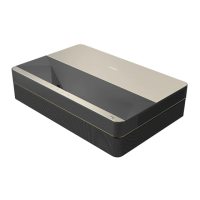
ChiQ B8U Specifications

General IconGeneral
BrandChiQ
ModelB8U
CategoryProjector
LanguageEnglish