Page 18 of 40 IRIS Touch Engineering Manual Version 1.4
GPRS/3G (IRIS Touch 600NG or 640NG)
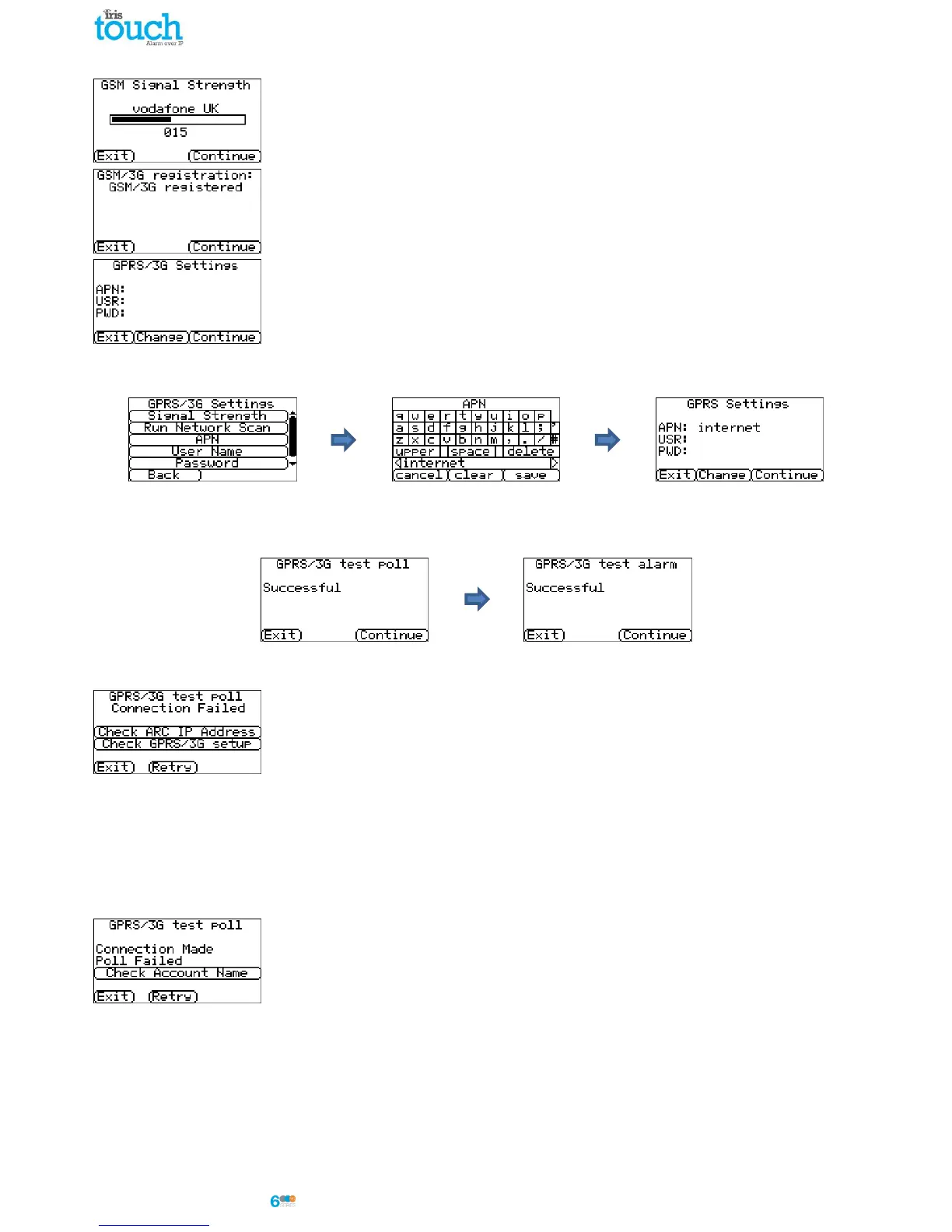
If you selected connection via GPRS/3G, the dialler will display the current operator /
signal strength for the base station to which it is currently attached.
Note: You will require a signal strength of 10 CSQ or higher for a reliable connection.
Click Continue.
Next the unit will check if it has GSM/3G registration and if it does it will report GSM/3G
registerted. If this screen shows GSM/3G not registered then please check the SIM card is
inserted correctly and contact the SIM provider to confirm it is enabled.
All GPRS/3G networks require the Access Point Name (APN) to be set. A few also require
User Name (USR) and Password (PWD).
Now enter in the information you have from the SIM provider for this SIM card by
clicking ‘Change’.
This will result in the following menu which allows you to enter in the settings for APN, User Name, Password and
Pin (Scroll down) with which you may have been supplied.
Once you have confirmed that the information entered in is correct click ‘Continue’.
The IRIS Touch dialler will make a test poll and test alarm transmission over GPRS/3G.
Note: The normal sequence of sending test alarms from the alarm panel must still be carried out.
Please ensure that both of these transmissions are successful. If not successful the dialler will indicate the possible
issues and the configuration to check as shown below:
This indicates that the poll call did not reach the IRIS Secure Apps system and could be
caused by one of the following:
Check ARC IP Address entered is correct for the monitor centre.
Note: if using Ethernet on a VPN for example then the ARC IP would be for this connection and not the
correct one for GPRS/3G. In this case please have the ARC operator check the Allocator setup for this
account and try a Reload Parameters.
Check GPRS/3G settings are correct for APN, User name, Password and Pin.
Ensure SIM card is setup for GPRS/3G Machine to Machine data.
This indicates that the test poll call has reached the IRIS Secure Apps system but the
account number is not valid.
Check that the account number is programmed correctly.
Check with the monitoring centre that the account in IRIS Secure Apps is setup



 To Next Page