IRIS Touch Engineering Manual Version 1.4 Page 15 of 40
8. Main menu (Only accessible via USB connection)
The IRIS Touch dialler has a number of options available which are accessible using the USB connection, to a
PC/Laptop and using the IRIS Toolbox software.
The IRIS Toolbox software is available from
http://www.chironsc.com/downloads_security.html.
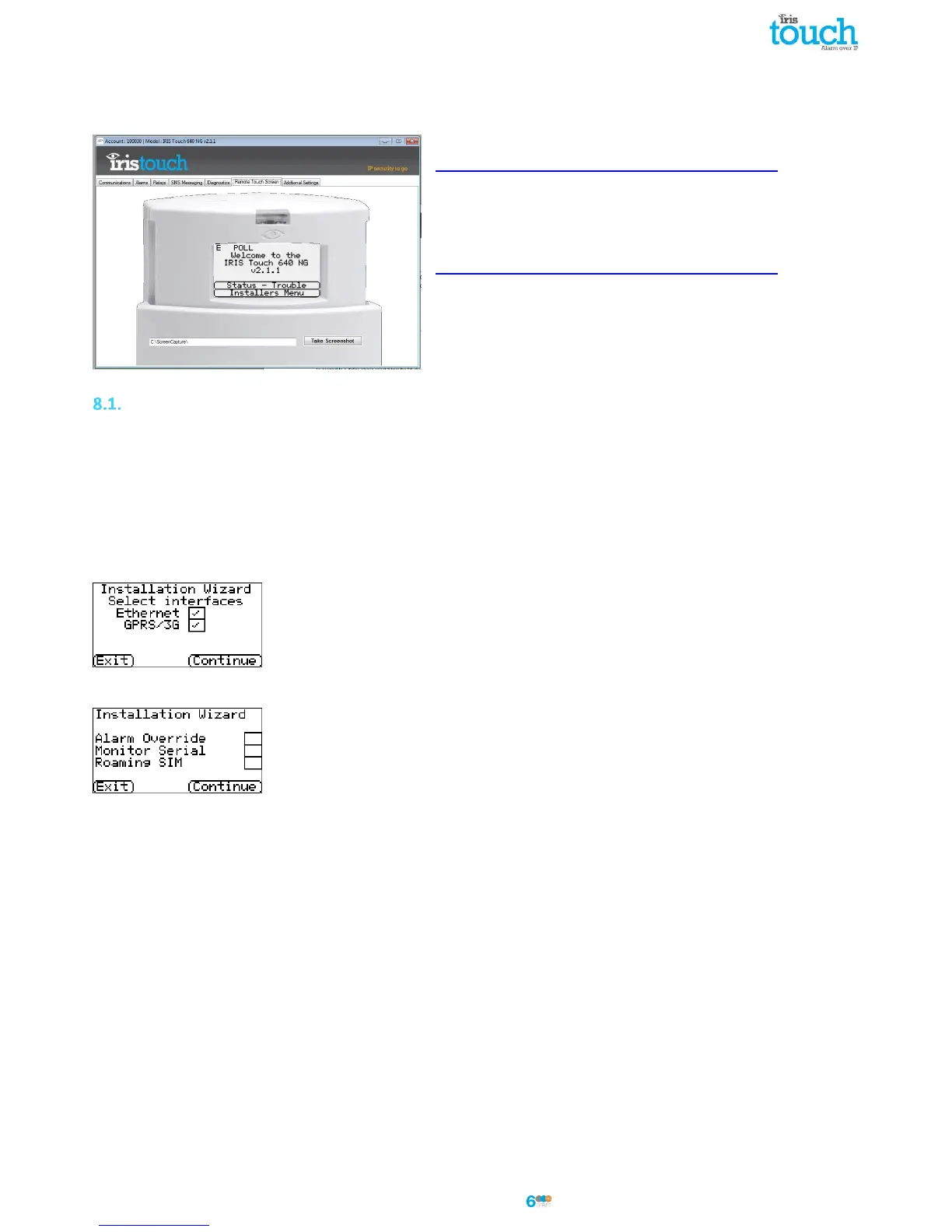
To access the main menu please go to the Remote Touch Screen
Tab which should then show the following. If you need further
assistance on how to use the IRIS Toolbox software please refer
to the IRIS ToolBox user guide available from
http://www.chironsc.com/downloads_security.html
Under the main menu you have a number of options and below
we will go through each section explaining their functions and
uses.
Installation Wizard
The Installation wizard guides you through the set up process for the IRIS Touch dialler and if there is a problem you
will be told what it is and will not be allowed to continue until it is solved.
Note: During the Installation Wizard process you may find that some configurations are already setup, when the
panel is using an integrated serial / RS485 connection. These configurations would have been downloaded from
the alarm panel setup and if these are incorrect you would need to correct them first in the alarm panel.
Select the Installation Wizard and follow the on screen prompts.
Select interfaces
The first options within the Installation wizard are the network paths settings.
The IRIS Touch dialler has Ethernet and GPRS/3G options for single or dual
communications. If you connect a PSTN expansion board you will have an additional
communication path and can then have a triple path communicator.
Select the paths required and then click ‘Continue’.
Additional options
The next screen will give you a number of options to enable or disable. Please look at the
reference below for more details:
Alarm Override
Allows the IRIS dialler to override / replace the phone number and account number used by the alarm panel dialler
with the IP address of the monitoring centre and account number entered during configuration. This can be used for
dial port or serial / RS485 connection to alarm panels where you may not have access or are unable to change the
account / phone number in the alarm panel. This can be useful when converting some old alarm panel sites to work
with the IRIS Touch dialler solution.
Monitor Serial
Set the IRIS dialler to monitor the serial port for activity and report any status change back to the monitoring centre
(ARC), the monitoring centre will also need to enable the serial port monitoring from the IRIS Secure Apps software
to receive alarm notifications on this status.
Roaming SIM
This option enables an enhanced roaming feature when used with a Roaming SIM.
Standard Roaming SIMs will always attach to the preferred provider even if this has the weakest signal.
Enabling this option forces the GPRS/3G attachment to attach to the strongest signal base station. This allows the
IRIS Touch dialler to be even more resilient with the GPRS/3G network.



 To Next Page