- 17 -
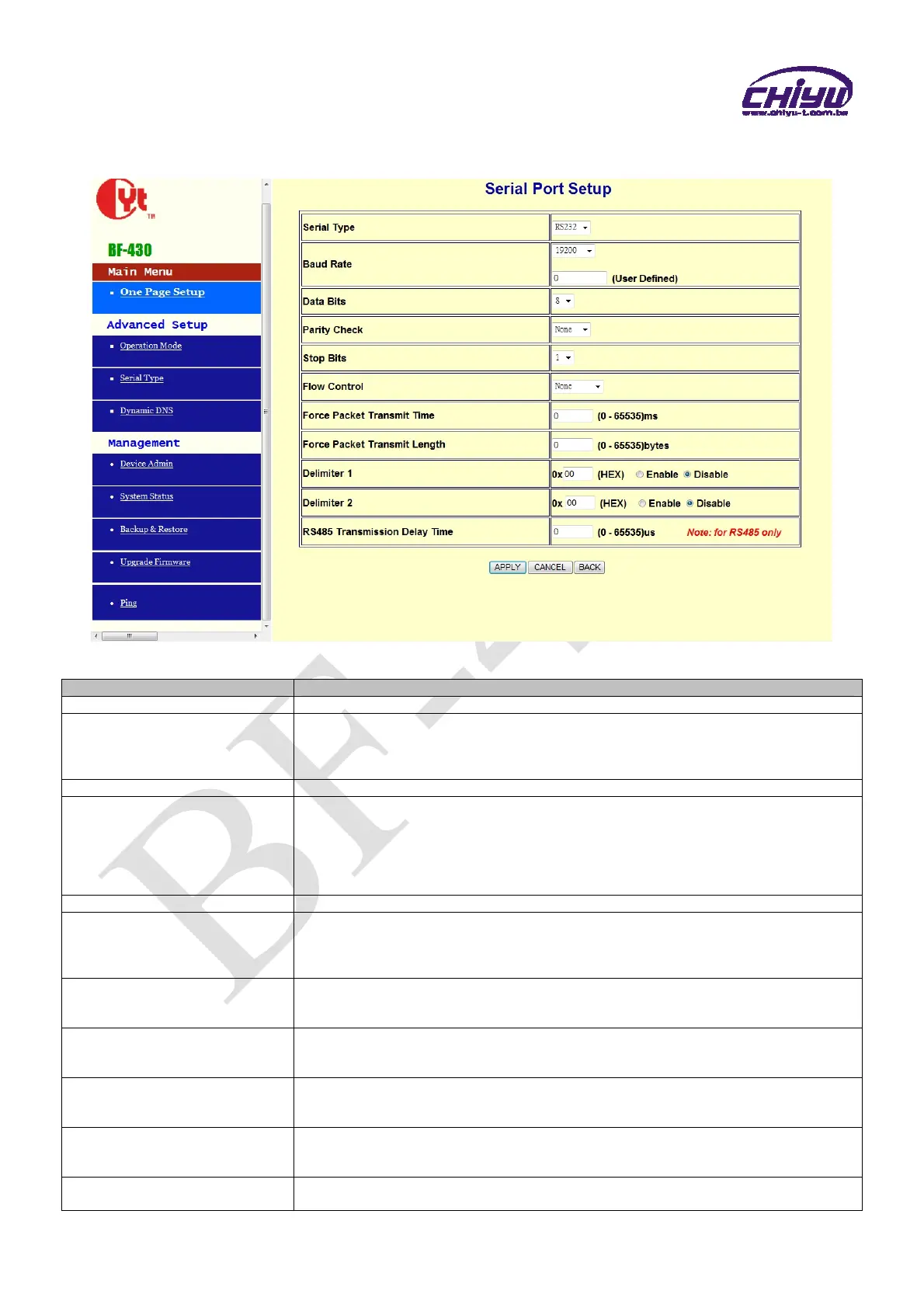
2、Serial Port Setup
Function instruction
Function Description
Serial Type Set the serial type, RS232 and RS485 for setting , default setting is RS232
Baud Rate
1.Set serial port baud rate, the parameters can be selected:1200、2400、4800、9600、
19200、38400、57600、115200、230400 and Others
2.After selecting Others , fill custom baud rate into the user defined
3.Default setting is 19200
Data Bits Set the data bits, 5,6,7,8 parameters can be selected, default setting is 8
Parity Check
Set the parity check,4 parameters can be selected:
1.odd
2.Even
3.Mark
4.Space
Default setting is None
Stop Bits Set the stop bits, 1,2 parameters can be selected, default setting is 1
Flow Control
Set the flow control,2 parameters can be selected:
Xon/Xoff:Software flow control
CTS/RTS:Hardware flow control
Default setting is None
Force Packet Transmit Time
(ms)
Force packet transmit time
The minimum setting is 0 ms of setting serial interval between data. Default setting is
0,the range is 0~65535ms
Force Packet Transmit Length
(bytes)
Force packet transmit length.
The serial set length of data transmission range is from 0~ 65535 bytes, the default
setting is 0
Delimiter 1
Set the transmission data end by identified delimiter and if your transmission data
includes the identified delimiter, BF-430 will send out packet at once.
Default setting is disabled. The range is from 0x00 ~ 0xFF
Delimiter 2
Set the transmission data end by identified delimiter and if your transmission data
includes the identified delimiter, BF-430 will send out packet at once.
Default setting is disabled. The range is from 0x00 ~ 0xFF
RS485 Transmission Delay
Time
Set the RS485 transmission delay time, range is 0 ~65535us, the default setting is 0


 To Next Page