- 13 -
Advanced Setup
1、Operation Mode Setup
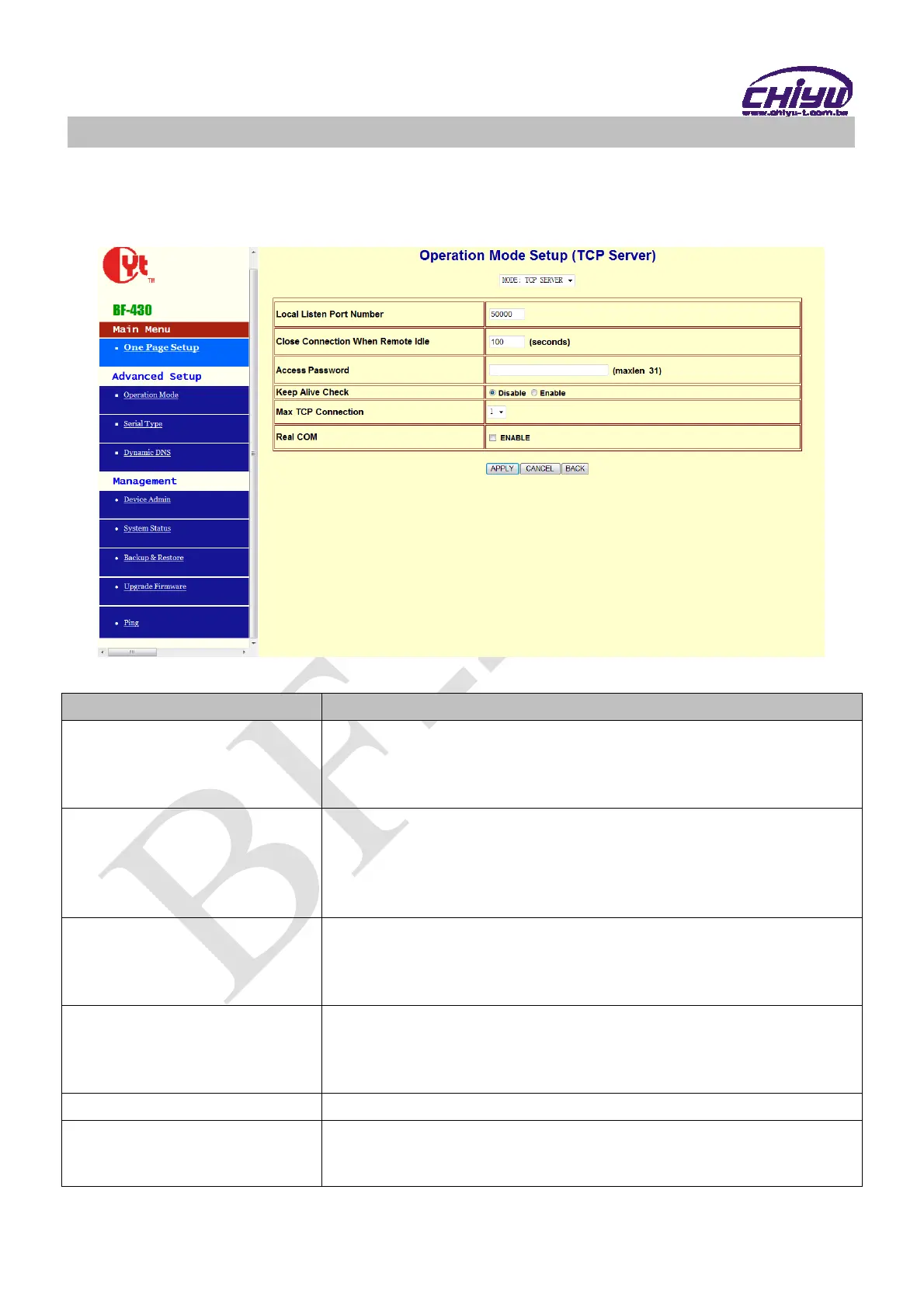
(1)TCP Server
Function instruction
Function Description
Local Listen Port Number
If data transmit thru TCP/IP remote command, must select Serial
Server Mode into TCP SERVER and set LISTEN PORT NUMBER
into the same value with monitoring side.
Default setting is 50000
Close Connection When
Remote Idle
The default setting of close connection time is 100 seconds and the
range is from 0 ~ 32768
The value must set to be 0 if you want to keep
BF-430 connect
with monitoring side or the connection will be off automatically
when remote idle.
Access Password
Make sure the data secure, user must set the code for
management. User must inset the correct password and process
the further procedure after authority.
up to 31 characters
Keep Alive Check
Set Enable or Disable keep alive check function,default setting is
Disable
While keep alive check enable, the pin packet will be send to
Gateway every 30 seconds to make cure the connection.
Max TCP Connection
The maximum TCP connection is 4 sets , default setting is 1
Real COM
When using the Virtual COM, if you need BF-430 with VCOM to
send each other RTS / CTS, DTR / DSR signal, this option must
be checked


 To Next Page