82
User’s manual
12/2016
GB
SDmatic
6.3 Control menu
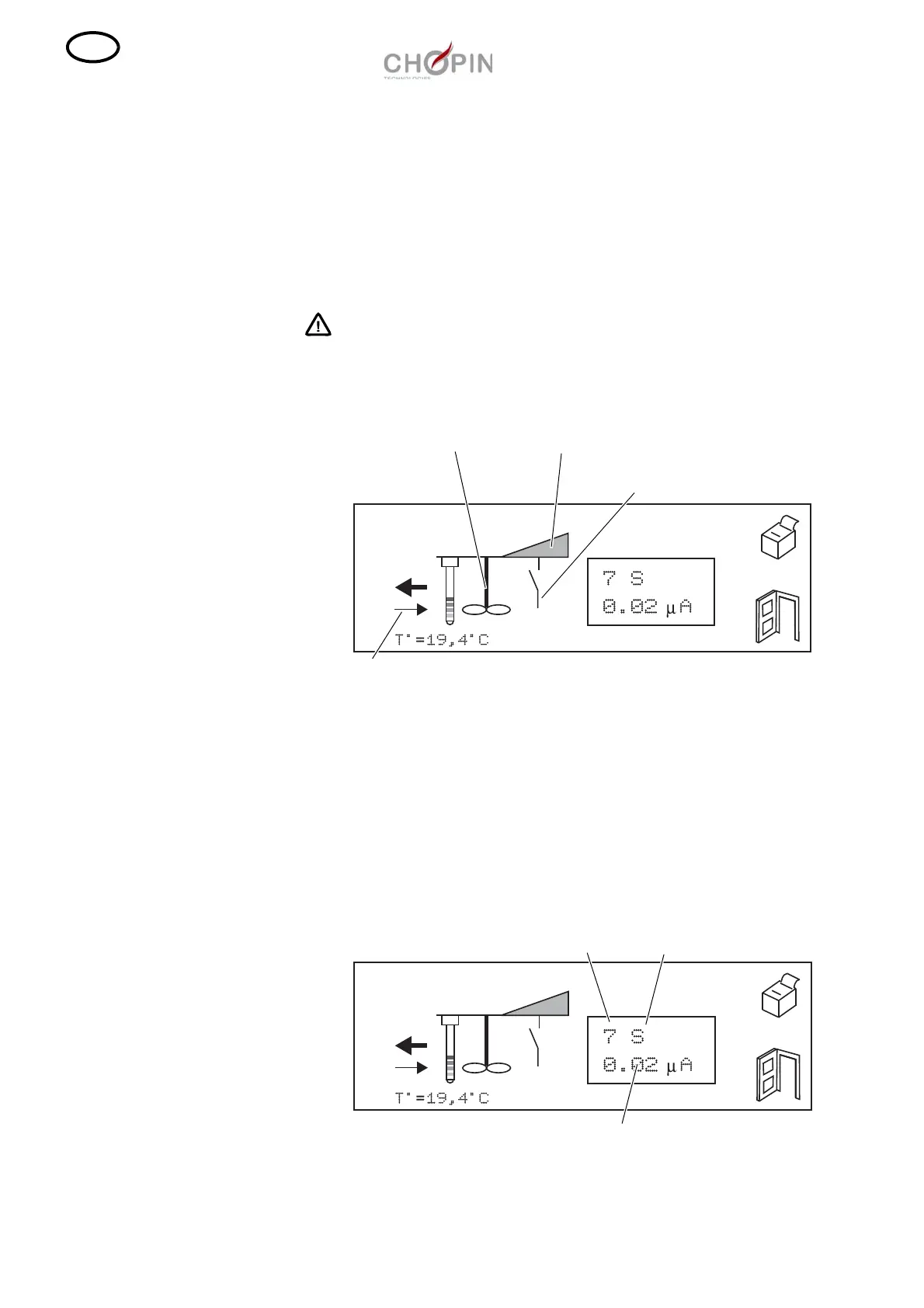
■ This menu allows testing of some functionality.
❏ To run the vibrator, press on the corresponding icon. Press it
again to stop the vibrator.
❏ To run the stirrer, press on the corresponding icon. Press it again
to stop the stirrer.
Take care of the rotor of the stirrer.
❏ To verify the status of the SDmatic closing contact, close and
open the SDmatic and check the corresponding icon.
■ To verify the measurement chain at the probe level, check the
value displayed on the second line of the text box.
❏ The value corresponds to the probe measurement. It should be
very close to zero. If this value is higher than 0.5 A, the
measurement probe is probably dirty and it must be cleaned. If the
value remains higher than 0.5 A after cleaning of the probe,
contact your Chopin representative.
Small arrow
Vibrator Position of the measurement
device (high/low)
Closing/opening contact
Stirrer
Measurement probe
value 0.5 A
Numerical value Probe



 To Next Page