EasyManua.ls Logo

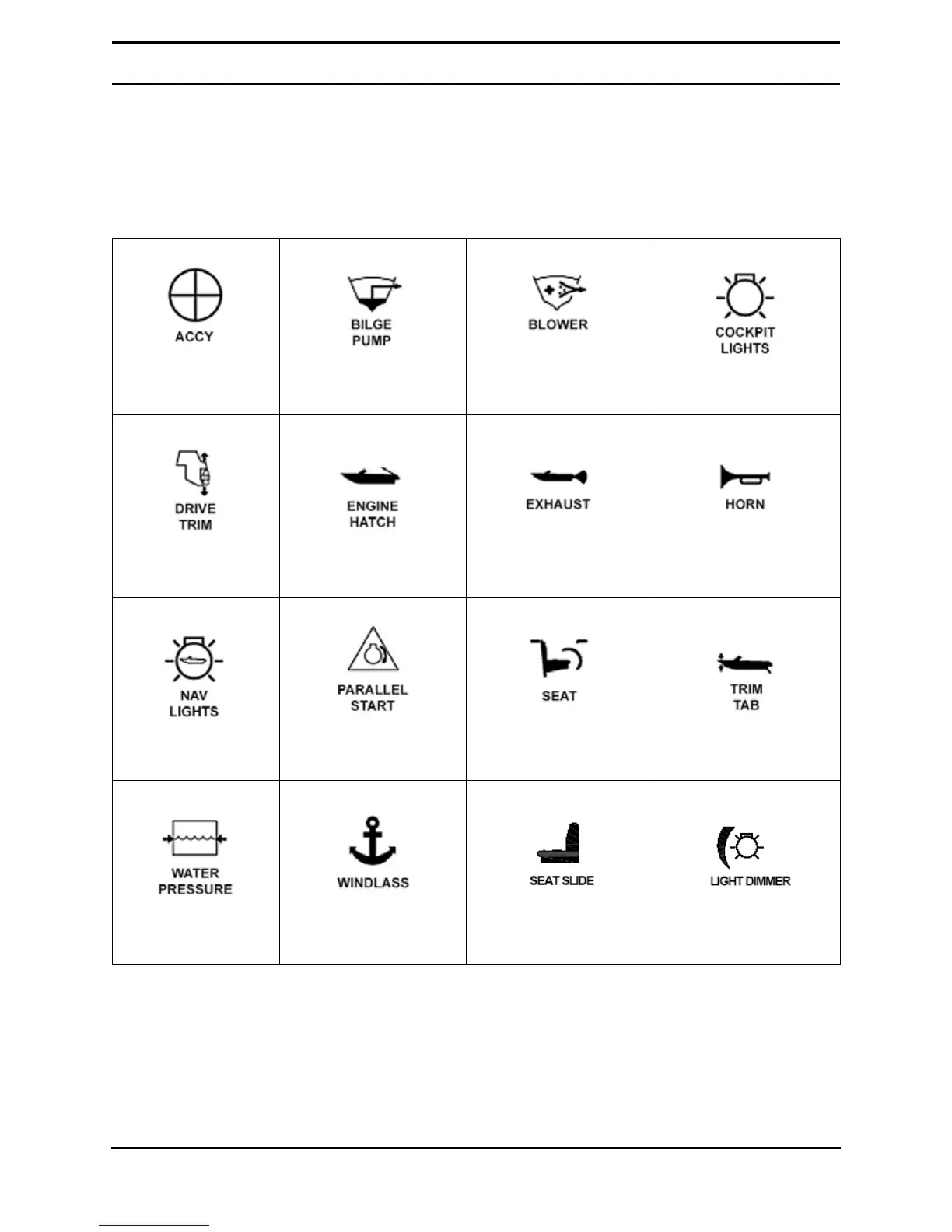
Chris-Craft Launch 28 - Switch Identification; Table 3-1. Switch Identification Icons

Chris-Craft Launch 28
302 pages
Print Icon
To Next Page IconTo Next Page
To Previous Page IconTo Previous Page
Loading...
3–2 Chris-Craft
Systems
Switch Identification
There are numerous switches you should be aware of when operating your boat. This section identifies
these switches by their icon.
Table 3-1. Switch Identification Icons
Activate Accessory
Outlet
Turn Bilge Pump
ON/OFF
Engine Compartment
Blower
Cockpit Lights
Adjust Engine Drive
Trim
Open/Close Engine
Hatch
Turn Selectable Exhaust
ON/OFF
Horn
Turn Nav Lights
ON/OFF
Activate Battery
Parallel Circuit
Rumble Seat
Open/Close
Activate Trim Tab (one
switch for each trim tab)
Turn ON/OFF Water
Pressure Pump
Extend or Retrieve
Anchor
Slide Helm Seat
FWD and AFT
Dim/Brighten
Dash Lights

Table of Contents

Related product manuals