EasyManua.ls Logo

Christie DHD630-GS - User Manual

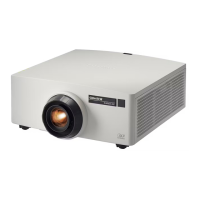
Christie DHD630-GS
90 pages
Print Icon
To Next Page IconTo Next Page
Loading...
GS Series
DHD630-GS / DWU630-GS
DHD635-GS / DWU635-GS
User Manual
020-001213-02

Table of Contents

Other manuals for Christie DHD630-GS

Questions and Answers

  • K
    Kim WilsonJul 25, 2025
    How to fix Christie DHD630-GS when no image appears on the screen?
    • M
      Margaret Tyler PhDJul 25, 2025
      If no image is showing on your Christie Projector, verify that all cables and power connections are correctly and securely connected. Also, check if the Light Status LED is green and ensure that you have removed the lens cap and the projector is switched on.
  • M
    Mr. Andre FisherJul 30, 2025
    What to do if the image is out of focus on my Christie DHD630-GS?
    • H
      Heather DelgadoJul 30, 2025
      If the image on your Christie Projector is out of focus, first ensure that both front and back lens caps are removed. Then, adjust the lens focus until the image fits the screen. Also, verify that the projection screen is within the required distance for optimal focus.
  • T
    tracey13Aug 3, 2025
    How to correct an incorrectly displayed image on a Christie Projector?
    • M
      Mary JonesAug 3, 2025
      If the image on your Christie Projector is displayed incorrectly, try the following: 1. Press AUTO on the control panel or IR remote. 2. Ensure your display resolution setting is lower than or equal to WUXGA (1920 × 1200). 3. If using a Notebook, press AUTO. 4. Adjust the resolution of the computer. 5. Restart all equipment including the projector.
  • A
    adrianryanAug 7, 2025
    How to adjust image size on a Christie DHD630-GS Projector?
    • K
      karensnowAug 7, 2025
      If the image size is incorrect on your Christie Projector, adjust the lens zoom to fit the screen. Verify that you are using the correct lens for your setup. If needed, change the position of the projector to achieve the desired image size.
  • C
    Cynthia LopezAug 11, 2025
    How to fix a stretched image on a Christie Projector?
    • C
      Christian WilsonAug 11, 2025
      If the image on your Christie Projector appears stretched, and you are playing 4:3 format DVD titles, change the format to 4:3 in the projector's on-screen display. If the image is still stretched, adjust the aspect ratio by setting the display format as 16:9 (wide) on your DVD player.
  • O
    ocoxAug 16, 2025
    What to do if Christie Projector connection fails with a new IP address?
    • A
      Amber FrazierAug 16, 2025
      If the connection fails with a new IP address on your Christie Projector, ensure the RJ45 cable is correctly and securely connected to both the projector and the network device. Make sure the IP address of the projector and the controlling device are set to the same region with different IP addresses. Try connecting the projector directly to the computer to check the network environment. Also, ensure every device has a unique IP address.
  • R
    Robert CohenAug 20, 2025
    How to resolve a vertical flickering bar on a Christie DHD630-GS Projector?
    • W
      William SmithAug 20, 2025
      If you observe a vertical flickering bar on your Christie Projector, use Auto Image to make an adjustment. Also, check and reconfigure the display mode of your graphic card to ensure it is compatible with the projector.

Summary

GS Series User Manual

Product Overview and Introduction

Provides an introduction to the GS Series projector and its main features.

Safety Information

General Safety Precautions

Lists essential safety warnings and precautions for operating the projector.

Laser Safety Warnings and Procedures

Details critical warnings and procedures related to laser radiation.

Installation Guide

Turning the Projector On

Step-by-step instructions for powering on the projector.

Turning the Projector Off

Instructions for safely powering off the projector.

Removing and Installing the Lens

Provides instructions for lens removal and installation.

Operating the Projector

Picture Menu Settings

Details available settings within the Picture menu for image adjustment.

3 D Menu Settings

Configuration options for the projector's 3D functionality.

Web User Interface Access

Instructions for logging into and using the web-based management interface.

Troubleshooting Common Issues

No Image or Incorrect Display Issues

Resolution steps for when no image or an incorrect image appears.

Presentation Not Displayed

Troubleshooting steps if the computer presentation is not displayed.

Image Quality Problems

Solutions for unstable, flickering, out-of-focus, or stretched images.

Network Connection Issues with New IP Address

Troubleshooting steps for connection failures after IP address changes.

Product Specifications

Key Features and Capabilities

Highlights the main features, lens compatibility, and operation methods.

Christie DHD630-GS Specifications

General IconGeneral
Matrix size0.65 \
Matrix typeDMD
Native aspect ratio16:9
Projection distance- m
Vertical scan range24 - 120 Hz
Horizontal scan range15 - 91 kHz
Projection technologyDLP
Contrast ratio (dynamic)6000:1
Contrast ratio (typical)1200:1
Screen size compatibility- \
Projector native resolution1080p (1920x1080)
Light source typeLaser
Service life of light source20000 h
Focus-
Zoom capabilityYes
Focal length range- mm
PlacementDesktop
Product typeStandard throw projector
Product colorWhite
Market positioningBusiness
Supported 3D formatsFrame packing, Side by side, Top and bottom
Supported graphics resolutions640 x 480 (VGA), 1920 x 1200 (WUXGA)
Power sourceAC
AC input voltage100 - 240 V
AC input frequency50 / 60 Hz
Power consumption (standby)- W
Power consumption (typical)650 W
HDMI version1.4
HDMI ports quantity3
Serial interface typeRS-232
USB 2.0 ports quantityUSB 2.0 ports have a data transmission speed of 480 Mbps, and are backwards compatible with USB 1.1 ports. You can connect all kinds of peripheral devices to them.
S-Video inputs quantity0
Ethernet LAN data rates10, 100 Mbit/s
Card reader integratedNo
Remote control typeWireless/Wired
Noise level36 dB
CertificationUL/CSA/IEC 60950-1, FCC Class A, CE, FDA, CCC, KC, PSE, CU, SABS, BIS, VCCI, RCM, Ukr, TER, SASO REACH, WEEE
Noise level (economic mode)34 dB
Operating temperature (T-T)0 - 40 °C
Operating relative humidity (H-H)0 - 85 %
Sustainability certificatesRoHS
Weight and Dimensions IconWeight and Dimensions
Depth505 mm
Width456 mm
Height190 mm
Weight15850 g
Package depth626 mm
Package width596 mm
Package height349 mm
Package weight21350 g

Related product manuals