46
Français
English
DeutschItaliano
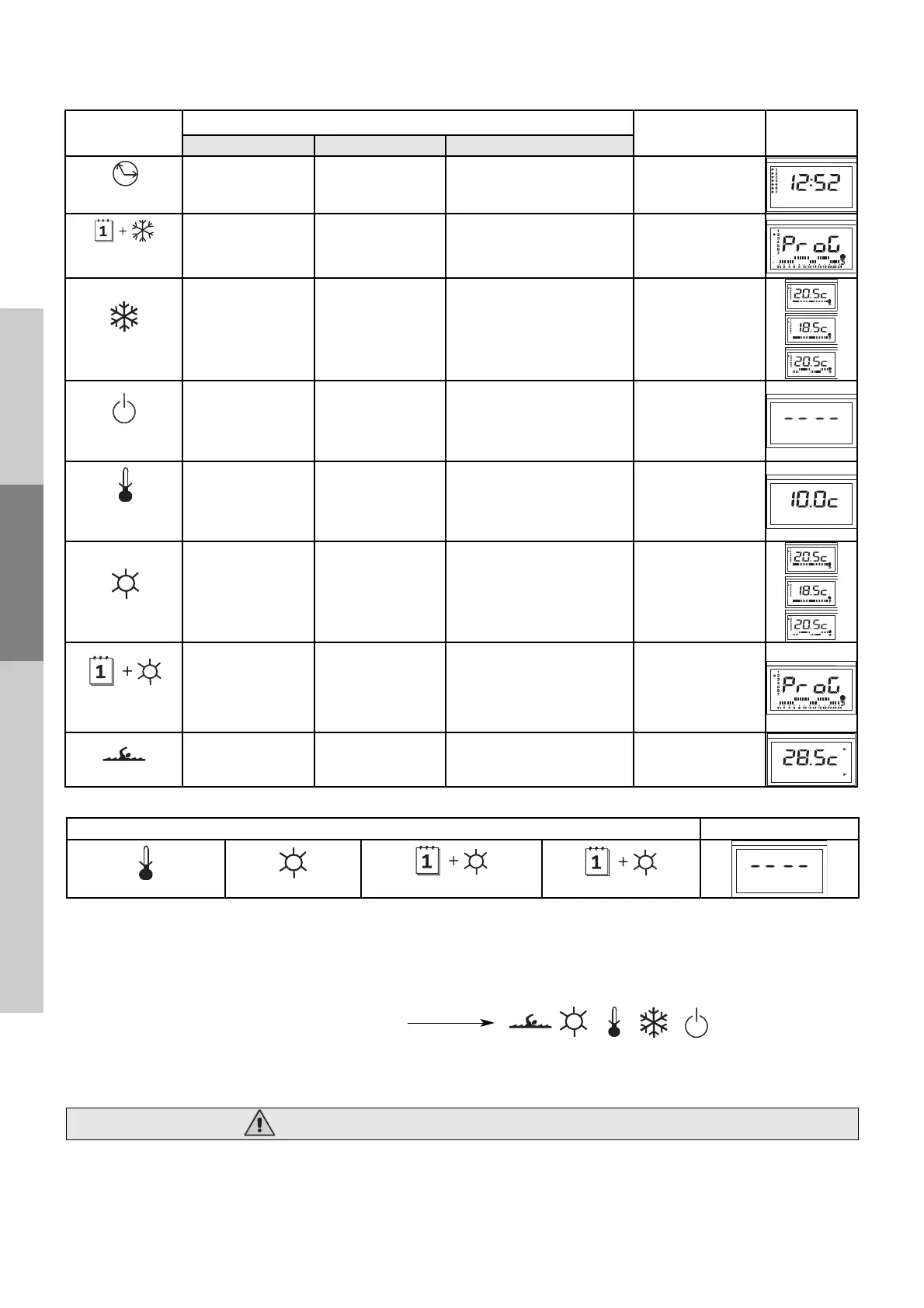
5-2-2 Position of the dial (No. 14) on the terminal unit
A - Reversible units
5-2-3 Accessing the settings
You will have to adjust a number of settings to suit your particular system and requirements.
These settings (identified by the letter ‘P’ followed by a digit) will help you to keep your unit operating at peak performance.
The complete table of settings is given on the following page.
To access the settings, do as follows:
Turn the terminal dial to one of the following positions:
- Access customer settings
: press OK and + simultaneously for 3 seconds
- Access installer settings: press OK and + simultaneously for 5 seconds.
Changing the settings
- Press + and - to display the desired setting
- Press OK to display the value of the setting
- Press + and - to change the value of the setting
- Press OK to confirm the change and go back to the settings numbers
Exiting settings mode: press and hold OK for 3 seconds or wait 1 hour.
Only qualified personnel may access the settings.
B - If you have a non-reversible unit
Dial position Display
Frost protection mode
Heating mode
Heating programming
Pool
Dial
position
Buttons
Mode Display
+ -
OK
Clock
Advance
the minutes.
Minutes advance quickly
when pressed and held. .
Reverse
the minutes.
Minutes reverse quickly
when pressed and held.
Go to following day
Time and day adjustment,
unit off
Cooling
programming
Place cursor on comfort =
sun
Place
cursor
on economy = moon
Go to following day
Weekly
programming
in cooling mode
Cooling mode
Raise the cooling setpoint
Lower the cooling set-
point
Go to Comfort mode,
Economy mode
then Programmed mode.
Cooling mode, unit autho-
rised to operate
On/off
Four-cursor display Four-cursor display —————————-
Off
and reset mode
permanent fault
Frost protection
mode
Raise the frost protection
setpoint
Lower the frost protection
setpoint
—————————-
Frost protection mode
Heating mode
Raise the heating setpoint
Lower the heating set-
point
Go to Comfort mode, Economy mode
then Programmed mode.
Heating mode
Unit authorised
to
produce
hot water
Heating
programming
Place cursor
on comfort = sun
Place cursor
on economy = moon
Go to following day
Weekly programming in
heating mode Unit autho-
rised to produce
hot water at
programmed setpoint
Pool
Raise the
setpoint
Lower the
setpoint
Display the pool
temperature
Pool heating
Unit authorised
to produce hot water




 To Next Page