7
General Setting
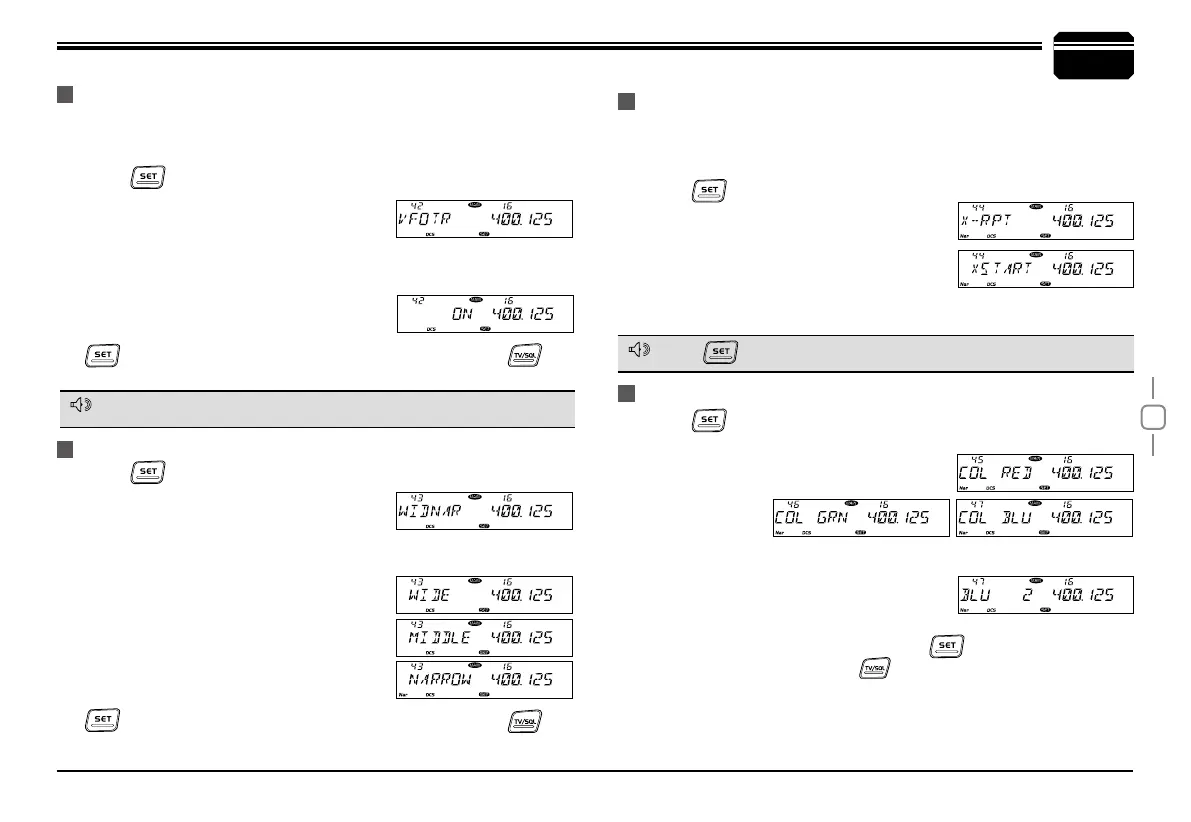
Set the left band and right band as VHF (136~174MHz) and UHF
(400~523MHz) then turn off this function will enable Cross Band repeater
function.
Press
1.
key to enter function menu.
Switch the selector knob to choose No 44
2.
function. The LCD displays "X-RPT"
Press the Main band selector knob, the
3.
LCD displays "XSTART".
Press the Main band selector knob, the radio prompt “DU” and the
4.
LCD displays "RPT", the corss band repeat function is on.
Press
1.
key to enter function menu.
Turn the Main band selector knob to choose No. 45-47 menu.
2.
The LCD displays "COL RED","COL
GRN","COL BLU".
CROSS BAND REPEAT
LCD BACKLIGHT
Press
1.
key to enter function menu.
Turn the Main band selector knob to
2.
choose No.43 menu. The LCD displays
"WIDNAR".
Press the Main band selector knob to enter function setup.
3.
Switch the Main band selector knob to
4.
choose wanted value.
WIDE: Wide band (25KHz)
MIDDLE: Middle band (20KHz)
NARROW: Narrow band (12.5KHz)
Press the Main band selector knob or
5.
key to store value and back to function menu. Press key
or hold selector knob for over 0.5 second to store setup and exit.
WIDE/NARROW BAND
This function is only valid when both bands work on VFO mode.
Press
will turn off cross band function.
NOTE
NOTE
Enable this function, the adjustment for any band of VFO frequency,
will bring same frequency change to both bands. Adjust one gear, the
frequency for both bands will increase or decrease one step size value.
Press
1.
key to enter function menu.
Turn the Main band selector knob to
2.
choose No.42 menu. The LCD displays
"VFOTR".
Press the Main band selector knob to enter function setup.
3.
Switch the Main band selector knob to choose wanted value.
4.
Available Values: ON, OFF.
Press the Main band selector knob or
5.
key to store value and back to function menu. Press key
or hold selector knob for over 0.5 second to store setup and exit.
VFO FREQUENCY LINKAGE
Press the Main band selector knob to enter function setup.
3.
Switch the Main band selector knob to
4.
choose wanted value.Each color (Red,
blue, Green) with 32 brightness levels.
Press the Main band selector knob or
5.
key to store value and
back to function menu. Press key or hold selector knob for over
0.5 second to store setup and exit.


 To Next Page