TRANSMIG 350i, 450i, 550i
Manual 0-5205 3-23
INSTALLATION, OPERATION AND SETUP
3.11 Setup for STICK (MMAW) Welding
A. Remove all packaging materials. Do not block the air vents at the front or rear of the Power Source.
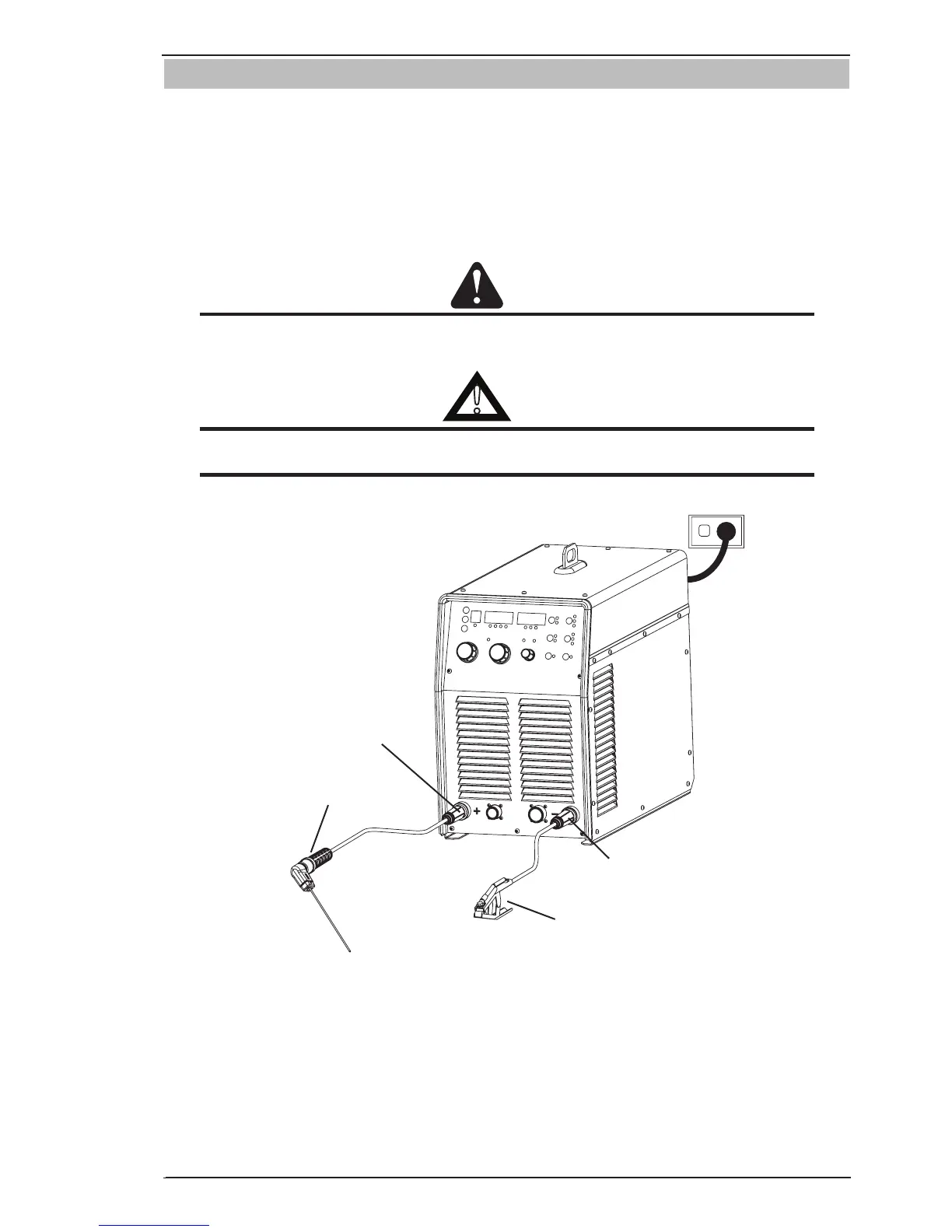
B. Connect the Electrode Holder to the positive welding terminal (+). If in doubt, consult the electrode manu-
facturer. Welding current flows from the Power Source via heavy duty bayonet type terminals. It is essential,
however, that the male plug is inserted and turned securely to achieve a sound electrical connection.
C. Connect the work lead to the negative welding terminal (-). If in doubt, consult the electrode manufacturer.
Welding current flows from the Power Source via heavy duty bayonet type terminals. It is essential, however,
that the male plug is inserted and turned securely to achieve a sound electrical connection.
CAUTION
Loose welding terminal connections can cause overheating and result in the male plug being fused
in the terminal.
!
WARNING
Before connecting the work clamp to the workpiece make sure the mains power supply is
switched off.
D. Select STICK mode with the process selection control button
Negative Welding
Terminal (-)
Work Lead
Electrode Holder
Positive Welding
Terminal (+)
A-10641
Figure 3-10: Setup for Manual Arc Welding.



 To Next Page