14 15
EN EN
• Add the tablets to the solution one tablet at a
time.
• Shake the bottle in between and keep adding
tablets to the water until the solution turns
from wine red to blue, record the number of
tablets as you go.
• Using the data table supplied with your kit,
match up the number of tablets with the hard-
ness. You will need this gure when program-
ming your water softener in the next section of
this manual.
9. Switching on for the rst time
• Check that the inlet hoses and outlet hoses
or couplings are properly connected i.e.
inlet-to-inlet, outlet-to-outlet.
The by-pass arrangement (see page 09)
should be in the open position in example:
• the inlet- and outlet valves closed (E), (C)
• Check that the by-pass valve (D) open
• Check that the mains stop valve (F) open.
• Check that the Brine Cabinet (G) contains
salt.
• Check that the water softener is connected
to the drain (H) and the over ow pipe is be
linked to each other connected.
Note: The drain and over ow must not be
linked to each other.
• Gently open the inlet valve (C) so that water
ows into the resin vessel.
• Turn ON the power, you will hear the valve
move quietly into the start position. When
the positioning process has been completed
(which can take up to 5 minutes) you will
hear the movement stop, the valve has now
reached its start position in preparation for
the programming procedure.
• Close the by-pass valve (D).
• Gently open the outlet valve (E).
• Check for leaks, take corrective action to stop
leaks if required.
• Your water softener is now on line and you
may start the valve programming procedure
set out in the next section of this manual.
4. Operation
4.1 Function
Capacity requirement-dependent of the unit
controller:
The unit operates according to the principle of intel-
ligent regeneration. The average capacity level of
each model is preset and updates automatically to
the actual consumption within 14 days.
The presetting is appropriate for the most common
applications. It is not necessary to adjust the unit
for individual requirements.
Intelligent quantity-dependent regeneration
When the unit is started, the available supply of
softened water is programmed (depending on the
hardness of the water).
At a user-de ned time (e.g. at night), the unit
checks whether the remaining supply of softened
water is suf cient for the following day. If this is not
the case, the softening column is regenerated by
only the exact percentage necessary to fully reple-
nish the supply of softened water to 100%.
Note: With intelligent regeneration, the remaining
supply of softened water is not wasted.
This intelligent regeneration method is possible
because of the precision owmeter, which is able
to adjust the amount of brine required for partial re-
generation. The consumption of regenerative and
water is reduced to the required minimum.
In the event of a power failure, the data and the
time are retained (for approx 72 hours).
The unit is optionally equipped with a device that
disinfects the ion exchange resin during the rege-
neration. A spring-loaded non-return valve (18) is
optionally available (see page 5).
Automatic regeneration triggering:
This is an optional setting - not as standard on all
softeners.
4.2 Operation
Setting the Type of Salt used
To operate effectively, your water softener must be
set to the type of salt you intend to use in the sys-
tem. Tablet salt is suitable.
Pressing the [SET] button will return the display to
the Normal Operation mode. Programming is now
complete and no further adjustment of the water
softener is required.
Remember to check the salt and water level in the
brine cabinet weekly.
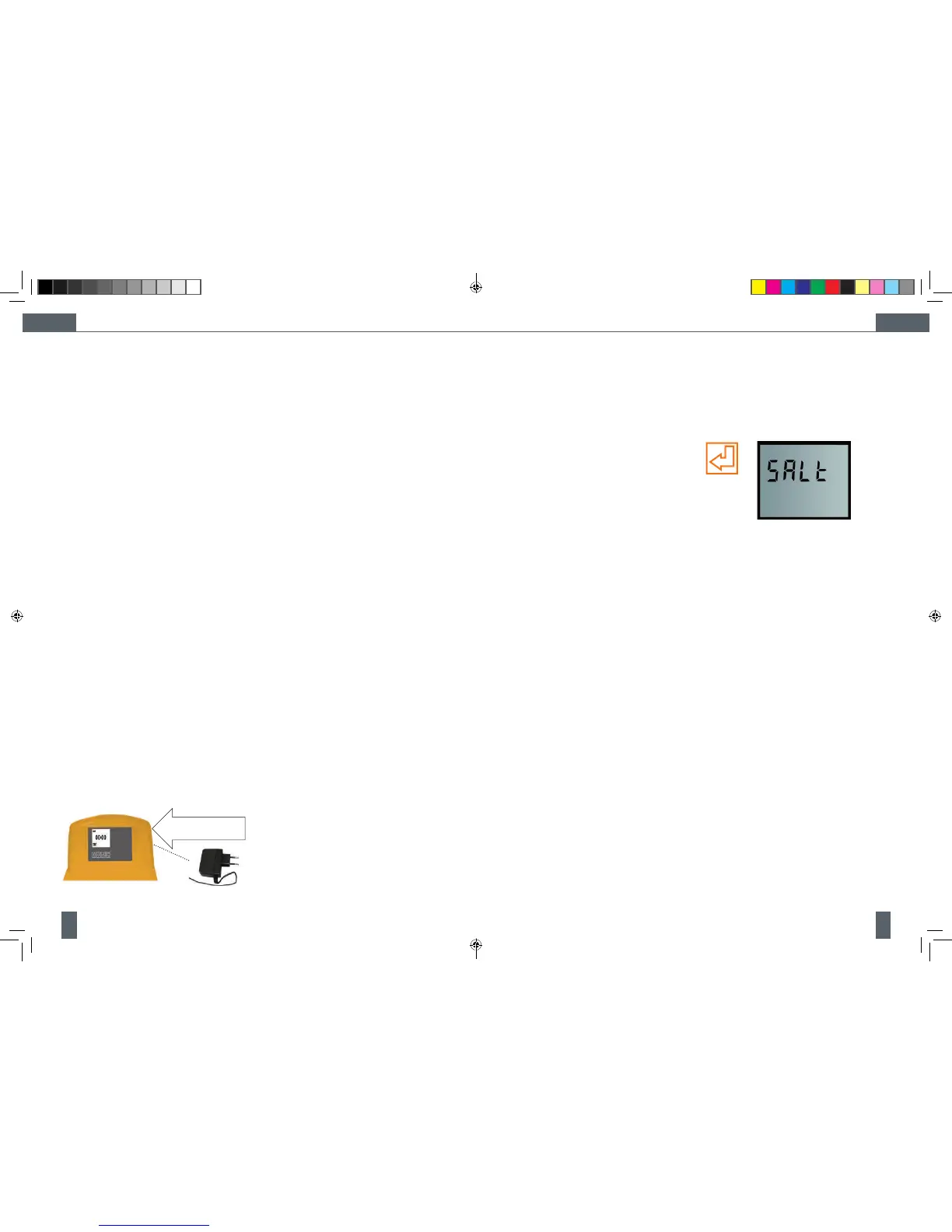
connect
jack plug
here
Lift off this cover and connect the
jack plug of the lead to the
control box behind the front panel
Charge Bar
Having set the display on the control facia, you will
notice that during normal operation there is a char-
ge bar running along the bottom of the display. This
charge bar shows the percentage of water softener
capacity remaining since the last regeneration. Im-
mediately following a regeneration, the charge bar
returns to 100%.
Resetting the display during operation.
If the time is to be adjusted during normal opera-
tion, press any key to illuminate the display, press
the [SET] key once. The display will ash and indi-
cate present time. Using the keys will alter the time
as described on page 7.
Power loss
The AMECS system will maintain the individual
programming parameters of the water softener for
up to 72 hours.
If the power cut lasts longer than 72 hrs, the con-
trol will ash “00:00“ when power is returned to the
control. The unit will continue to keep time from the
moment power is restored. In this situation the time
of day will need to be reset.
Flow indicator
During normal operation, a ow indicator will ash
on the display at a rate of one litre per pulse when
water is passing through the softener.
Cleaning
Your water softener may be cleaned using a damp
cloth and a mild detergent. Do not use bleaches,
solvents or spirits as they may damage the sur-
faces.
Manual regeneration [recharge] button
Under normal operating conditions your water sof-
tener will regenerate automatically and you should
not normally have to regenerate the unit manually.
If however a manual regeneration is required then
follow the procedure set out below.
1. Press any key to illuminate the display.
2. Momentarily pressing the button (symbol
underneath the display and furthest to the
right) will illuminate Recharge Tonight on the
display and perform a regeneration at 2.00
a.m. regar less of the remaining water softe-
ner capacity.
3. If the button is subsequently pressed, this
will clear the Recharge Tonight indicator from
the display and cancel the Recharge Tonight
feature.
4. If the [recharge] button is pressed down
for six seconds, the controller will fl ash the
Recharge display and immediately com-
mence the regeneration cycle which cannot
be cancelled.
Adding regenerative
Re ll the salt no later than when SALt is indica-
ted on the display or 150mm above the base of the
softener.
Acknowledge - low SALt alarm:
NOTE: This function is optional - not standard on
all models.
Open the cover (4). Pour regenerative into the
storage area (5).
Press [SET] and hold until the SALt display goes out.
Re ll the unit in such a way that no dirt can get
into the storage area (5) (if necessary, clean the
packages containing the regenerative before use).
Clean the storage area or brine cavity (6) with
clean water if it gets dirty.
Salt usage
Your water softener is controlled by a microproces-
sor which constantly monitors water usage.
The system will build up a history of your water re-
quirements and calculate the most economical re-
generation pattern. This will ensure a constant sup-
ply of softened water whilst maintaining high levels
of water and salt ef ciency. As your water softener
uses a proportional brining system, more frequent
regenerations do not necessarily mean high water
/ salt usage.
Increase in number or residents
Sudden changes in your water usage should not
affect your water softeners performance. If howe-
ver, the number of guests staying with you incre-
ases, you will notice that the water usage patterns
will alter. This may cause your water softener to
regenerate more often than normal. As the water
usage returns to its normal level, the number of re-
generations will also return to normal.
Cabinet Water Level
During normal operation the water level inside the
water softener cabinet will rise and fall as required
by the regeneration process. If the water softener
is used within the speci ed operational parameters
the water level should not reach the over ow con-
nection. If however an over ow situation occurs
please refer to the troubleshooting section on
page 17 to diagnose the problem.
OPM - Cillit Access 10-25 vOrange - EN, DEv4.indd 14-15 02/10/2012 09:49


 To Next Page
 Loading...