10
Using the Control Module
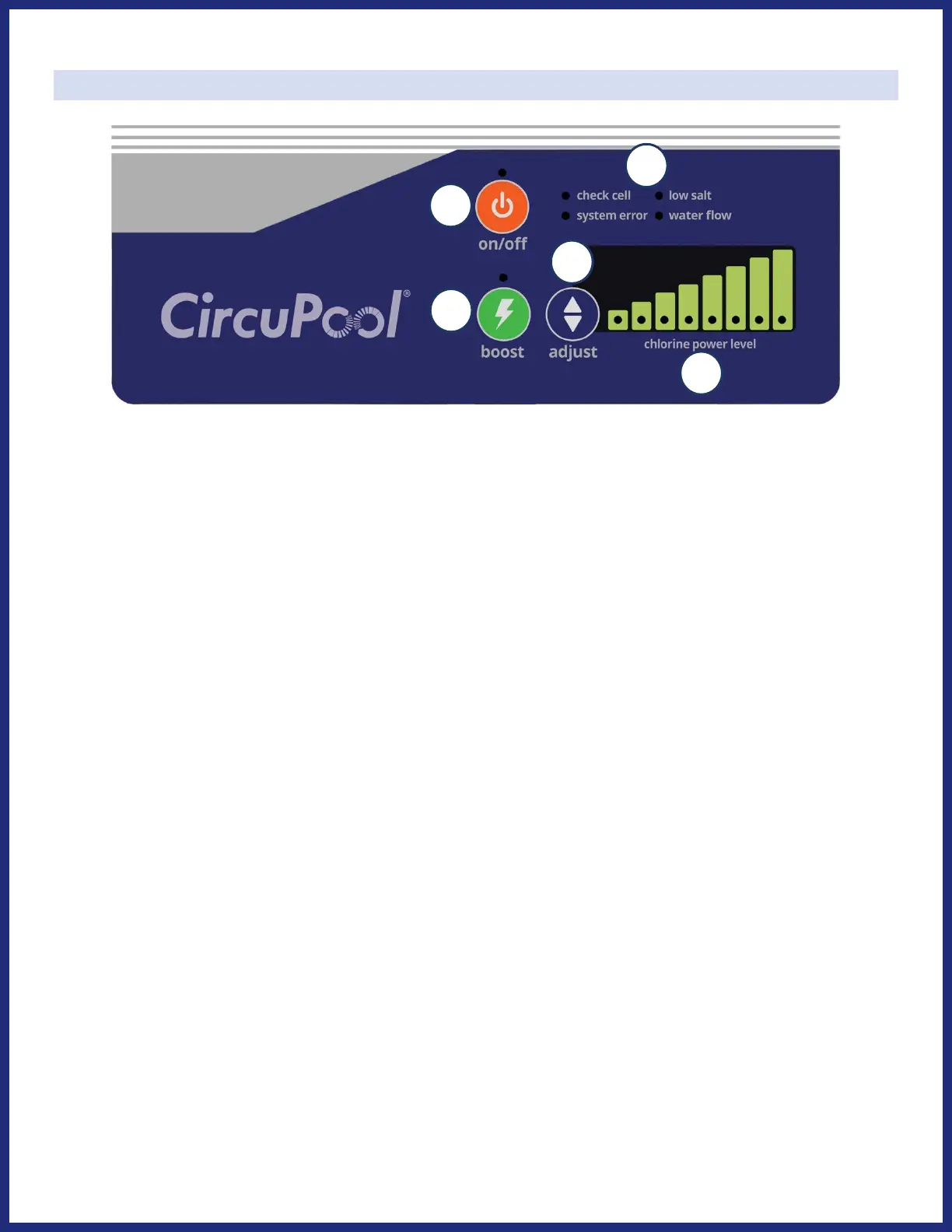
1) ON/OFF: Use this button to manually activate / deactivate the system on or off.
2) Adjust (Chlorine Output): Press to change the system's power level setting (the rate of chlorine production),
in order to customize operation for your pool's needs.
3) Boost (Chlorine Output): Press to activate/deactivate super-chlorination mode (maximum output for 24
hours of system run time). When pressed, boost mode is activated and the whole LED bar will be on. After
24 hours (of system run time), chlorine output will automatically return to previous setting.
4) Chlorine Output Power Level: Displays the system’s chlorine output level that you have chosen. These LED’s
are also used to display system diagnostics during troubleshooting.
5) System Messages: These LED lights display important information about the operations of your system. If any
of these orange LED lights are flashing or illuminated, please see the Troubleshooting section of this manual.
• CHECK CELL: Inspect for the Cell and soak the Cell in cleaning solution to remove calcium buildup or debris.
• LOW SALT: When this LED is illuminated, salt may need to be added to the pool. First, inspect the Cell for
mineral scaling and clean if necessary. If this does not solve the problem, manually check the salinity of
the pool water and add salt according to the table on page 7.
• SYSTEM ERROR: This LED is illuminated when the system is not able to produce chlorine or a critical fault
has occurred in the power supply. Please refer to the “Troubleshooting” section on page 20.
• WATER FLOW: When this LED is illuminated, the Flow Sensor is not being triggered by water flow. This
causes the Cell to stop generating chlorine. Verify that you have proper water flow without air bubbles in
the Cell housing, and verify that water flow is fully pressing the flow switch away from its resting center
position. In case you have a variable speed pump, increase flow until the LED turns off.
* See Troubleshooting section for more details



 To Next Page