23
Always double-check the voltage of your power source. Connection to
improper voltage can: a) cause severe damage/harm, or b) cause lights
and screen to power on without system function.
All service should only be attempted by a person with appropriate
electrical skills, with all equipment disconnected from power.
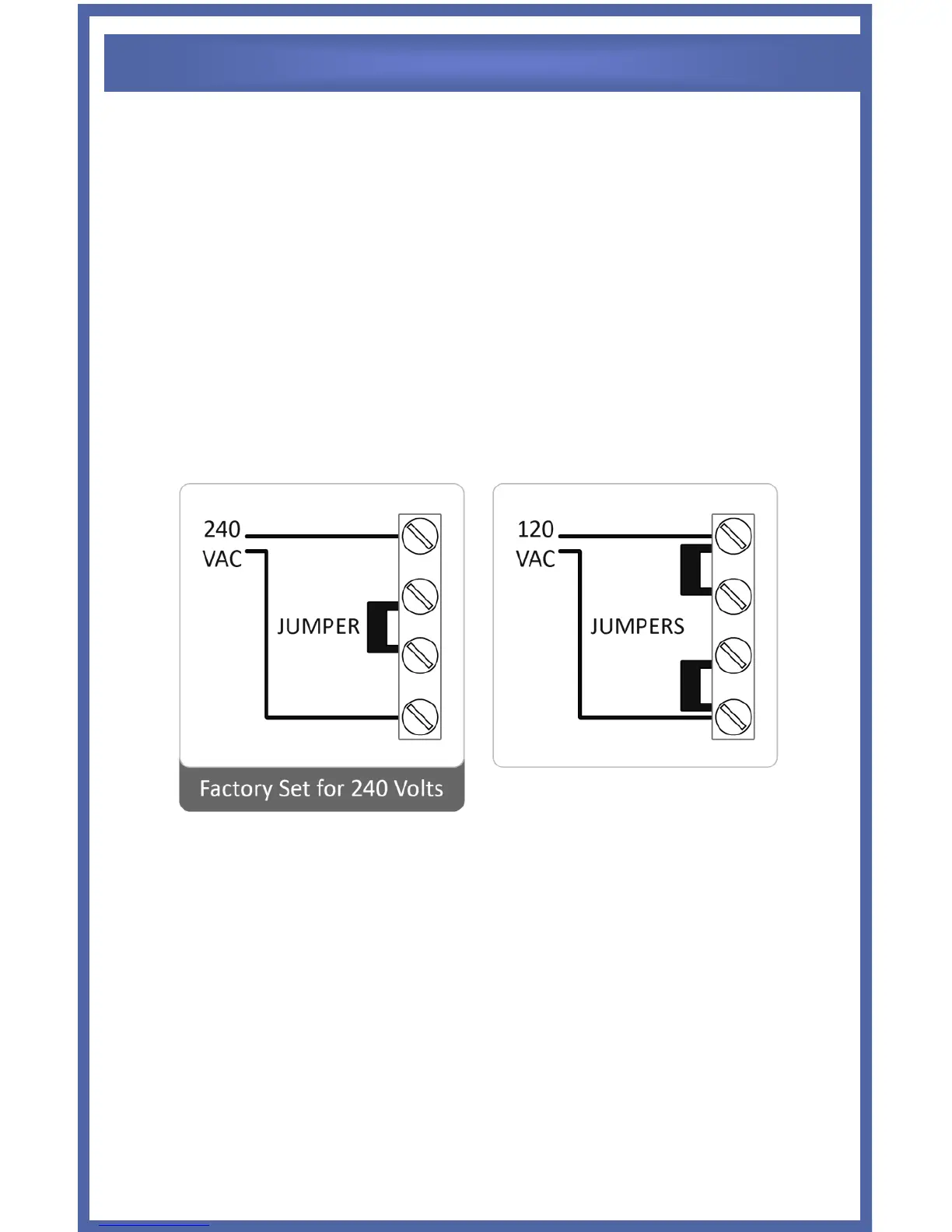
The Universal Series is shipped from the factory with a 240 VAC
configuration unless specially ordered. If 120VAC is needed, move the
internal jumpers as shown below. If unsure, seek professional advice.
This set of terminal screws can be located inside of the Control Module,
and accessed by removing the six screws from the Control Module's
aluminum base. The factory voltage setting is the 240V configuration,
with a jumper clip inserted between the second and third terminals. The
Control Module can be made to accept 110V by reconfiguring the
jumper clips as shown above right, with two jumper clips instead
connecting the first & second terminals, and the third & fourth
terminals.


 To Next Page