Chapter 3 Switch Installation
Installing the Switch
3-30
Catalyst 3750 Switch Hardware Installation Guide
78-15136-01
Attaching the Brackets to the Switch for Wall-Mounting
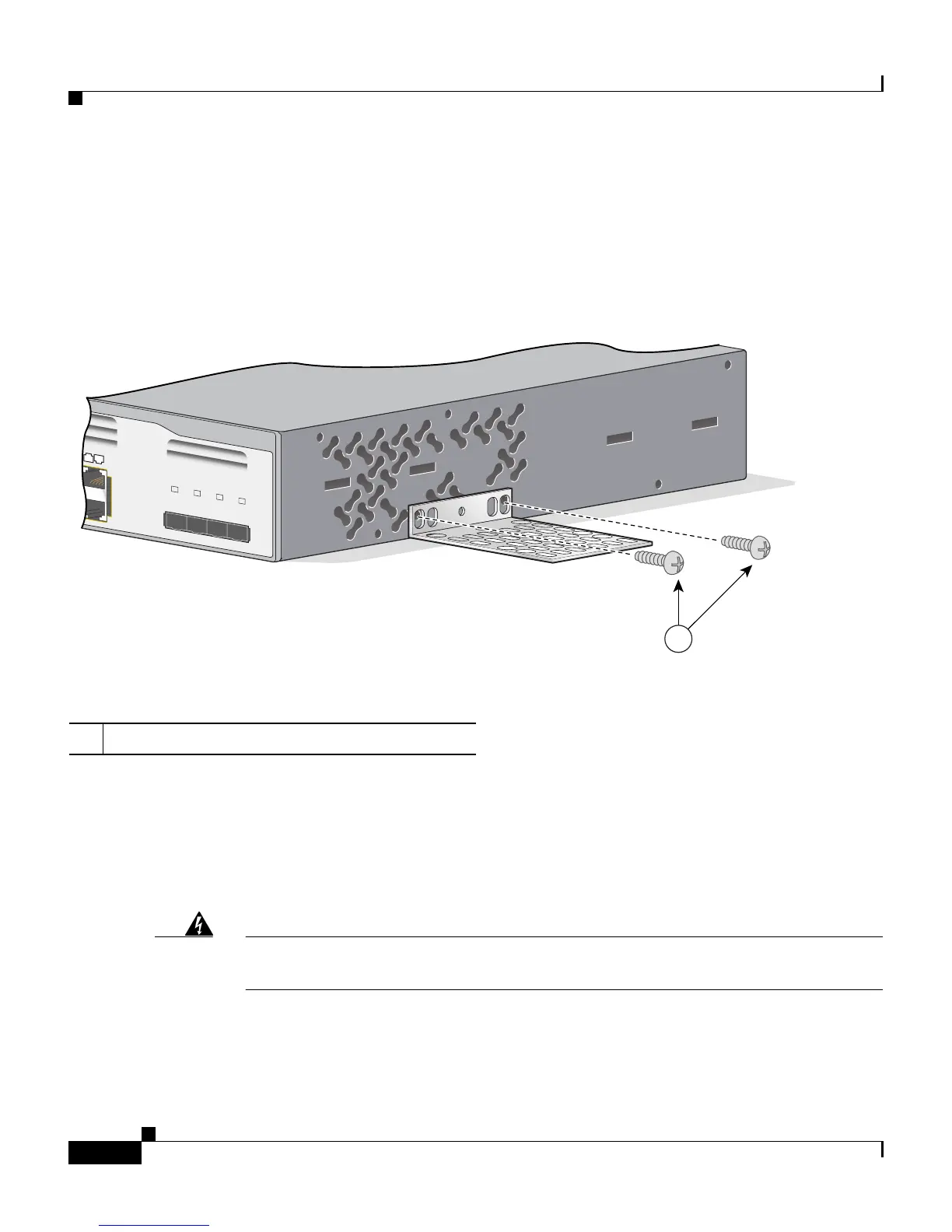
Figure 3-28 shows how to attach a 19-inch bracket to one side of the switch.
Follow the same steps to attach the second bracket to the opposite side.
Figure 3-28 Attaching the 19-inch Brackets for Wall-Mounting
Attaching the RPS Connector Cover
If you are not using an RPS with your switch, use the two Phillips pan-head
screws to attach the RPS connector cover to the back of the switch, as shown in
Figure 3-29 and Figure 3-30.
Warning
If an RPS is not connected to the switch, install an RPS connector cover on the
back of the switch.
1 Phillips truss-head screws
Catalyst 3750
SERIES
23X
24X
23
24
25
26
27
28
1
86687













 To Next Page