EasyManua.ls Logo

Cisco 7975G - User Manual

Cisco 7975G
14 pages
Print Icon
To Next Page IconTo Next Page
Loading...
Cisco Unified IP Phone User Guide for Cisco Unified Communications Manager 8.6 (SCCP and SIP) 1
An Overview of Your Phone
Cisco Unified IP Phones are full-feature telephones that provide voice communication over the data
network that your computer uses, allowing you to place and receive phone calls, put calls on hold,
transfer calls, make conference calls, and so on.
In addition to basic call-handling features, your Cisco Unified IP Phone can provide enhanced
productivity features that extend your call-handling capabilities. Depending on the configuration,
your phone supports:
Access to network data, XML applications, and web-based services.
Online customizing of phone features and services from your Cisco Unified CM User Options
web pages.
A comprehensive online help system that displays information on the phone screen.
Understanding Buttons and Hardware
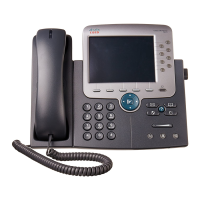
To identify buttons and hardware on your phone, refer to the following figures and table.

Other manuals for Cisco 7975G

Questions and Answers

  • M
    Michelle MatthewsSep 10, 2025
    What does security error message mean on Cisco 7975G?
    • B
      Brandon KaneSep 10, 2025
      If you receive a Security Error Message on your Cisco IP Phone, your phone firmware has identified an internal error. If the message persists, contact your system administrator.
  • T
    Tamara RobinsonAug 25, 2025
    Why does my Cisco 7975G IP Phone keep resetting unexpectedly?
    • A
      Aaron WatersAug 25, 2025
      Your Cisco Unified IP Phone might be resetting due to several reasons. First, ensure the Ethernet connection is active, checking for port, switch, or cable issues. If voice network problems exist, investigate them. Confirm that the phone is properly configured for DHCP and that the DHCP server is correctly set up with a lease duration Cisco recommends to be 8 days. If a static IP address is used, verify its settings. Heavy network usage without a voice VLAN, unauthorized resets by other administrators, or DNS/connectivity errors could also be the cause. As a troubleshooting step, you can use the Erase softkey to reset the phone to its default values or power cycle the phone.
  • M
    millermatthewAug 25, 2025
    What to do if Cisco Unified IP Phone resets unexpectedly?
    • J
      Jake Brown MDAug 26, 2025
      If your Cisco Unified IP Phone is unexpectedly resetting, several factors could be at play. First, check the Ethernet connection to ensure it's active and that there are no cable breaks. It's also worth investigating whether intermittent network outages are affecting voice traffic. Make sure the phone is properly configured to use DHCP, or if a static IP address is assigned, verify the settings are correct. Isolating the phones on a separate auxiliary VLAN may also improve voice traffic quality. To see if the phone received a reset command from Cisco Unified Communications Manager, press the Applications Menu button, then go to Settings > Status > Network Statistics. Look for 'Reset-Reset' or 'Reset-Restart' messages.
  • Z
    zhaysSep 23, 2025
    What to do in case of configuration file corruption on Cisco IP Phone?
    • D
      dawn04Sep 23, 2025
      Create a new phone configuration file.
  • V
    Valerie CamposSep 12, 2025
    How to fix Cisco Unified IP Phone displaying security error message?
    • K
      kristin51Sep 12, 2025
      If your Cisco Unified IP Phone displays a 'Security Error' message, it means the phone's internal Power On Self Test (POST) has detected missing encryption functionality, causing it to fail to boot. To resolve this, try manually resetting the phone. If that doesn't work, power up the phone with the handset off-hook to attempt launching a backup software image. As a last resort, perform a factory reset of the phone.
  • K
    Kelly MurraySep 16, 2025
    What to do if Cisco 7975G IP Phone does not register?
    • M
      mccarthypeterSep 16, 2025
      If your Cisco IP Phone isn't registering, the CTL file might not have the correct information for the Cisco Unified Communications Manager server. You should change the Cisco Unified Communications Manager server information in the CTL file.
  • L
    ljohnsonSep 4, 2025
    Why can't I hear a dial tone on my Cisco IP Phone?
    • D
      david43Sep 4, 2025
      If you cannot hear a dial tone or complete a call on your Cisco IP Phone, it might be because you need to log into the Extension Mobility service. Alternatively, you may need to enter a client matter code (CMC) or forced authorization code (FAC) after dialing a number, if you are using an SCCP phone. It is also possible that time-of-day restrictions prevent you from using some features during certain hours.
  • P
    Phillip MeyersSep 5, 2025
    What to do if softkey does not appear on Cisco 7975G IP Phone?
    • R
      Robert MillerSep 5, 2025
      If a softkey that you want to use does not appear on your Cisco IP Phone, press the 'more' button to reveal additional softkeys. You might also need to change the line state, for example, by going off-hook or having a connected call. Additionally, your phone might not be configured to support the feature associated with that softkey.
  • M
    Michael KleinSep 18, 2025
    What to do if signed configuration files are not requested on Cisco 7975G?
    • M
      Michele HernandezSep 18, 2025
      If signed configuration files are not being requested, the CTL file may lack TFTP entries with certificates. You should configure TFTP entries with certificates in the CTL file.
  • J
    Jay TurnerAug 30, 2025
    Why does Barge fail and result in a fast busy tone on my Cisco 7975G?
    • S
      Shelby FlemingAug 30, 2025
      Barge fails and results in a fast busy tone because you cannot barge an encrypted call if the phone you are using is not configured for encryption.

Summary

Understanding Buttons and Hardware

Programmable and Footstand Buttons

Details programmable buttons for access to lines, services, and call features, and the footstand for angle adjustment.

Key Phone Buttons and Features

Explains the functions of display, messages, directories, help, settings, services, volume, speaker, mute, and headset buttons.

Navigation, Keypad, and Screen Elements

Covers navigation pads, keypad, softkey buttons, handset light strip, and the phone screen for user interaction.

Understanding Line and Call Icons

Understanding Phone Screen Features

Phone Screen Elements

Explains the primary phone line, programmable buttons, softkey labels, status line, call activity area, phone tab, and feature tabs on the phone screen.

Choosing Phone Screen Items

Cleaning and Maintaining the Phone Screen

Understanding Feature Buttons and Menus

Accessing the Help System on Your Phone

Understanding Feature Availability

Understanding SIP and SCCP

Understanding Energy Savings

Cisco 7975G Specifications

General IconGeneral
Handset typeWired handset
Product typeIP Phone
Product colorGrey, Silver
SpeakerphoneYes
Voice codecsG.711Mu, G.711a, G.722, G.729A, iLBC
Number of melodies24
Aspect ratio4:3
Display diagonal5.6 \
Display resolution320 x 240 pixels
Lines quantity8 lines
Phonebook capacity- entries
Number of VoIP accounts-
Front cameraNo
Security algorithms128-bit AES
Networking standardsIEEE 802.1Q, IEEE 802.1p, IEEE 802.1x, IEEE 802.3af
Ethernet LAN data rates10, 100, 1000 Mbit/s
Ethernet LAN interface typeGigabit Ethernet
Supported network protocolsDHCP, TFTP
Volume controlDigital
Headphone outputs1
Ethernet LAN (RJ-45) ports2
Number of handles included1 pc(s)
AC adapter output voltage48 V
Storage temperature (T-T)-10 - 60 °C
Operating temperature (T-T)0 - 40 °C
Operating relative humidity (H-H)10 - 95 %
CertificationFCC
Weight and Dimensions IconWeight and Dimensions
Depth152.4 mm
Width266.7 mm
Height203.2 mm
Weight1600 g

Related product manuals