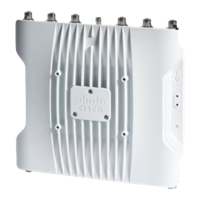
Step 2 Connect the supplied ground lug to the access point ground connection point using the supplied screws. Apply supplied
oxide inhibitor between the ground lug and the access point ground connection.
Grounding lug26-32 screws1
AP ground connection point3
Step 3 Tighten the screws to 12-15 inch-lbs of torque.
Installation Overview
10
Installation Overview
Grounding the Access Point




 To Next Page