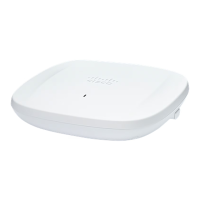
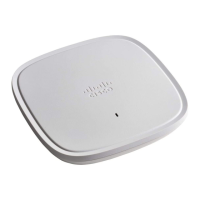
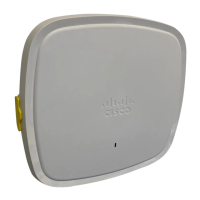
The Cisco Catalyst Wireless 9162I Series Wi-Fi 6E Access Point is an enterprise-class tri-band (2.4 GHz, 5 GHz, 6 GHz) indoor access point designed for robust wireless network deployments. It supports full interoperability with both 802.11ax and 802.11ac clients, making it suitable for hybrid network environments that include other access points and controllers.
Function Description:
The primary function of the CW9162I AP is to provide high-performance Wi-Fi 6E connectivity for enterprise indoor environments. It operates across three frequency bands (2.4 GHz, 5 GHz, and 6 GHz) to maximize network capacity and reduce congestion. The AP is designed to work with Cisco 9800 wireless controllers and supports various operating modes, including Local mode (default, serving clients with central switching), FlexConnect mode (local data switching, managed by controller), Monitor mode (dedicated sensors for LBS, rogue AP detection, and IDS), and Sniffer mode (capturing and forwarding packets for analysis). It also supports Site Survey mode for configuring RF parameters.
Important Technical Specifications:
- Radios: The CW9162I AP features five radios:
- One 2x2:2 6-GHz radio
- One 2x2:2 5-GHz radio
- One 2x2:2 2.4-GHz radio
- One tri-band antenna with a dedicated 2.4-GHz, 5-GHz, and 6-GHz Aux radio
- One internal single-band antenna with a dedicated 2.4-GHz IoT radio
- Antennas: It incorporates internal antennas, including two internal dual-band antennas (2.4-GHz and 5-GHz), two internal single-band antennas (6-GHz), one tri-band antenna (2.4-GHz, 5-GHz, and 6-GHz Aux), and one internal single-band antenna (2.4-GHz IoT).
- Hardware Interfaces:
- 1x100/1000/2500 Multigigabit Ethernet (RJ-45) port
- RS-232 Console Interface through RJ-45
- Recovery push button (enables partial or full system configuration recovery)
- USB 2.0 port, type-A connector
- DC 12V power jack
- One multicolor LED for status indication
- Operating Frequencies and Maximum Output Power (EIRP):
- Wi-Fi (European Union - CE Region):
- 2.412-2.472 GHz: 20 dBm
- 5.180-5.250 GHz: 23 dBm
- 5.250-5.350 GHz: 23 dBm
- 5.470-5.725 GHz: 30 dBm
- 5.725-5.850 GHz: 13.98 dBm
- 5.945-6.425 GHz: 23 dBm
- Bluetooth Low Energy (BLE): 2400-2483.5 MHz: 9.92 dBm
- Wi-Fi (United Kingdom Region):
- 2.412-2.472 GHz: 20 dBm
- 5.180-5.250 GHz: 23 dBm
- 5.250-5.350 GHz: 23 dBm
- 5.470-5.725 GHz: 30 dBm
- 5.725-5.850 GHz: 23 dBm
- 5945-6425 GHz: 24 dBm
- Bluetooth Low Energy (BLE): 2400-2483.5 MHz: 9.92 dBm
- Powering: The AP can be powered via 802.3bt (Cisco Power Injector AIR-PWRINJ7=), Cisco Universal PoE (UPoE), 802.3at (PoE+), 802.3af (PoE), or a DC power jack. Note that 802.3af power limits functionality (2.4-GHz radio off, 5-GHz and 6-GHz radios derated to 1x1, Ethernet downgraded to 1 GbE, USB port off).
- Operating Temperature: 32°F to 104°F (0°C to 40°C). Derates to 1x1 tri-radio operation between 104°F and 122°F (>40° and 50°C).
- Regulatory Compliance: Complies with FCC Part 15 rules, VCCI Class B for Japan, Canadian Compliance (license-exempt RSS), European Community (CE Mark, indoor use only for 5150-5350 MHz and 5945-6425 MHz), United Kingdom (indoor use only for 5150-5350 MHz and 5925-6425 MHz), and Administrative Rules for Cisco Catalyst Access Points in Taiwan.
- RF Exposure: Requires a minimum separation distance of 20 cm (7.87 inches) for international guidelines and 41 cm (16.14 inches) for FCC guidelines.
Usage Features:
- Tri-band Wi-Fi 6E: Offers superior performance and capacity across 2.4 GHz, 5 GHz, and 6 GHz bands, supporting the latest Wi-Fi standards.
- Multiuser Multiple-Input Multiple-Output (MU-MIMO): Enhances downlink performance for multiple clients simultaneously.
- Orthogonal Frequency Division Multiple Access-based (OFDMA-based) scheduling: Improves uplink and downlink efficiency.
- Integrated Bluetooth Low Energy (BLE) radio: Enables IoT use cases such as location tracking and wayfinding.
- Intelligent Capture: Provides network and Cisco DNA Center with deep analysis capabilities.
- Spatial Reuse (BSS coloring): Allows APs and their clients to differentiate between multiple Basic Service Sets (BSSs), enabling more simultaneous transmissions.
- Power savings mode (TWT): Allows clients to stay asleep and wake up only at scheduled (target) times to exchange data with the AP, providing significant energy savings for battery-operated devices.
- Cisco Digital Network Architecture Center (DNA Center) support: Enables Cisco DNA Spaces, Apple FastLane, and Cisco Identity Services Engine.
- Optimized AP Roaming: Ensures that client devices associate with the AP in the coverage range that offers the fastest data rate available.
- Cisco CleanAir Pro technology: Supports 2.4-GHz, 5-GHz, and 6-GHz bands, delivering proactive, high-speed spectrum intelligence across wide channels to combat performance problems arising from wireless interference.
- Cisco Software-Defined Access (SD-Access) deployment: Supported for flexible and scalable network architectures.
- Controller Discovery: Supports multiple methods for discovering the controller, including locally stored IP addresses (priming), DHCP Option 43, and DNS discovery.
- Mounting Options: Can be mounted in various locations such as suspended ceilings, hard ceilings, walls, electrical or network boxes, above suspended ceilings, and desk mounts, using different bracket types (AIR-AP-BRACKET-1=, AIR-AP-BRACKET-2=, AIR-AP-T-RAIL-F=, AIR-AP-T-RAIL-R=, AIR-CHNL-ADAPTER=).
Maintenance Features:
- Mode Button: The Mode button on the AP allows for resetting the device to factory default settings or clearing its internal storage, including configuration files, passwords, WEP keys, and IP addresses. This is crucial for troubleshooting or re-provisioning the AP.
- LED Status Indications: A multicolor LED on the AP provides visual cues for various operating conditions, including:
- Green: Normal operating condition (no wireless client associated).
- Blue: Normal operating condition (at least one wireless client associated).
- Blinking Green: Executing boot loader or boot loader signing verification failure.
- Blinking Blue: Software upgrade in progress.
- Alternating Green and Red: Discovery or join process in progress.
- Cycling through Red-Off-Green-Off-Blue-Off: General warning or insufficient inline power.
- Syslog Messages: The AP can send all CAPWAP-related error messages and syslog information to a syslog server, aiding in troubleshooting join issues and other operational problems. The syslog server IP address can be configured via DHCP Option 7 or directly by the controller.
- Console Access: The AP's console port is enabled for monitoring and debug purposes, allowing direct command-line interface (CLI) access for advanced troubleshooting. A console cable of one meter or less is recommended to avoid booting issues.
- Preinstallation Configuration: Optional preinstallation steps ensure proper controller connectivity and network configuration, including enabling Layer 3 connectivity, configuring switches, and enabling DHCP.
- Regulatory Compliance Information: Comprehensive documentation on regulatory compliance helps ensure the device is used in accordance with local and international standards, minimizing potential issues.
- Cisco Bug Search Tool (BST): Provides access to a comprehensive list of defects and vulnerabilities in Cisco products and software, enabling users to stay informed and address potential issues.
- Cisco Support and Documentation: Access to Cisco Profile Manager, Cisco Services, Cisco Support, Cisco DevNet, Cisco Press, and Cisco Warranty Finder for comprehensive support, resources, and documentation.

 Need help?
 General

 To Next Page