Beta Draft - Cisco Confidential
2-7
Cisco Identity Services Engine Appliance Hardware Installation Guide 1.0
OL-22971-01
Chapter 2 Introducing the Cisco ISE-3300 Series Hardware
ISE-3315, ISE-3355, and ISE-3395 Hardware Summary
ISE-3315 Front Panel Features
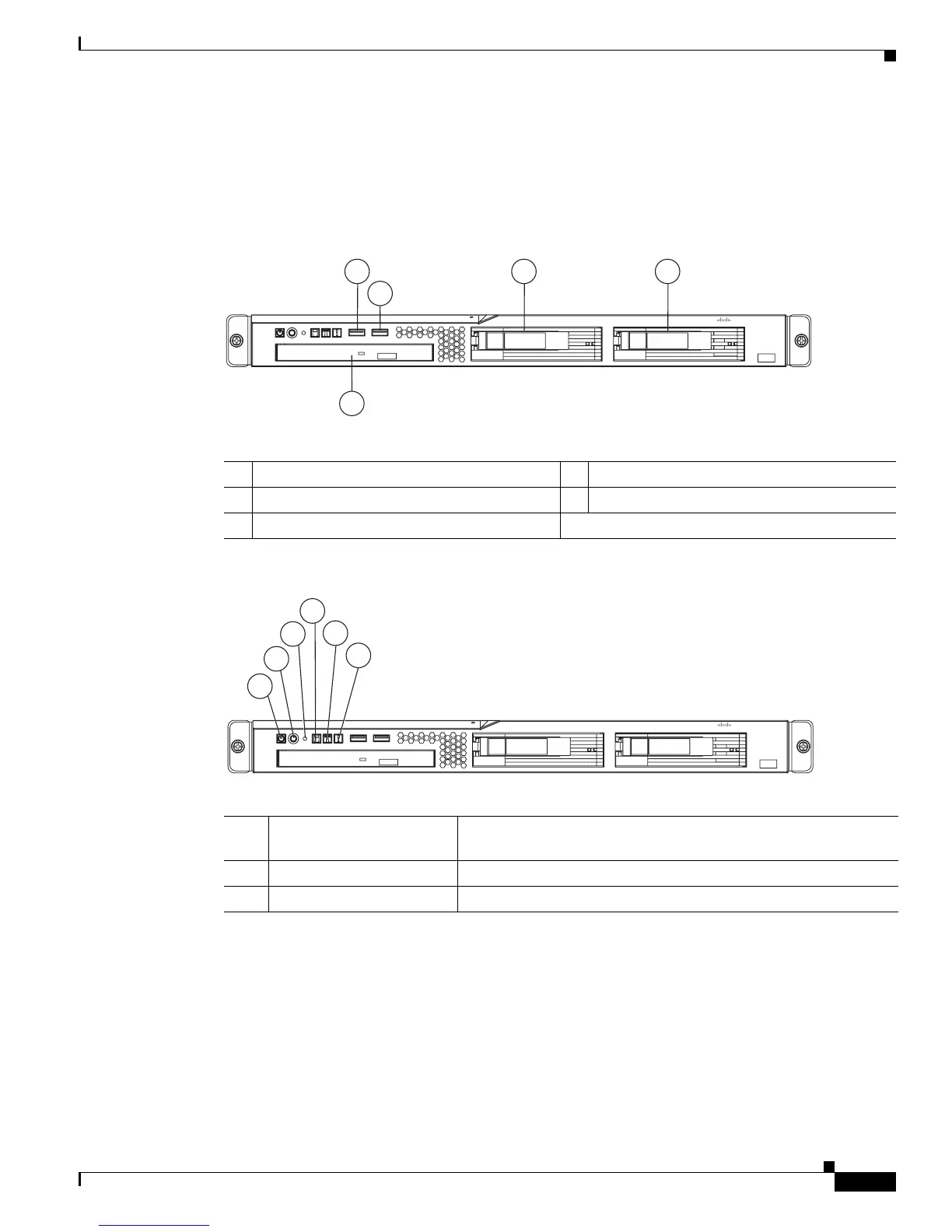
Figure 2-2, Figure 2-3, and the accompanying tables illustrate and describe the ISE-3315 front panel
features, LEDs, and buttons.
Figure 2-2 Cisco ISE-3315 Front Panel Features
Figure 2-3 Cisco ISE-3315 Front Panel LEDs/Buttons
1
Front USB Port 1
4
HDD Bay 2
2
Front USB Port 2
5
CD-ROM/DVD Drive
3
Hard Disk Drive (HDD) Bay 0
Cisco ISE 3315 Series
Identity Services Engine
CISCO
1 3 4
2
5
195197
1
Power Status LED Green = The appliance has AC power and is powered up
Off = The appliance is powered off (AC power disconnected)
2
Power Button (Recessed)
3
Reset Button (Recessed)
1
2
4
5
6
3
195198
Cisco ISE 3315 Series
Identity Services Engine
CISCO


 To Next Page