41
Installing and Upgrading Internal Modules in Cisco 2800 Series Routers
OL-5792-04
Replacing the Power Supply
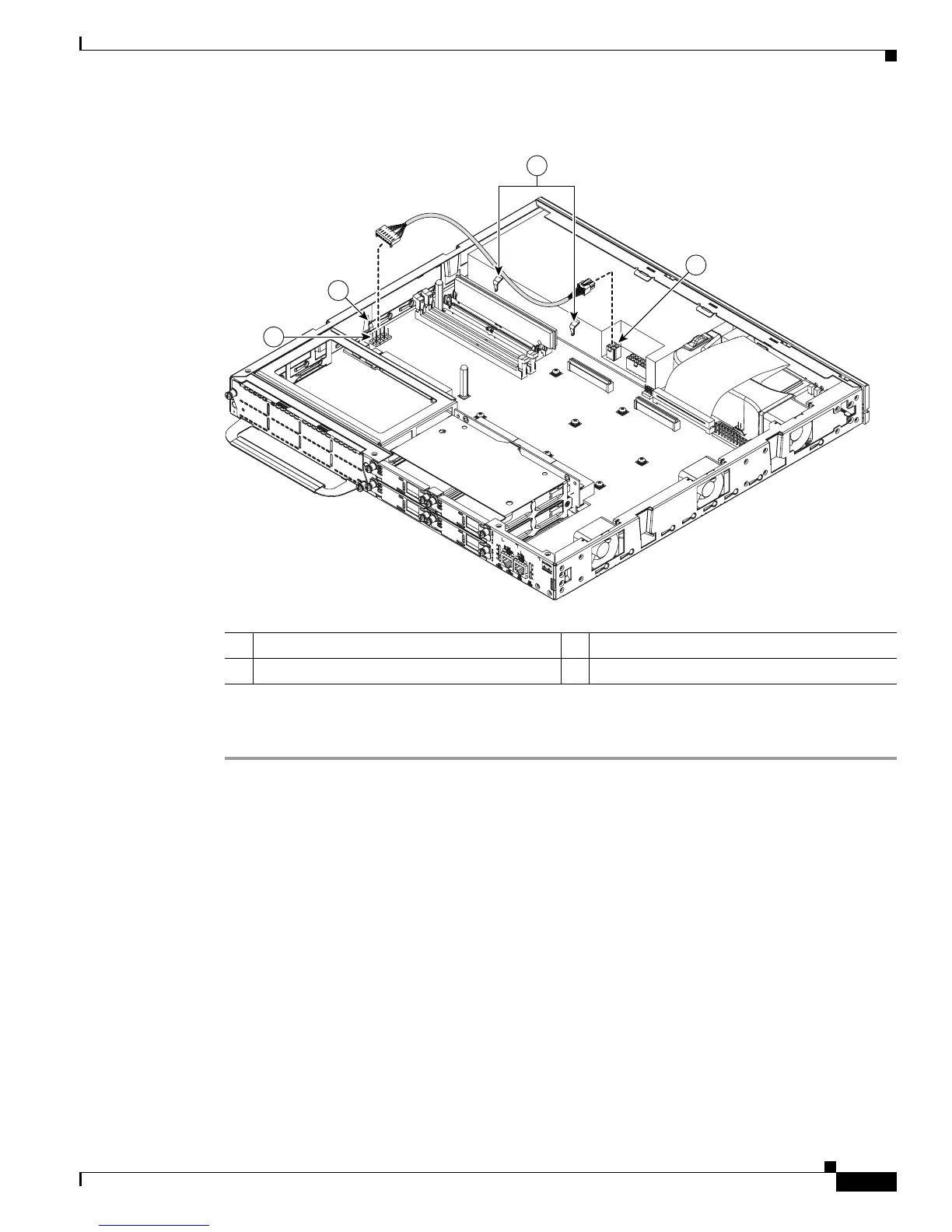
Figure 40 Connecting an ILP Cable in a Cisco 2811 Router
.
Step 6 If you are finished installing modules, install the cover on the router. See the “Installing the Chassis
Cover” section on page 51.
Installing a Power Supply in a Cisco 2821 or Cisco 2851 Router
Three types of power supplies are available for the Cisco 2821 and Cisco 2851 routers:
• An AC-input power supply, driven by external AC power
• A DC-input power supply, driven by external DC power
• An inline power (ILP) supply, driven by external AC power. This supply provides power for the
router and inline power for a complement of IP phones attached to the router.
The following sections describe how to install each type of power supply.
1 ILP cable connector on the power supply 3 ILP cable guides
2 ILP cable connector on the motherboard
2
3
1
3
127114



 To Next Page