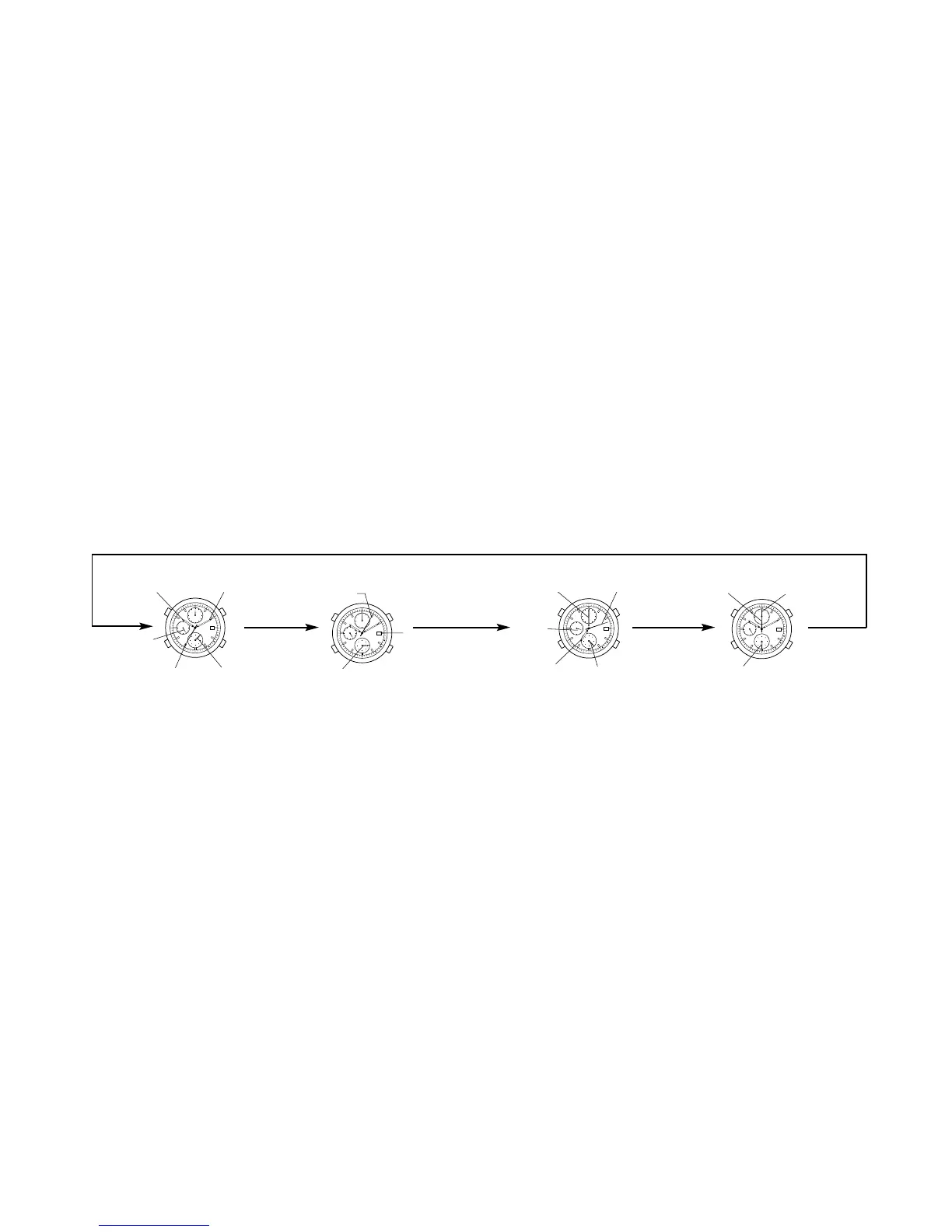
Each press of the M button changes Time <TME> → Calendar <CAL> →
Alarm <ALM> → Chronograph <CHR>. Confirm the change with the mode
hand.
After that it returns to the time <TME> display.
15
■ CHANGING THE MODES
Other than the time display, this watch has alarm and chronograph main
display functions.
14
Time mode
Displays present time in hours, minutes,
seconds and 24-hours.
Use the 24-hour hand to confirm am/pm.
24
6
12
18
A
L
M
W
A
R
N
I
N
G
S
E
T
S
T
O
P
C
H
A
R
G
E
ON
O
FF
7
0
2
46
8
A
L
M
T
M
E
C
H
R
A
L
M
T
M
E
C
A
L
C
A
L
C
H
R
M
Calendar mode
Display alarm set time. The alarm setting is
in 1 minute. Confirm of am/pm with the 24-
hour hand. If the alarm is ON, it will ring at
the set time for 15 seconds once every day.
24
6
12
18
A
L
M
W
A
R
N
I
N
G
S
E
T
S
T
O
P
C
H
A
R
G
E
ON
OFF
7
0
2
46
8
A
L
M
T
M
E
C
H
R
A
L
M
T
M
E
C
A
L
C
A
L
C
H
R
M
Alarm mode
Measures up to a maximum 60 minutes
in 1/20 seconds, and displays split times.
A confirmation rings when you
start/stop or measure a split time.
24
6
12
18
A
L
M
W
A
R
N
I
N
G
S
E
T
S
T
O
P
C
H
A
R
G
E
ON
O
FF
7
0
2
46
8
A
L
M
T
M
E
C
H
R
A
L
M
T
M
E
C
A
L
C
A
L
C
H
R
M
Chronograph mode
Displays current date by second hand (Month)
and Date. Since the date and function hand
are synchronized with each other, the function
hand will turn at when correcting the date.
24
6
12
18
A
L
M
W
A
R
N
I
N
G
S
E
T
S
T
O
P
C
H
A
R
G
E
ON
O
F
F
7
0
2
46
8
A
L
M
T
M
E
C
H
R
A
L
M
T
M
E
C
A
L
C
A
L
C
H
R
M
Hour hand Minute hand
Month
(second hand)
Date
Minute hand
Alarm ON/OFF
1/20 second
hand/minute hand
Hour hand Mode hand <ALM>
Second hand
Under the
second hand
Mode hand <CHR>
Second hand
Mode hand <TME>
Mode hand <CAL>
24-hour
hand
24-hour
hand
M
MM
M





 To Next Page