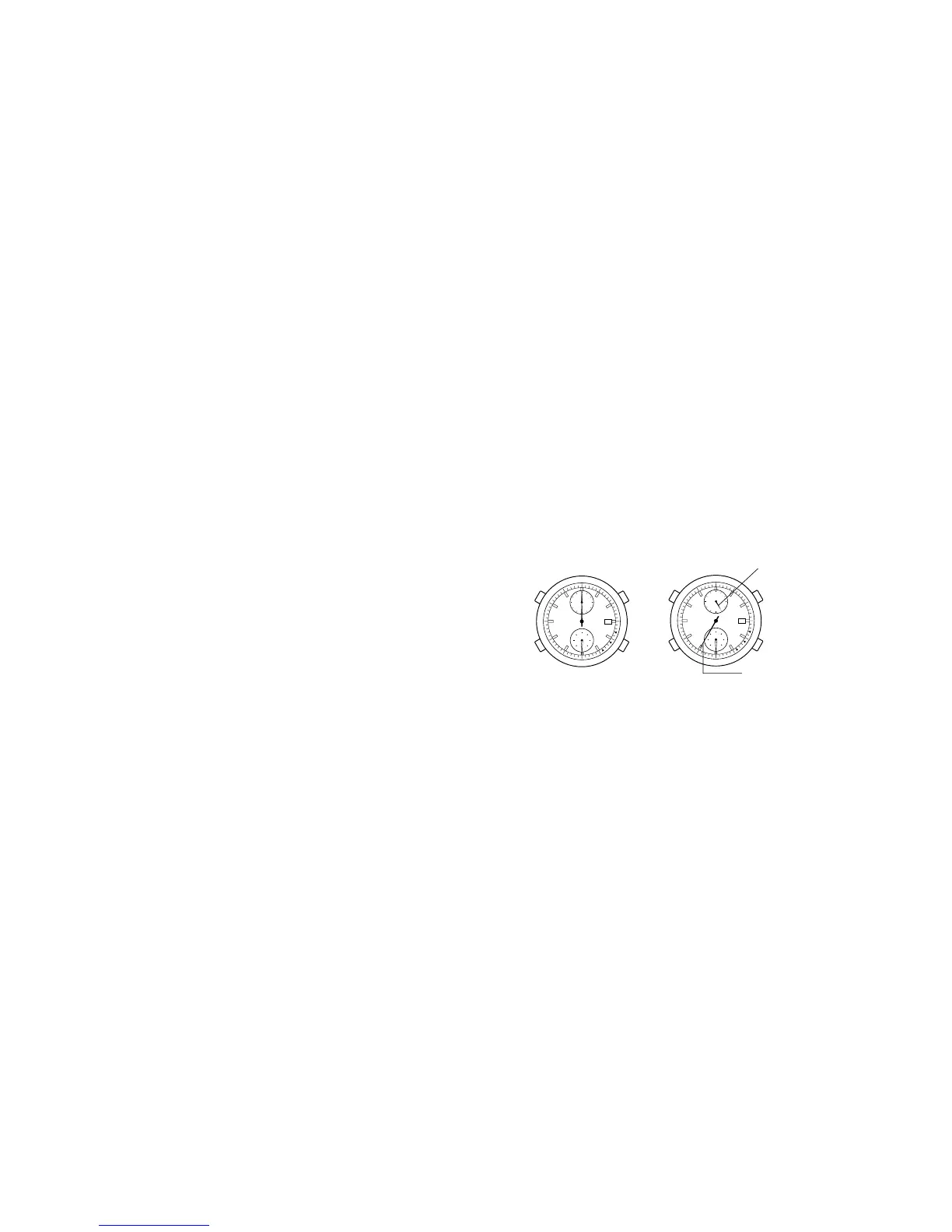
Reading the Chronograph Hands
• Function hand → Chrono minutes or chrono 1/20 seconds.
* The function hand moves every one minute.
Pressing button B while in chrono stop or split display, switches the function hand
to show chrono 1/20 seconds.
• Second hand → Chrono second hand.
21
• Each time button B is pressed............The watch advances 1 minute in a
clockwise direction.
• Each time button C is pressed............The watch turns back 1 minute in a
counterclockwise direction.
* Depress button B or button C continuously, the hands move rapidly.
Switching the Alarm ON and OFF
Each time button A is pressed in the alarm mode, the alarm switches ON
and OFF.
Alarm Sound Monitor
On the alarm mode (button M in normal position), pressing button A will
sound the alarm for 5 seconds.
NOTE
• There may be some variation in the volume of the alarm sound,
depending on how much the secondary battery is charged.
• The alarm sound volume gets rather lower in the displays other than the
time display (calendar, alarm, chronograph, “0” position confirmation, and
each display’s adjustment state).
Once the alarm time has been set, use the watch normally in time display
mode.
20
Chronograph reset








 To Next Page