2322
Using the chronograph —
Chronograph mode
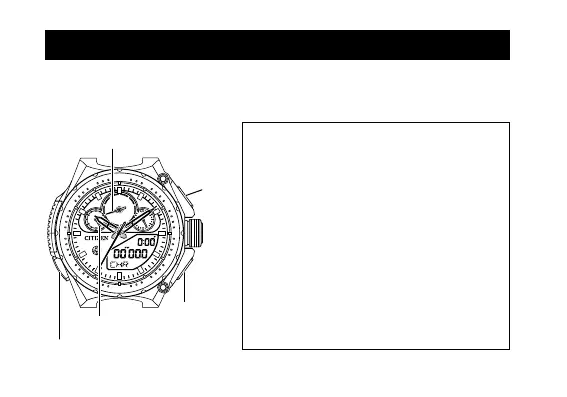
The chronograph hands normally point to “0/.00”, “0 (or 60)”.
You can measure times up to 23 hours 59 minutes 59 seconds 999, per 1/1000
second.
24
12
18
.01
50
10
20
30
0
40
.02
.03
.04
.05
.06
.07
.08
.09
.00
6
0
1
2
3
4
5
6
7
8
9
1/1000Sec.
60
30
25
20
15
10
05
55
50
45
40
35
Button B
Crown
Button A
Button M
Chronograph
second hand
1/10 chronograph second hand
1/100 chronograph second hand
• When the measurement time passes over
23 hours 59 minutes 59 seconds 999, the
measurement stops and the measurement
time is reset.
• When 60 seconds elapsed after starting
/restarting the measurement, the
chronograph 1/10 second and 1/100
second hands stop at “0/.00.”
• After the chronograph 1/10 second
and 1/100 second hands stop, you can
change the mode with the measurement
continued (other than the Race mode and
Lap Record mode).


 To Next Page