2524
Measuring lap times —
Race mode
24
12
18
.01
50
10
20
30
0
40
.02
.03
.04
.05
.06
.07
.08
.09
.00
6
0
1
2
3
4
5
6
7
8
9
1/1000Sec.
60
30
25
20
15
10
05
55
50
45
40
35
01
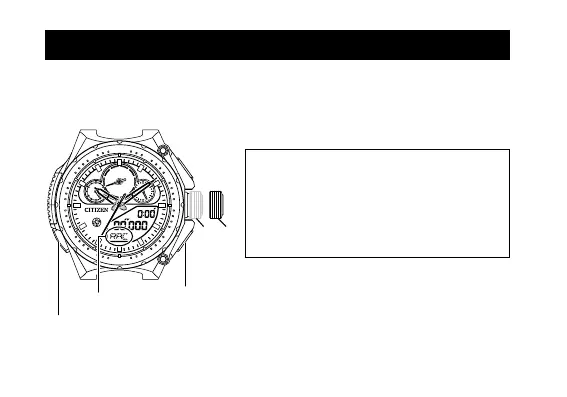
Button A
Crown
Button B
Button M
“RAC”
You can measure lap times and the average speed of each lap. The records of the
latest 20 laps are stored in the Lap Record mode. (
→
page 28)
■ Setting the distance of the course
• To calculate speed, set the distance of the
course. (Setting range: 0 to 99.999 km)
• When you set the distance, records in the
Lap Record mode are deleted. To cancel
the setting, push in the crown to position
0 before step 3 on page 21.
1
. Press button
M
to change the mode
to Race. (“RAC”)


 To Next Page