Hydro 4
Hydro 4
Page 9
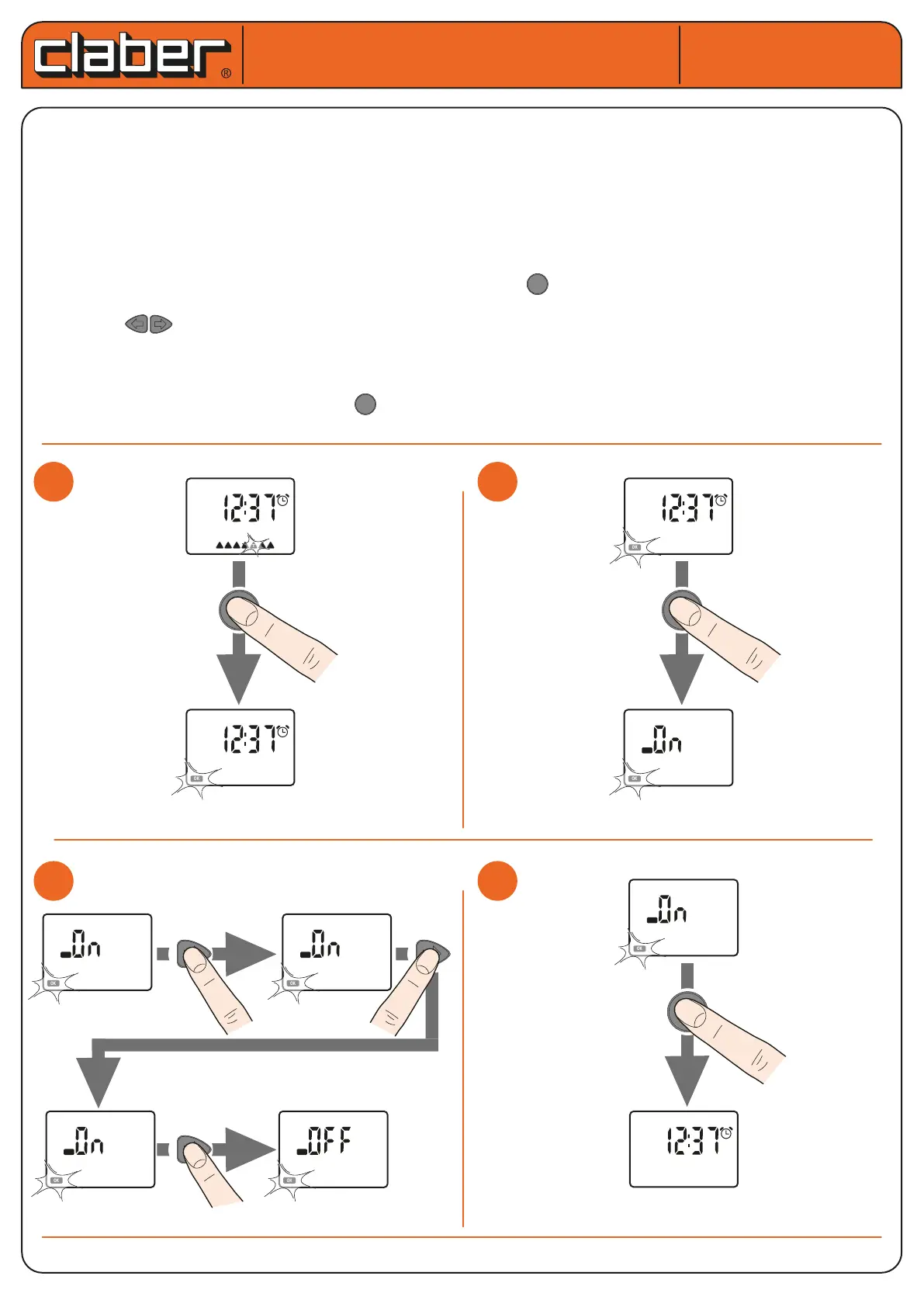
PROGRAMMING WATERING - Enabling programmes A and B and setting to o.
Activating/deactivating programmes A and B of the water timer is useful in managing:
- watering requirements based on the season: for example, programme A can be set for the summer - maxi-
mum watering requirements, and programme B for the spring - low watering requirements;
- simplied programming: if just one programme is sucient for your watering requirements, it is possible to
eliminate the display of the pages of the other programme, simplifying setting operations for the programme
being used.
- setting to OFF: to temporarily stop watering without losing the programme settings, as described below.
The display normally shows the current TIME/DAY screen; press to go into the time programming and press
it twice more.
Then press to select which programme is to be enabled. The possible selections are 4
If programmes A and B are assigned on the same day, this could cause the simultaneous opening of the two
lines: the system does not have a sucient ow rate, this could have a negative impact on the quality of the
watering.
Once the selection has been made, press to conrm enabling of the programme/s displayed.
Hydro 4 (cod.): 90829
User manual
User manual
PROG
EXIT
LINE
B
A
B
A
B
A
B
A
B
A
B
A
B
A
B
A
S M T W T F S
LO W BAT T
OK
ERR
1 2 3 4 %
14
15
1
1
2
2
S M T W T F S
OK
OK
x 2
OK
3
3
4
4
PROG
EXIT
LINE
B
A
B
A
B
A
B
A
B
A
B
A
B
A
B
A
S M T W T F S
LO W BAT T
OK
ERR
1 2 3 4 %
14
15
OK
PROG
EXIT
LINE
B
A
B
A
B
A
B
A
B
A
B
A
B
A
B
A
S M T W T F S
LO W BAT T
OK
ERR
1 2 3 4 %
14
15
OK
PROG
EXIT
LINE
B
A
B
A
B
A
B
A
B
A
B
A
B
A
B
A
S M T W T F S
LO W BAT T
OK
ERR
1 2 3 4 %
14
15
OK
PROG
EXIT
LINE
B
A
B
A
B
A
B
A
B
A
B
A
B
A
B
A
S M T W T F S
LO W BAT T
OK
ERR
1 2 3 4 %
14
15
OK
PROG
EXIT
LINE
B
A
B
A
B
A
B
A
B
A
B
A
B
A
B
A
S M T W T F S
LO W BAT T
OK
ERR
1 2 3 4 %
14
15
OK










 To Next Page