4.44.4
Braking
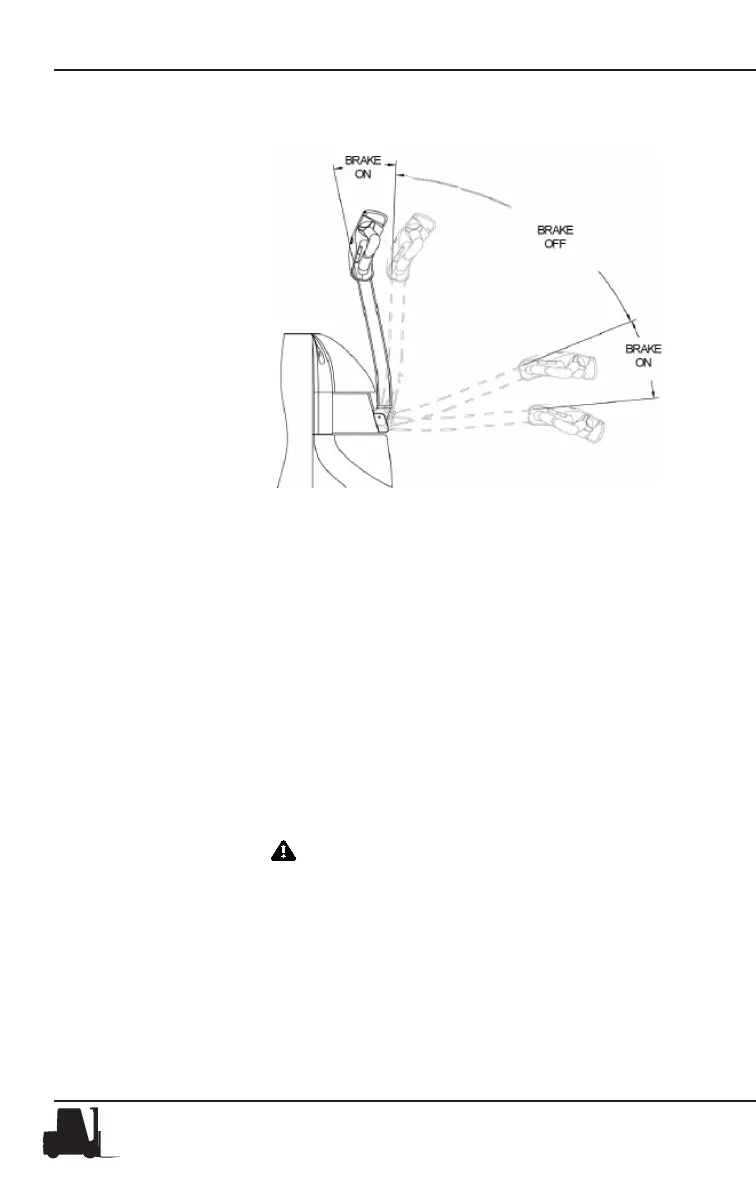
Lowering the control
handle to the operating
position disengages the
brake. Pushing the con-
trol handle to the "up"
position or pulling the
control handle to the
"down" position applies
the brake and shuts o
the drive motor.
When the direction/speed control is released to Neutral, the control will
automatically apply the plugging function to slow the truck to a stop.
This is the prefered method of stoping the truck.
Plugging (braking)
You can change direction and stop the truck without braking, by "plug-
ging." As you are traveling, move the travel control to the opposite
direction. The truck should slow to a smooth, controlled stop and then
accelerate in the opposite direction.
You can control the plugging distance with the travel control (direction/
speed): The farther the direction/speed control is rotated, the shorter
the reversal distance.
CAUTION
Be careful when plugging. Any sudden change in direc-
tion can cause the load to move or fall o forks.
Lift/Lower Control • Hand Rail • Horn Button


 To Next Page