14
Parts & Service: 020 8988 7400 / E-mail: Parts@clarkeinternational.com or Service@clarkeinternational.com
ADJUSTING THE BLADE TENSION
1. Raise the upper blade guide fully.
2. Check the tension by pressing
with a finger against the side of
the blade, halfway between the
table and upper guide.
• The blade should not flex more
than 2 mm.
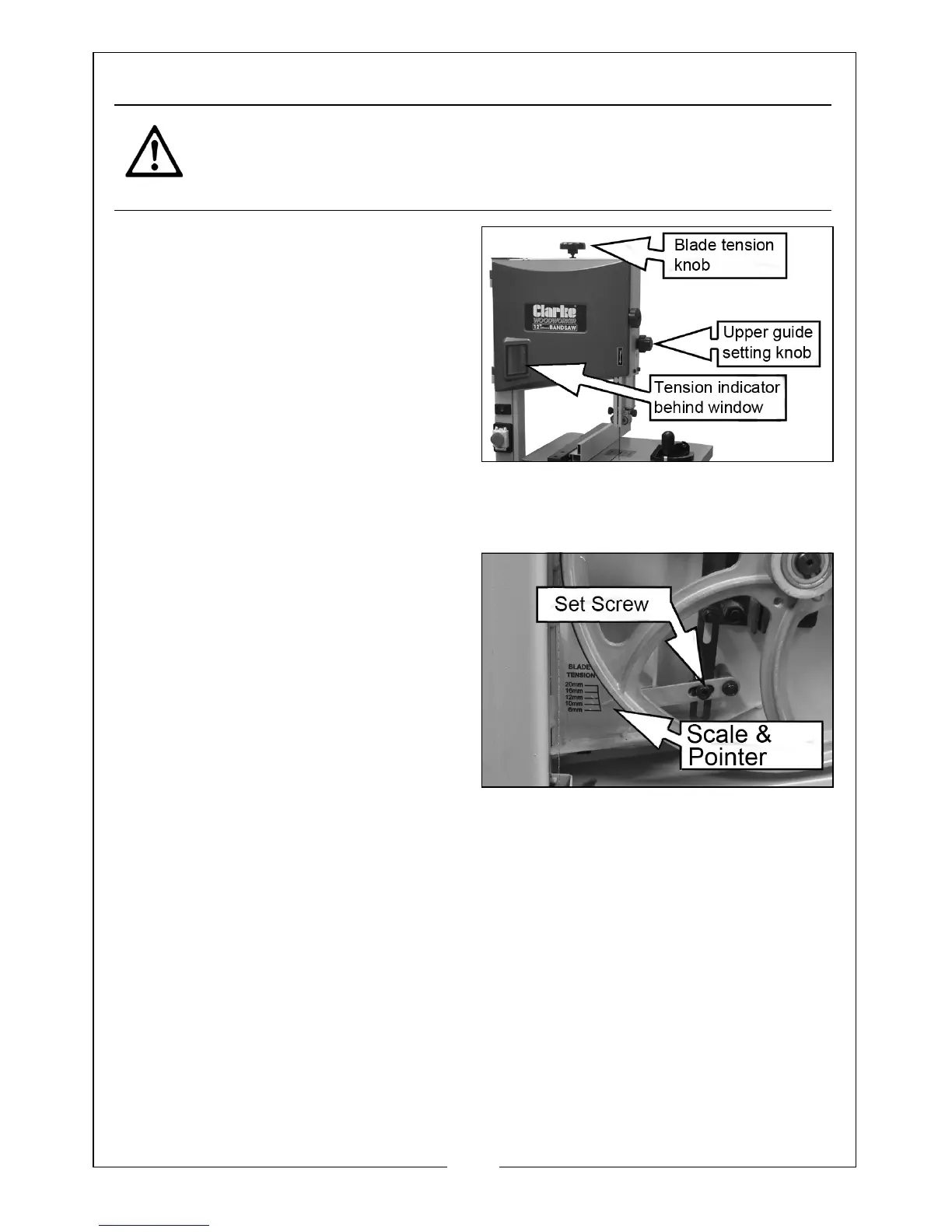
3. Turn the blade tension knob to
adjust tension.
• Turning the blade tension knob clockwise will increase the blade tension.
BLADE TENSION INDICATOR
The blade tension indicator set screw
shown in the diagram is factory set to
the width of the blade supplied
(12mm). If a blade of a different
width is to be used, you will need to
make the following adjustment:
1. With the new blade installed,
adjust the blade tension knob until
the pointer aligns with the blade
width on the scale.
• The bandsaw can use blades of 6, 10,12,16 & 20 mm wide.
• The scale indicates the correct adjustment, depending on the blade
width.
CAUTION: TOO MUCH TENSION CAN CAUSE THE SAW BLADE TO BREAK.
TOO LITTLE TENSION CAN CAUSE THE BLADE TO MAKE IRREGULAR CUTS


 To Next Page