9
English
O U T
1
1
2
Note: The sensor’s display goes down to -50 degrees. Themain display unit (receiver)
only displays temperatures down to -30 degrees. Ifthetemperature falls below -30,
“LO” appears on thedisplay.
Displaying thetemperature trend
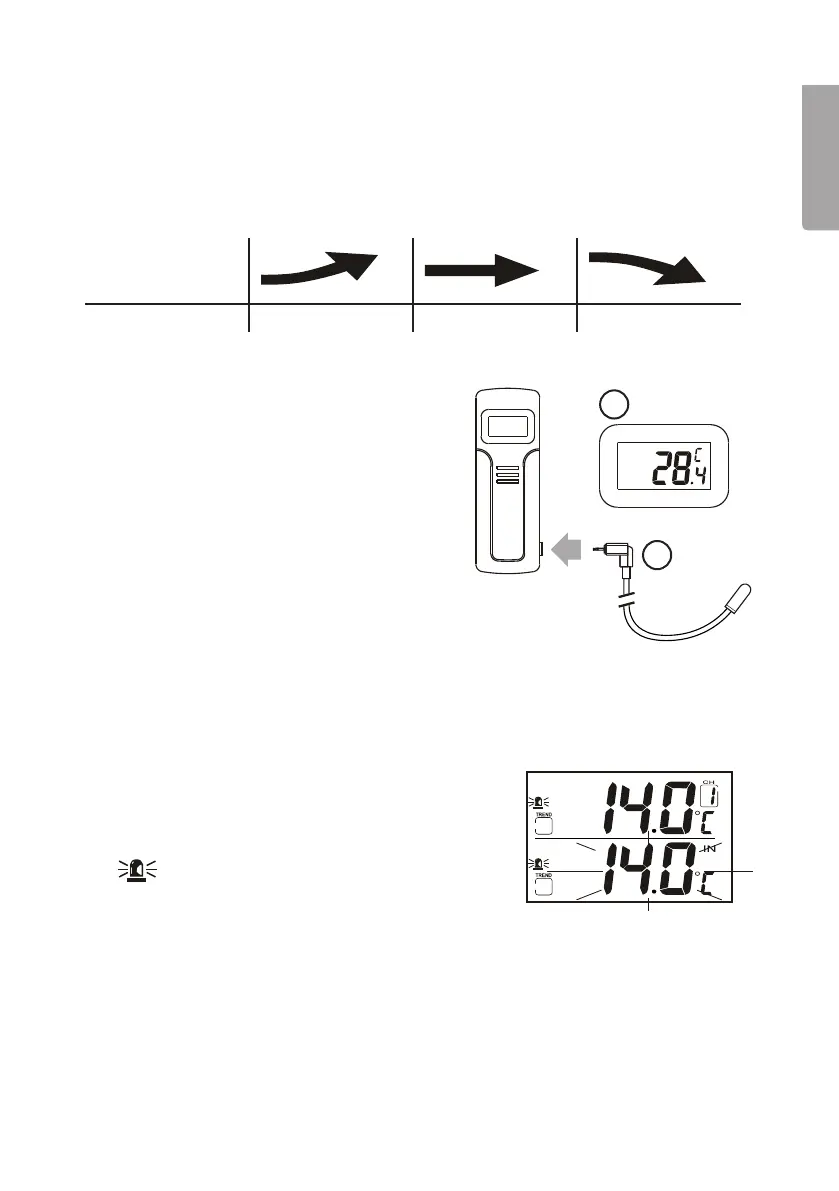
The temperature trend is read every half-hour and is shown with arrows as follows:
Indicator
Trend Rising Steady Falling
External temperature sensor
The sensor is equipped with asocket
forconnecting thesupplied external
temperature sensor.
1. Connecttheexternal temperature sensor
to theinternal sensor.
2. Whentheexternal temperature sensor
is connected, thefollowing appears on
thedisplay:
• The temperature at theexternal sensor
• The OUT symbol
• The humidity at theexternal sensor
4.2 Temperature alarm
You can decide if you want thealarm to warn you when thetemperature reaches
acertain level. Youcan set two alarms at thesame time – one for thereceiver and
onefor asensor.
Indoor temperature alarm (receiver)
1. Press[Mode/Snooze] repeatedly to get to
theindoor temperature alarm setting mode.
will appear.
2. Press[Alarm/C/F] repeatedly to switch between
temperature alarms for high and low temperatures
and also to activate thealarm.
• If thetemperature is rising, thearrow in the“trend” box will point upwards.
• If thetemperature is falling, thearrow in the“trend” box will point downwards.
• If thetrend arrow is not shown, it means that thetemperature alarm is deactivated.
3. Press[Hour/+/Max] or [Minute/-/Min] to set thetemperature for when thealarm
should sound.
4. Press[Mode/Snooze] to confirm thesetting.


 To Next Page