EasyManua.ls Logo

Classeq P500 - User Manual

Classeq P500
32 pages
Print Icon
To Next Page IconTo Next Page
Loading...
Installation and
operation manual
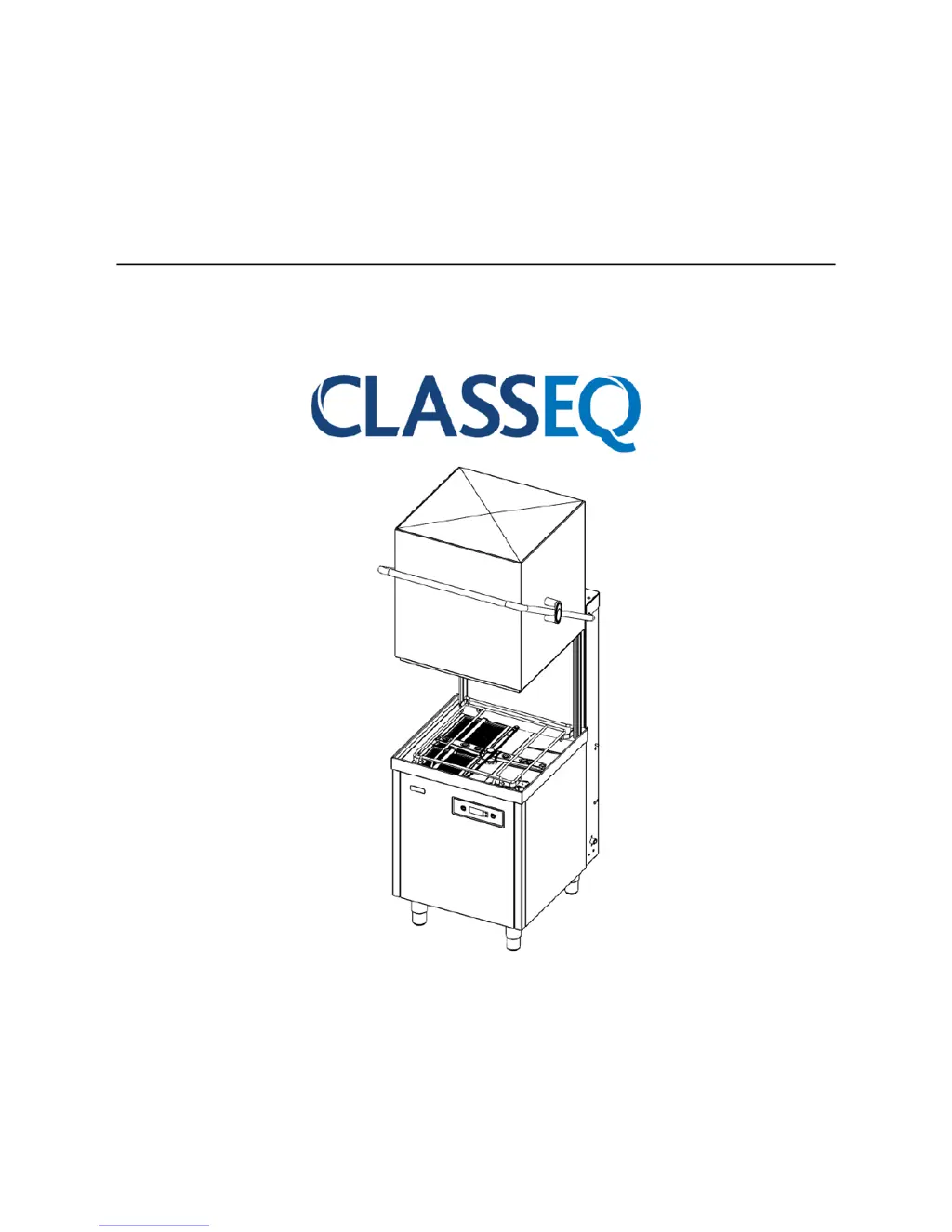
Pass Through Warewashers
CAUTION: Read these instructions before operating the warewasher
P500
P500A/RBP
P500AS
P500A WS
P500AS WS
A - Air break with rinse
booster pump
WS Water Softener
AS Dual Rinse Element

Other manuals for Classeq P500

Questions and Answers

  • D
    davidjensenSep 9, 2025
    How to prevent etching on Classeq Washer glasses?
    • A
      amandaharperSep 9, 2025
      Etching on glasses can be caused by high temperatures or aggressive chemicals. To address this, adjust the temperatures and consider changing the chemicals or their dosage rates.
  • S
    Scott CarterAug 23, 2025
    What to do when Classeq Dishwasher does not drain?
    • A
      Alexis AlvarezAug 23, 2025
      To address a Classeq Dishwasher that does not drain, ensure the drain/stand pipe is correct for the warewasher and the site waste is not blocked. Verify the warewasher waste hose is not kinked or blocked, and confirm the correct drain procedure is being used for the warewasher type.
  • C
    Charles WyattAug 25, 2025
    Why is my Classeq P500 Dishwasher leaving poor wash results?
    • B
      Brianna BarkerAug 25, 2025
      To troubleshoot poor wash results with your Classeq Dishwasher, ensure the warewasher is supplied with soft water. Check that the levels of chemicals within the rinse aid and detergent bottles, as well as the bottle weights and tubes, are correctly positioned. Verify that the chemical dosing is set to the correct concentration levels and that the warewasher is regularly cleaned. For external water softeners, ensure they are regenerated; for internal ones, check that the salt reservoir is full. Note that glasses may need renovation.
  • R
    Ronald LewisAug 27, 2025
    Why is my Classeq P500 filling slowly?
    • S
      Stephanie GibbsAug 27, 2025
      If your Classeq Dishwasher is filling slowly, check that the water supply is turned fully on and that the water supply hose has not been trapped or kinked. Also, verify that the site water supply has not been interrupted and that the site pressure is adequate.
  • D
    david19Aug 27, 2025
    What to check if the Classeq P500 Dishwasher cycle does not start?
    • J
      Jeffery SimsAug 27, 2025
      If the cycle does not start on your Classeq Dishwasher, ensure the warewasher is turned on. Also, verify that enough time has been allowed for the warewasher to fill and heat, and confirm that the wash tank is full of water.
  • R
    ryancharleneAug 29, 2025
    What to do if my Classeq P500 is overflowing?
    • J
      Jeremy GutierrezAug 29, 2025
      If your Classeq Dishwasher is overflowing, check that the drain/stand pipe is correct for the warewasher and that the site waste is not blocked. Also, make sure the warewasher waste hose is not kinked or blocked. Remove and clean all filters, then fully drain and refill the warewasher. If the issue continues, isolate the warewasher and request a service callout.
  • D
    david02Sep 17, 2025
    Why is there condensation on wares from my Classeq Washer?
    • R
      Rebecca RamirezSep 18, 2025
      Condensation on wares is often due to dirty glasses, towel drying, incorrect detergent levels or low temperatures. Check temperatures, chemical dosing and ensure correct chemicals are being used.
  • N
    Natasha WilsonSep 19, 2025
    What causes blue film on wares in my Classeq Washer?
    • A
      abbottandreaSep 22, 2025
      A blue film on wares can be caused by excessive rinse aid, hard water (lime scale), or high temperatures. Check temperatures, chemical dosing and ensure correct chemicals are being used.
  • A
    Adam ReedSep 7, 2025
    Why are my Classeq Washer glasses dirty after washing?
    • M
      Michael GarrettSep 8, 2025
      Dirty glasses can result from a dirty machine, so clean it regularly. Other causes include not pre-washing items, using poor quality or damaged glasses, or insufficient/poor quality rinse aid and detergent. Consider renovating or replacing glasses if they are damaged, and check your chemical and dosing rates.
  • R
    Robert BrownSep 4, 2025
    How to fix poor wash results in my Classeq Washer?
    • B
      Brian AllenSep 4, 2025
      Poor wash results can stem from several factors. Ensure the machine is cleaned regularly, including filters and wash arms. Avoid putting food waste into the machine; pre-wash wares with cold water only. Load baskets correctly, using the right type, and don't overload them. Verify temperature and chemical settings are correct, and that detergent and rinse aid feeds aren't crossed. If you have hard water, ensure the water softener is filled with salt. Finally, select the appropriate wash cycle for the soil level of your wares.

Summary

Explanation of Symbols

Warning and Safety Information

Danger Warnings

Safety warnings about serious or fatal injuries.

Warnings

Safety warnings about minor injuries or material damage.

Cautions

Warnings about product defects or destruction.

Know Your Warewasher

Warewasher Layout

Identifies and explains the main components of the warewasher.

User Interface

Details the control panel and its functions.

Accessories

Lists and illustrates items included with the warewasher.

Warewasher Specifications

Provides technical specifications and dimensions for different models.

Pre-installation

Feet Installation

Instructions for installing the machine's adjustable feet.

Re-route Drain Hose

Guidance on rerouting the drain hose during installation.

Equipotential Bonding

Instructions for electrical safety bonding of the warewasher.

Electrical Connection

Details on connecting the warewasher to the electrical supply.

Water Connections

Information on connecting the water supply to the warewasher.

Waste Water Connection

Instructions for connecting the waste water outlet.

Installation

Recommended Hand Tools

Lists essential tools for installing the warewasher.

Warewasher Placement

Guidance on positioning the warewasher for optimal installation.

Electrical Connection

Detailed steps for electrical connections and safety.

Water Supply Hose Connection

How to connect the water supply hose correctly.

Waste Water Connection

Proper procedures for waste water drainage connection.

Fitting Chemical Bottles

Instructions for installing detergent and rinse aid bottles.

Commissioning

Commissioning Interface

Overview of the control panel during commissioning.

Commissioning Mode

How to enter and navigate the commissioning menu.

Setting Chemical Dosage

Adjusting rinse aid and detergent settings.

Priming Chemicals

Steps to prime chemical pumps for initial use.

Integral Water Softener

Instructions for commissioning the water softener unit.

Wash and Rinse Tank Temperatures

Information on pre-set tank temperatures.

Operation

Operation Interface

Identifies controls on the user interface for operation.

Turning On the Warewasher

Steps to power on the warewasher.

Warewasher Ready to Operate

Indicators and conditions for readiness to start a cycle.

Changing Temperature Units

How to switch between Celsius and Fahrenheit displays.

Selecting a Wash Program

How to choose different wash cycle programs.

Loading a Basket

Guidelines for correctly loading items into the basket.

Starting a Cycle

Step-by-step process to initiate a wash cycle.

Draining Down the Warewasher

Procedures for draining the warewasher at the end of the day.

Service and Maintenance

Prior to Cleaning

Safety precautions before starting cleaning procedures.

Daily Cleaning

Routine cleaning recommendations for daily hygiene.

Lime Scale

Information on preventing and dealing with lime scale build-up.

Regular Maintenance

Ongoing maintenance tasks for the warewasher.

Descaling

Instructions for de-scaling the wash tank.

Troubleshooting

Warewasher Will Not Fill

Steps to diagnose and resolve filling issues.

Warewasher Will Not Turn On

Steps to diagnose and resolve power-on issues.

Warewasher Fills Slowly

Steps to diagnose and resolve slow filling issues.

Warewasher Over Filling

Steps to diagnose and resolve overfilling issues.

Warewasher Does Not Heat

Steps to diagnose and resolve heating issues.

Excessive Foam in Wash Tank

Steps to diagnose and resolve excessive foam issues.

Cycle Does Not Start

Steps to diagnose and resolve cycle start issues.

Cycle Runs for a Long Time

Diagnosing cycles that take too long.

Warewasher Does Not Rinse

Diagnosing cycles that fail to rinse.

Warewasher Over flowing

Diagnosing and resolving overflow issues.

Poor Wash Results

Diagnosing and resolving issues with wash quality.

Warewasher Does Not Drain

Diagnosing and resolving drainage issues.

Warewasher Will Not Turn Off

Diagnosing and resolving issues where the unit won't turn off.

Decommissioning

Appendix A - Water Softener Settings

Appendix B - Water Hardness Explained

Appendix D - Warewasher Specifications

Classeq P500 Specifications

General IconGeneral
Machine TypePass Through Dishwasher
Rack Size500 x 500 mm
Programs3
Cycle Time120 minutes
Wash Cycle Duration120 minutes

Related product manuals