7. Controls and Indicators
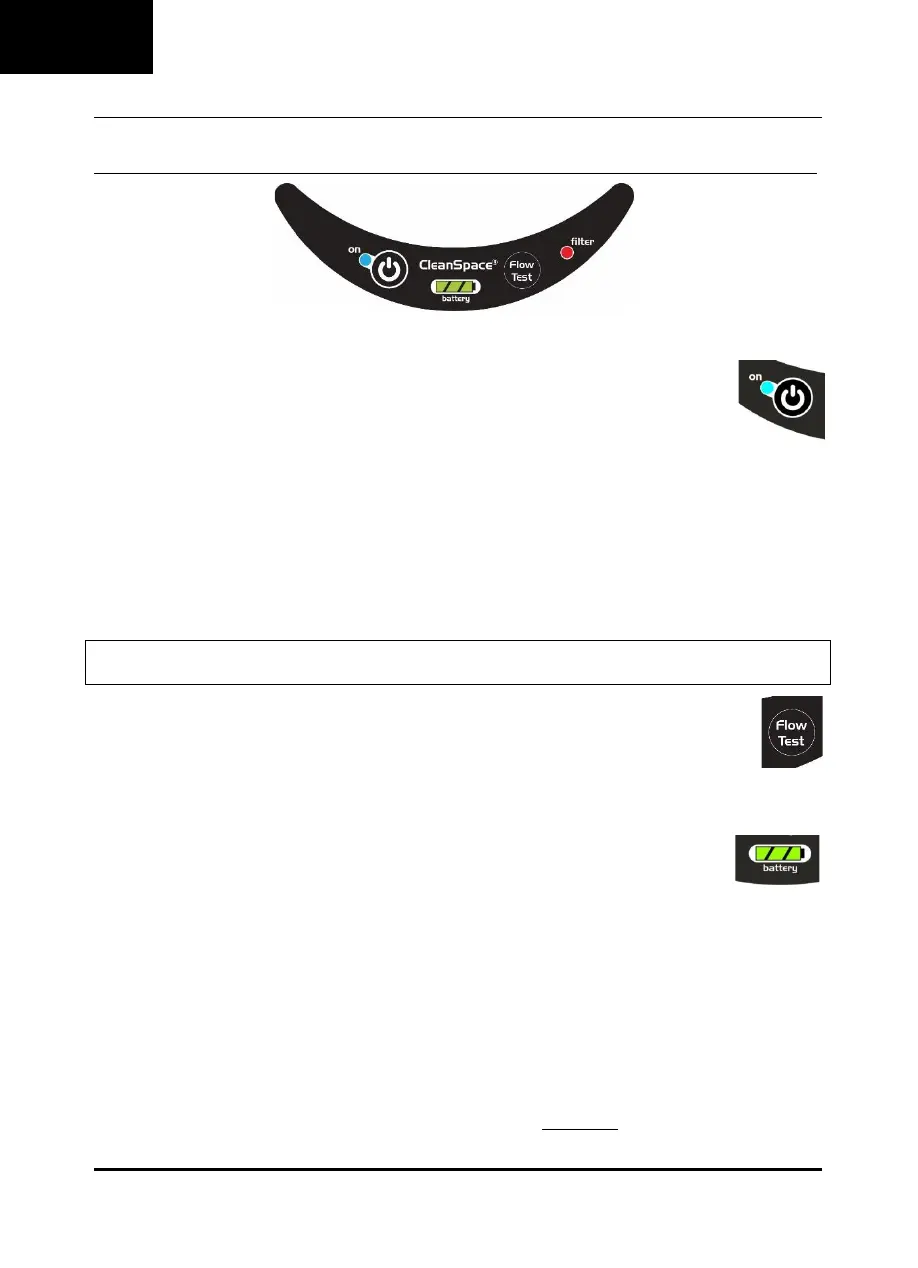
All controls and indicators are located on the keypad.
POWER BUTTON
This button is used to switch between the three (3) operating Modes: “Off”, “Standby”, and “On”.
i) Off Mode is when the green battery indicator lights are off, the motor is not running, and there is no
airflow to the mask. The CleanSpace Respirator automatically switches to Off Mode after three (3) minutes in
standby mode with no breathing sensed.
ii) Standby Mode is when the green battery indicator light(s) are on, the motor is not running, and there is no airflow to the
mask. If the CleanSpace Respirator is in Off Mode, it will switch to Standby Mode when the Power Button is pressed. The
CleanSpace Respirator will automatically switch to Standby Mode within ten (10) seconds of the user doffing the respirator.
iii) On Mode is when the CleanSpace Respirator is being worn, the motor is running, and there is airflow to the mask. If the
CleanSpace Respirator is in Standby Mode, it will switch to On Mode when breathing is detected, or the Power Button is
pressed.
To conserve battery life when not being worn, the CleanSpace Respirator is designed to automatically switch from On Mode to
Standby Mode, and then to Off Mode.
Note: The CleanSpace Respirator switches to On Mode when the respirator is in Standby Mode and breathing is detected. The
CleanSpace Respirator can only switch into On Mode from Standby Mode.
FLOW TEST BUTTON
The Flow Test Button measures the rate of flow produced by the CleanSpace Respirator to ensure it is able to
deliver the minimum design flow. When the CleanSpace Respirator is in Standby Mode (not On Mode), pressing
the Flow Test Button initiates Flow Test. This lasts about 5 seconds.
Refer to Section 9 for instructions on running the flow test.
BATTERY INDICATOR LIGHTS
The CleanSpace Respirator is equipped with a battery charge indicator comprised of three (3) battery
indicator lights. The battery is fully charged when the charger is connected to the Power Unit and all three
(3) lights are solid green. A fully charged Power Unit has a minimum of four (4) hours operating time.
The CleanSpace Respirator should be fully charged before use.
The CleanSpace Respirator will operate with one (1), two (2), or three (3) green battery indicator lights illuminated. When all
battery lights extinguish, the Power Unit had less than on (1) hour of operation remaining. It is recommended that the
CleanSpace Respirator be charged before use.
For approximate operating times, refer to Section 13. Battery Information.
LOW BATTERY ALARM
The Low Battery Alarm is triggered when the battery charge decreases beyond level at which it may not be able to supply the
manufacturer’s Minimum Design Flow. The Low Battery Alarm consists of three (3) beeps, repeated once per second and all
battery indicator lights extinguish.
If the Low Battery Alarm is triggered, you must leave the contaminated area immediately and recharge the battery.


 To Next Page