Clickfree C2 Portable Backup Drive (Macintosh) Backing up my content (HD)
HOW DO I CHANGE HOW CLICKFREE DOES BACKUPS?
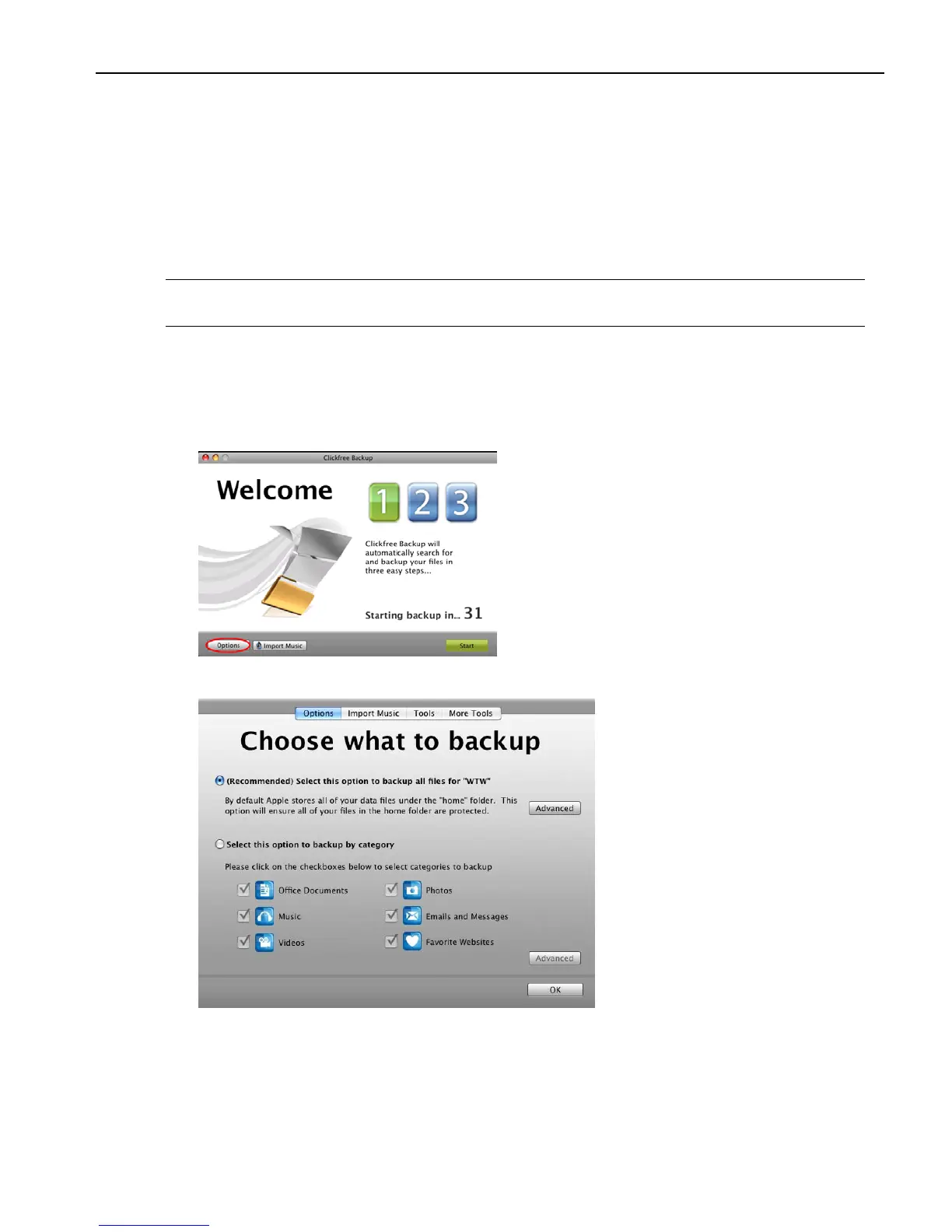
You can decide whether Clickfree backs up complete folders, or backs up content by
category (for example, Office Documents). The default is to back up your complete Home
folder.
If you choose to back up content by category, you can choose:
• The categories of content Clickfree backs up
• Where Clickfree looks for this content
Note: Changes you make to how Clickfree does backups are “sticky”: they are stored
and applied again to later backups for this user unless you modify them.
To review or change what gets backed up:
1. Follow steps 1 to 3 of the procedure “How do I start using my Clickfree Portable
Backup Drive (HD)?” on page 12.
2. Before the countdown reaches zero, click
Options.
The
Choose what to backup window is displayed:



 To Next Page