BRA2 - BRN2 EN
24
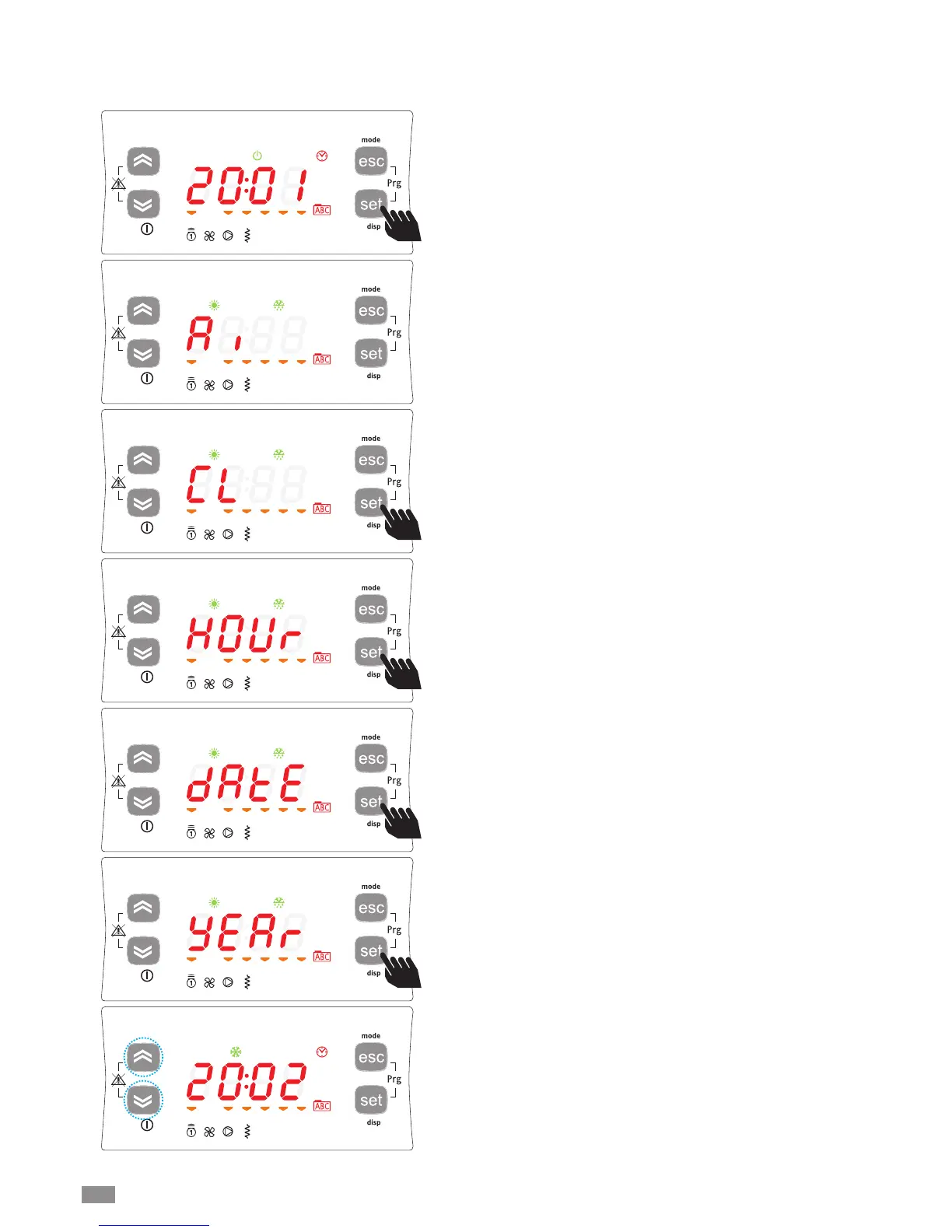
To set the clock of the unit, starting from the main display,
press the set button.
Pressing the set button once displays the various directo-
ries.
Scroll the menu using the UP and DOWN buttons until
reaching the directory CL.
SETTING THE CLOCK
The HSW15 controller is fitted with a clock for managing time bands to control specific events.
Follow the procedure shown below to set the hours, minutes and date.
To enter menu CL press the set button.
Once having entered this menu, HOUr will be shown. Select
whether to set the time, date or year using the UP and
DOWN buttons.
Once having decided which value to set, press the [set]**
button to enter the corresponding menu.
**pressed and held for 3 around seconds.
To set the time, date and year simply scroll with the UP and
DOWN buttons until the desired value and


 To Next Page