9
Based on Software Version 1.31.1. Content subject to change without notice. Check www.clintonelectronics.com for the most current manual.
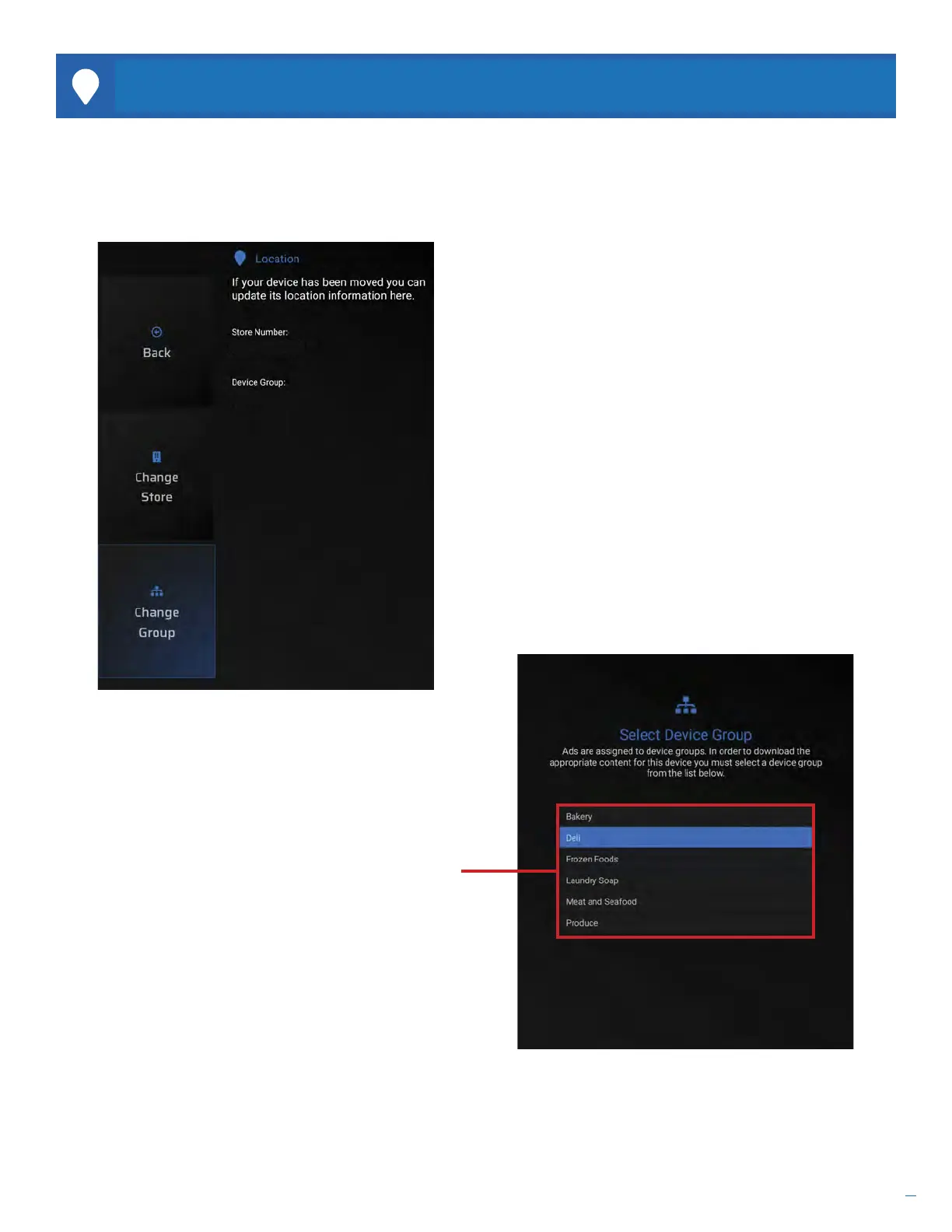
While the Store Number and Device Groups are not required, they are helpful when managing large groups of devices
using the Clinton Connect software. Use this menu to edit Store Numbers and Device Group locations.
LOCATION
C6701E
Main Entrance
C6701E
Main Entrance
Change Store. If the Store Number shown in the status
area of the screen is incorrect, select Change Store
and select the correct Store Number from the list.
Store Numbers must be set up beforehand by the
Clinton Connect admin.
This information can also be remotely edited by the
Clinton Connect admin.
Change Group. If the Device Group shown in the status
area of the screen is incorrect, select Change Group
and select the correct Device Group from the list.
Device Groups must be set up before hand by the
Clinton Connect admin.
This information can also be remotely edited by the
Clinton Connect admin.
Use the UP or DOWN arrows on the remote to scroll
through the list. Press the ENTER button to select the
desired Store or Group.
Press the EXIT button to leave this screen.


 To Next Page