13
Based on Software Version 1.31.1. Content subject to change without notice. Check www.clintonelectronics.com for the most current manual.
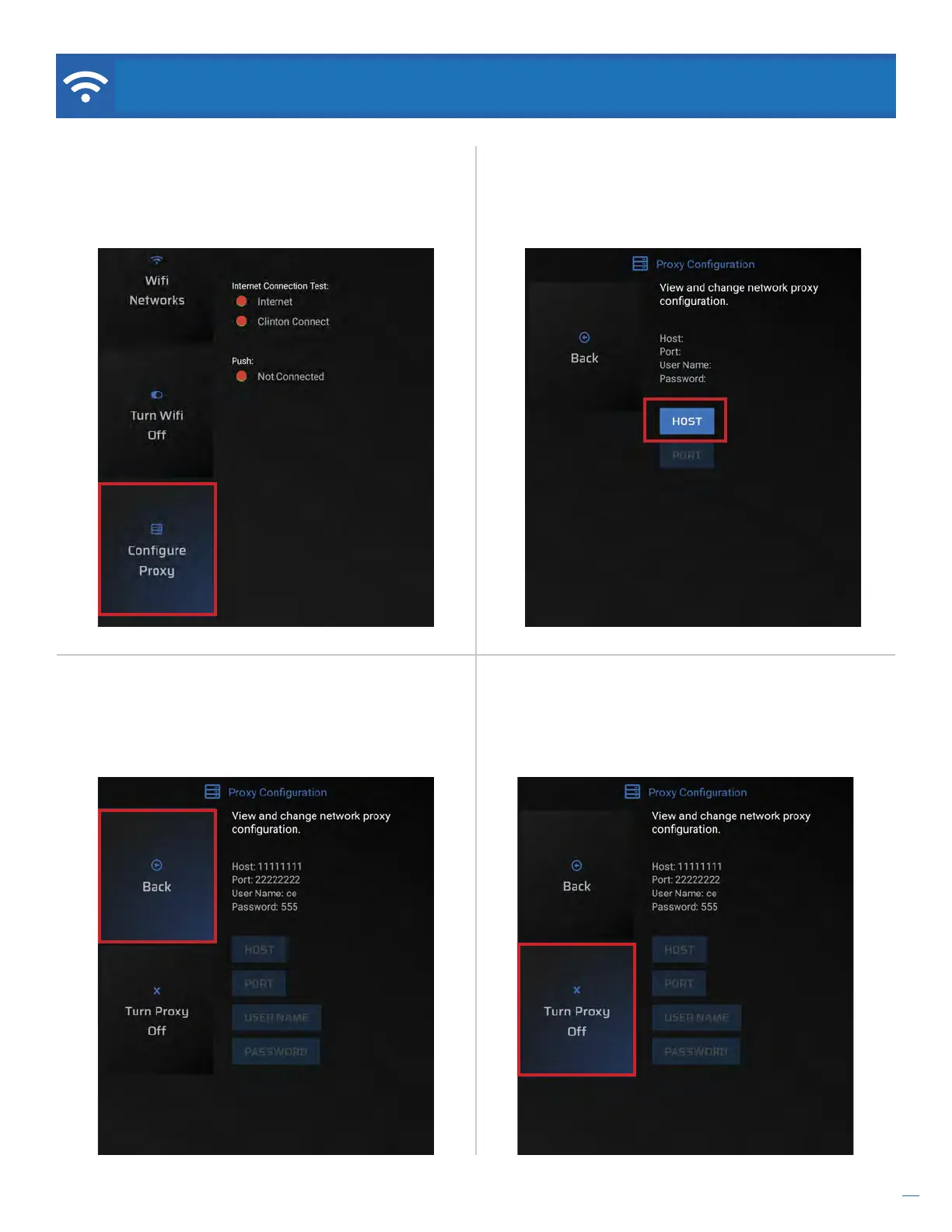
Step 7. Select Back and hit the ENTER button to
complete configuration. While the connection should
automatically establish, you may be required to reboot
the device to complete the connection.
Turn Proxy O. To disable the network proxy setting,
select the Turn Proxy O button from the Proxy
Configuration screen. The device will reboot after
removing the proxy configuration.
NETWORK / Proxy Configuration
Step 6. From the Proxy Configuration screen, use the
remote to set your desired Host, Port, User Name
(optional), and Password (optional).
Step 5. From the Network settings screen, use the
remote to arrow down to the Configure Proxy button
located at the bottom of the screen and press Enter
on the remote.
...Continued


 To Next Page