15
Based on Software Version 1.31.1. Content subject to change without notice. Check www.clintonelectronics.com for the most current manual.
NETWORK / Captive Portal
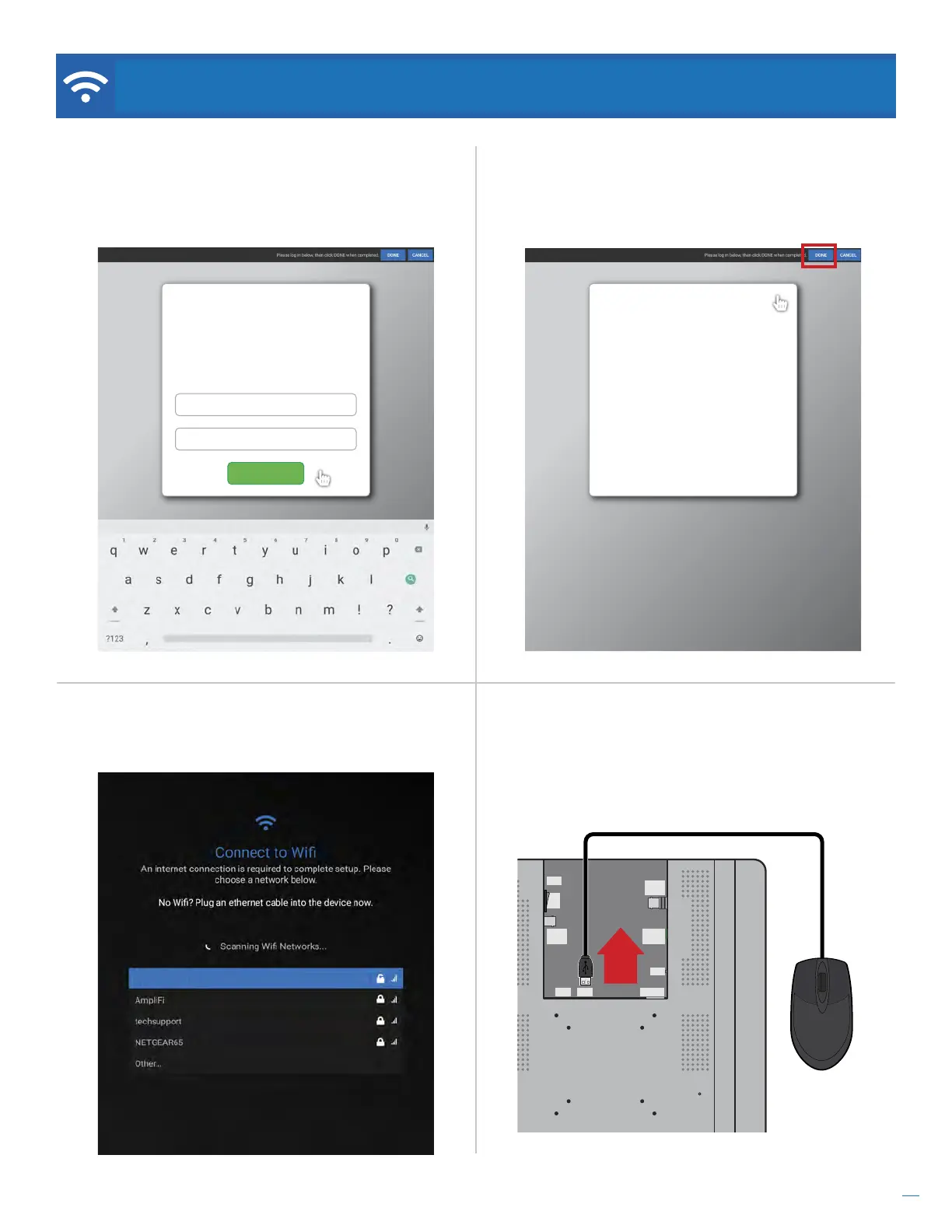
Step 7. Clicking DONE should close this page and
return you to the previous page.
Step 8. Disconnect the mouse from the USB port on
the back of the PVM.
Success!
You are now logged in.
Sign Out
Step 6. After successfully connecting to the network,
click the DONE button in the black bar at the top of the
screen to continue with any additional set up.
Step 5. Use the connected mouse and on-screen
keyboard to complete the required steps and login to
the Captive Portal Wifi network.
Wifi Access
Enter your username and password to connect
to the wireless network.
johnsmith01
************
Log in
Guest Network (Connected)
CAMERA
OSD
ON
OFF
DC24V
3. ALARM OUT
4. GND
1. ALARM1
2. GND
NETWORKUSBUSB
ANALOG
OUTPUT
EX-SDI
OUTPUT
...Continued


 To Next Page