42
EVH-X SPACE 2.1 - 12.1
M0SM10N17-03
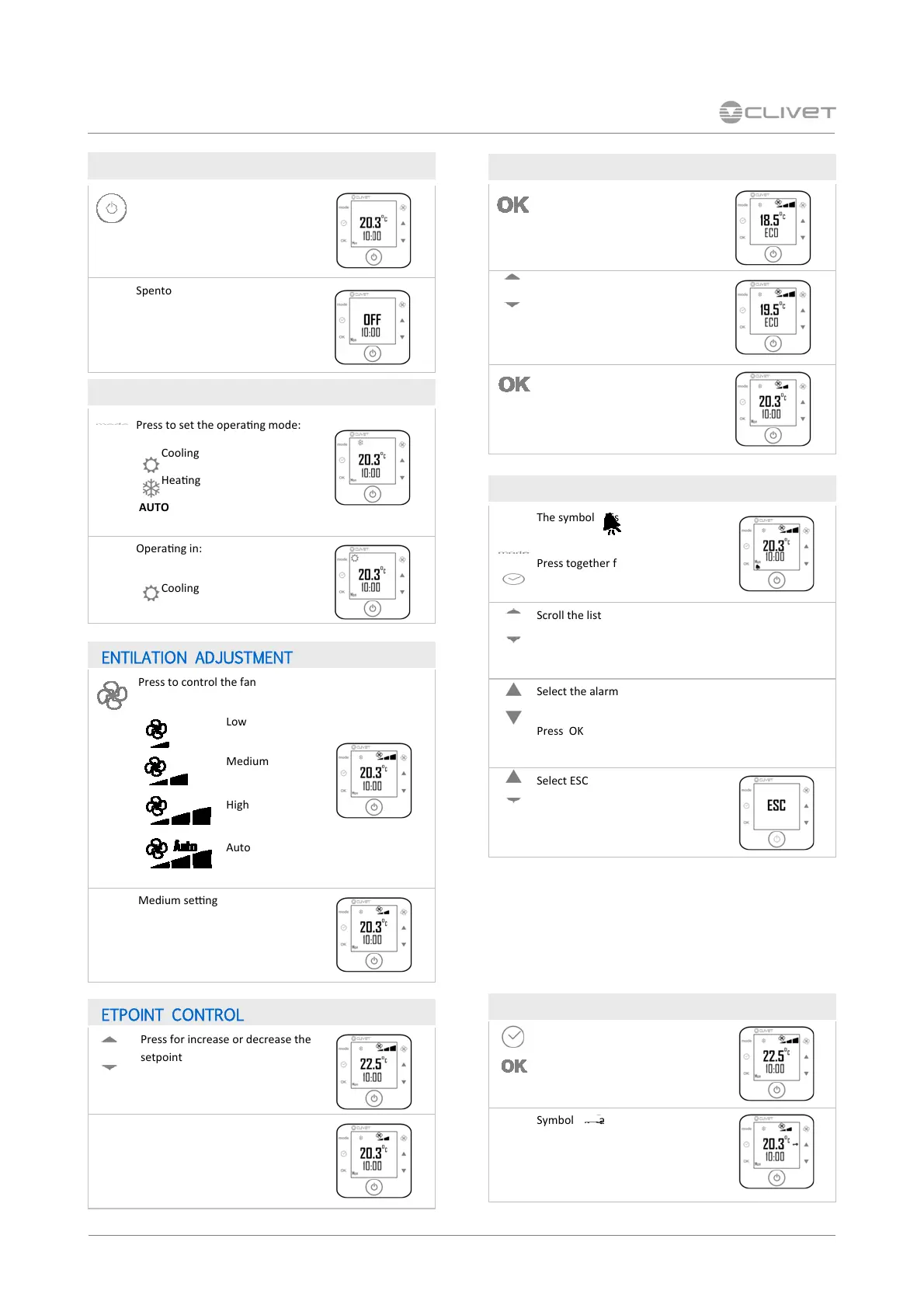
9 CONTROL
Press to set the operang mode:
Cooling
Heang
AUTO
Operang in:
Cooling
ON / OFF
Press for 5 seconds
Spento
VENTILATION ADJUSTMENT
Press to control the fan
Low
Medium
High
Auto
Medium seng
SETPOINT CONTROL
Press for increase or decrease the
setpoint
Back to the main screen and to
the room temperature displaying.
Press for 5 seconds
ECO Mode
Press to increase or decrease the
ECO setpoint
Press for 5 seconds
COMFORT mode of the main
screen
ALARM RESET
MODE CHANGE
The symbol is displayed
Press together for 5 seconds
Scroll the list
Select the alarm reset menu
Press OK
Select ESC
Press OK
ECO / COMFORT SETTING
BUTTON LOCK / UNLOCK
Press together for 5 seconds
Symbol appears
Alarm reset
Before resetting an alarm identify and remove the
cause that generate it.
Repeated reset can cause irreversibile damages.



 To Next Page
 Loading...