EasyManua.ls Logo

CLIVET EVH-X SPACE 10.1 - Status Visualization and Parameter Adjustment

CLIVET EVH-X SPACE 10.1
62 pages
Print Icon
To Next Page IconTo Next Page
To Previous Page IconTo Previous Page
Loading...
43
EVH-X SPACE 2.1 - 12.1
M0SM10N17-03
9 CONTROL
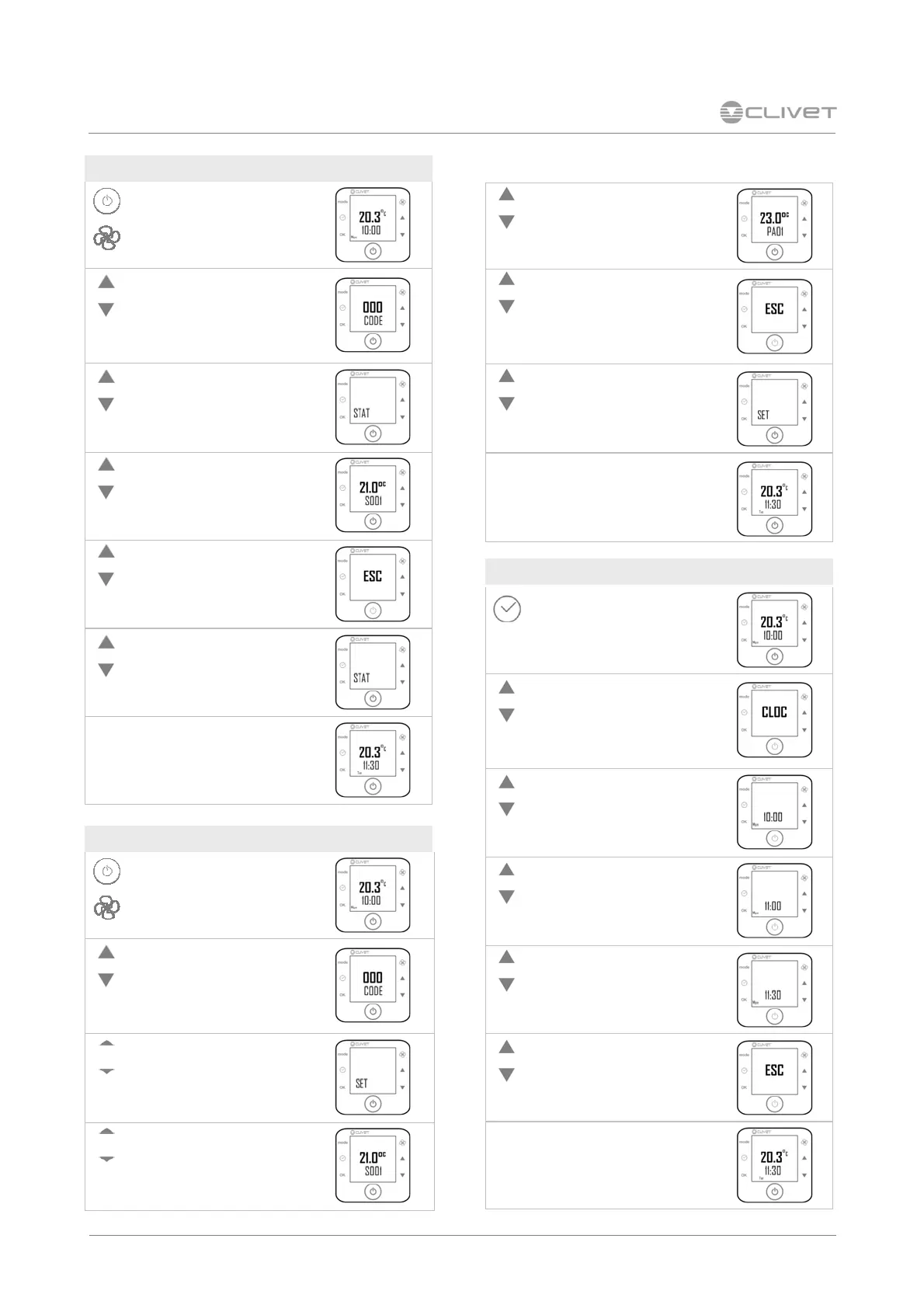
HOUR AND DAY
Press for 5 seconds
Select CLOC
Press OK
Change the hour
Press OK
Modify the minutes
Press OK
Select the day
Press OK
Select ESC
Press OK
Inial Screen
STATA (VISUALIZATION ONLY)
Press for 5 seconds plus the fan
buon
Enter as password any number
Press OK
Select STAT
Scroll the stata
Select ESC
Press OK
Select ESC
Press OK
Inial Screen
PARAMETER (only installer use)
Press for 5 seconds plus the fan
buon
Enter the password
Press OK
Select the group
Press OK
Scroll the parameters
Press OK
Set the new value
Press OK
Select ESC
Premere OK
Select others parameters or ESC
Press OK
Inial Screen

Table of Contents

Related product manuals