Home
CME
Electronic Keyboard
VX 5
Manual&Nbsp;
Page 11
CME VX 5 - Page 11
29 pages
Manual
Save Page as PDF
To Next Page
To Next Page
To Previous Page
To Previous Page
Loading...
26
z
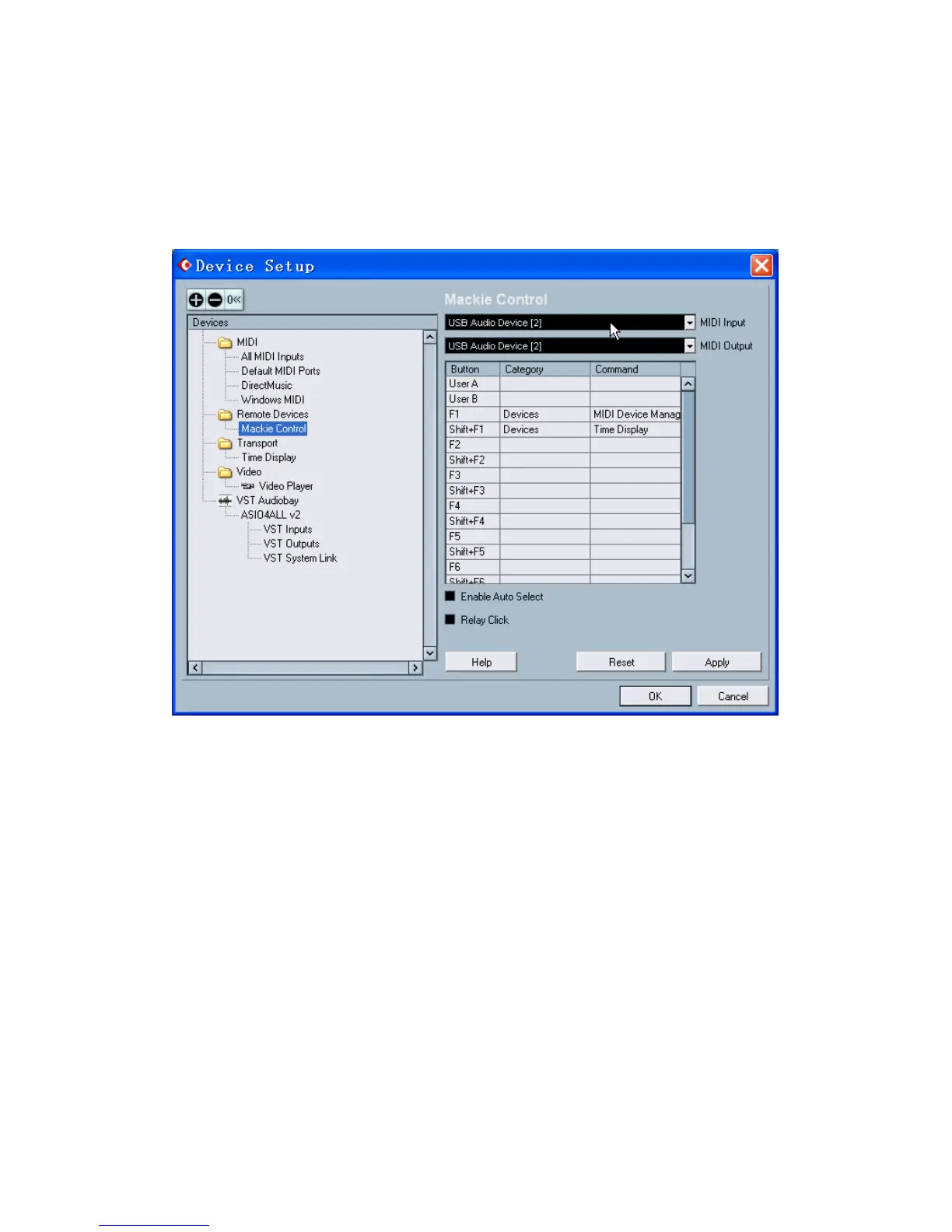
On the
【
Device Setup
】
window
,
For
【
MIDI Input
】
, selec
t “USB
Audio Device [2]”
For
【
MIDI Output
】
, select “
USB
Audio Device [2]”
Unselect
【
Enable Auto
Select
】
in the box below
.
z
Click on
【
OK
】
, close
【
Device Setup
】
window
.
z
Finished.
10
12
Table of Contents
Main Page
Table of Contents
2
Final Cut Pro 5 for Mac
3
Soundtrack Pro for Mac
5
Logic Pro 7 / Logic Express 7
7
Protools
9
Nuendo 3.2 / Cubase SX 3.1
10
Sonar 6
12
ACID Pro 6 / Vegas 7
14
Audition 2
17
Live 5
19
Reason 3
21
Tracktion 3
23
Samplitude 8 / Sequoia
24
Sawstudio
26
APB Tools
28
Other manuals for CME VX 5
User Manual
68 pages
Related product manuals
CME VX5
73 pages
CME UF5
24 pages
CME UF6
8 pages
CME U-Key
64 pages


 To Next Page