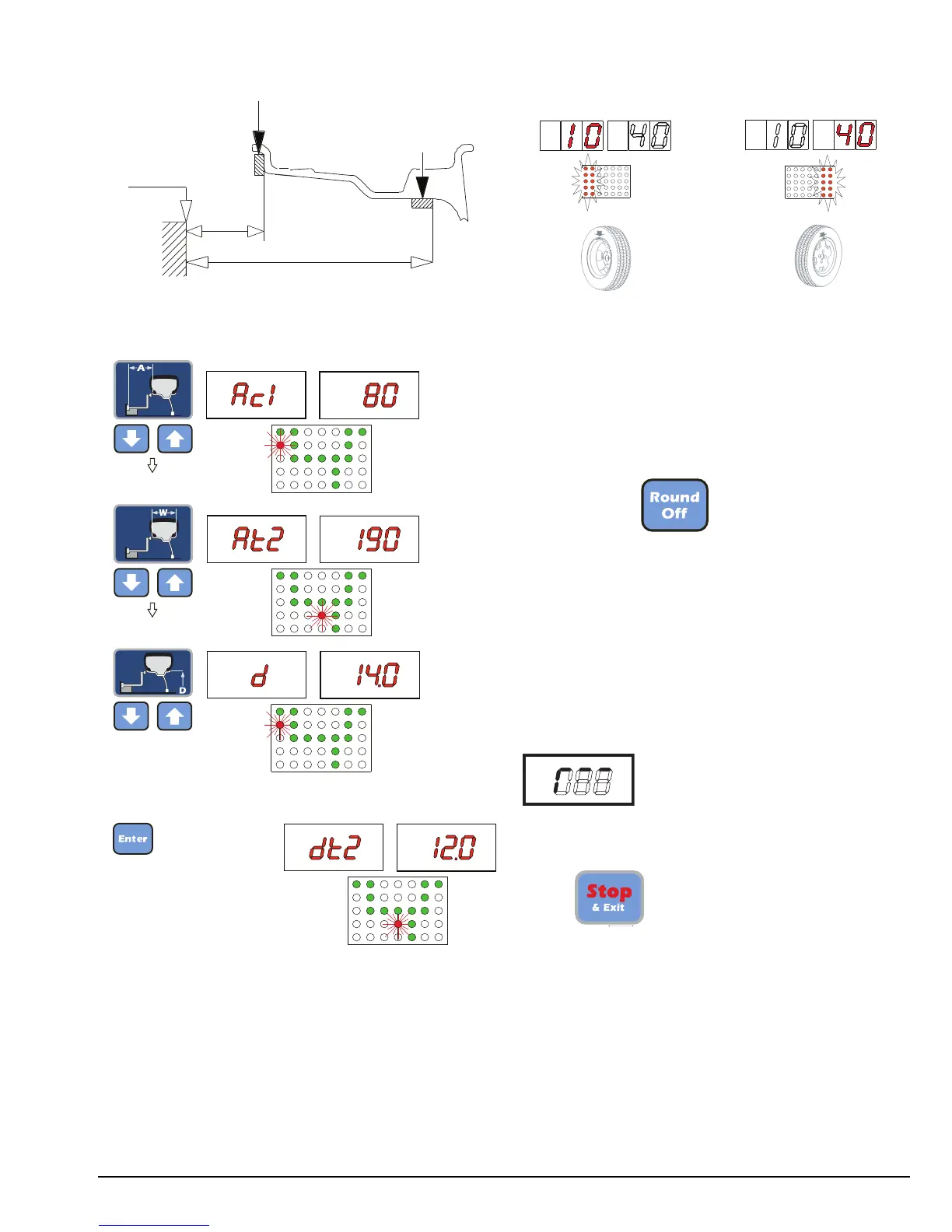
775 - c1-t2 Wheel
- Measure the dimensions as shown in the following
diagram
Presetting:
nominal
Note: when dt2 is not set, dt2 = d + 2" is automatic.
Result of Measurement
After performing a balancing spin, the amounts of
unbalance are shown on the digital readouts.
Digital readouts with LED’s 3 - 4 lit up indicate the
correct angular wheel position to mount the counter-
weights (12 o’clock position).
In the event of unbalance less than the selected
threshold value 0, is displayed in place of the unbal-
ance value, with it is possible to read the
values below the selected threshold.
Note: In the event of wheels with diameter less than
or equal to 13" and at temperature conditions near 0˚,
the wheel balancer automatically engages a special
measuring cycle involving two successive measure-
ments. The precision of unbalance values and the reli-
ability of the wheel balancer are unaffected. This type
of operation is reset every time the wheel balancer is
started.
If at the end of any balancing run, the flashing symbol
appears, manually turn the wheel
until unbalances are displayed.
Recalculation Of The Unbalance
Press after new setting of the measure-
ment.
Important: Always read and follow the instructions. • 11


 To Next Page