EasyManua.ls Logo

COBHAM AVIATOR UAV 200 - Connection Settings Management; Accessing Advanced Control Panel; Editing Connection Parameters

COBHAM AVIATOR UAV 200
61 pages
Print Icon
To Next Page IconTo Next Page
To Previous Page IconTo Previous Page
Loading...
Document: 677-A0219_IM issue 1.4
COBHAM PUBLIC
Page 34 of 61
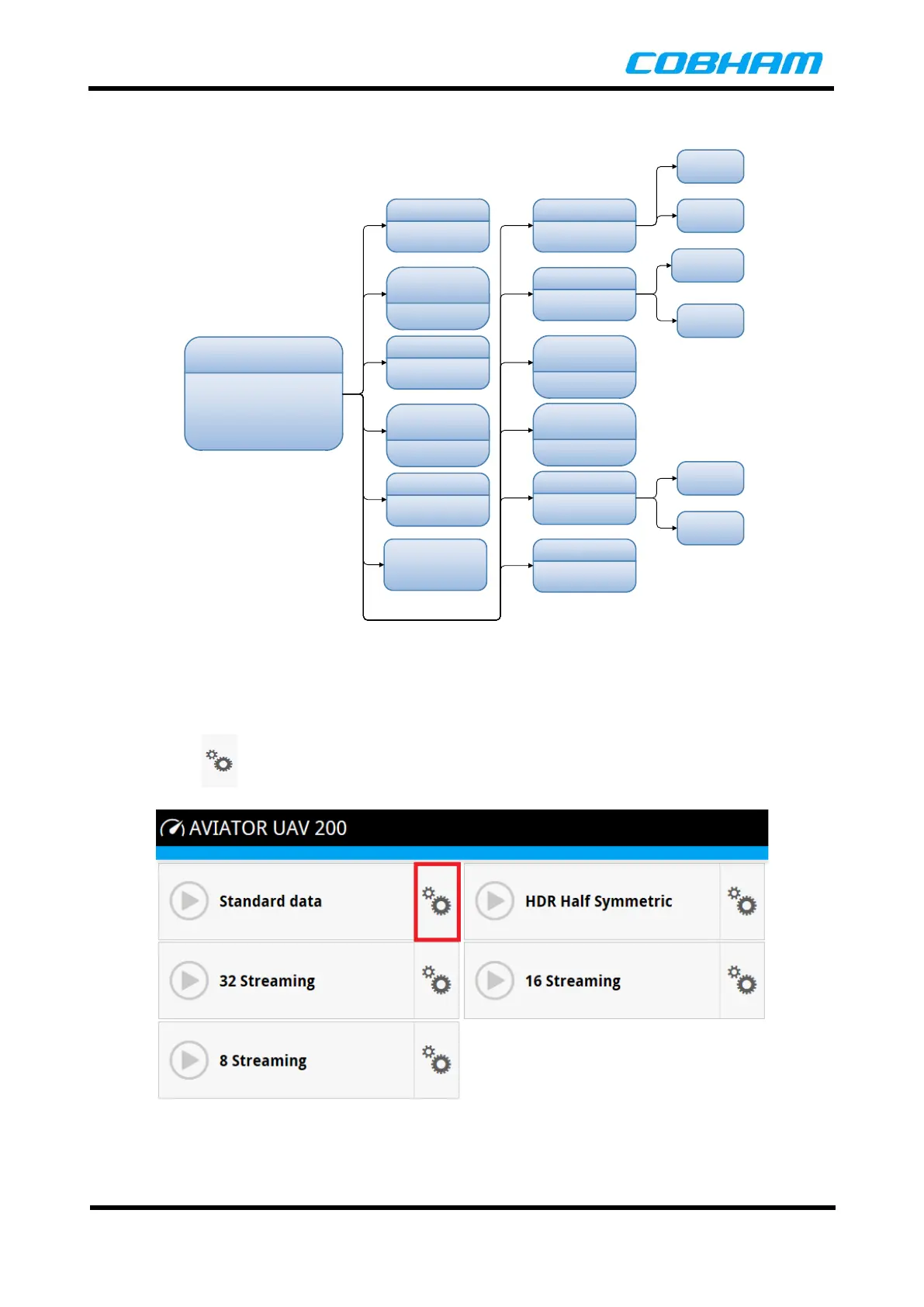
Below in Figure 8-9 is the overview of the Advanced Control Panel Menu structure and sub-functions.
Advanced
Control Panel
User Permissions
Load/Save
Configuration
Tracking Settings
Passwords
Factory Reset
Templates
Remote
Management
Connection
Watchdog
Data Limits
Help Desk
Advanced
Watchdog
Call Charges
Connections
Traffic
Filters
User
Password
Admin
Password
Standard
Streaming
Figure 8-9: Advanced Control Panel Menu
8.4.4 Connection Settings
To change the Connection Setting Parameters, the user will need to login as an Administrator. See
Section 8.4.5.4.
The click on the button shown below next to the connection the user wants to edit.
Figure 8-10: Connection Settings