Chapter 2: To get started
98-148232-B Installation process 11
Installation process
Physical installation
See also the supplied Installation guide.
A pole mount kit is included in the delivery. To mount the
EXPLORER 540 on a pole, do as follows:
1. Attach the base of the pole mount bracket to the
EXPLORER 540 using the included Hex L key on the 4
screws. Caution! Max. length of the screws is 9 mm!
Longer screws can damage the EXPLORER 540.
2. Unscrew two of the long screws from the pole mount
kit to leave one side open for the pole.
3. Place the pole mount kit with the EXPLORER 540
around the pole as shown.
4. Remount the two remaining long screws. Do not
tighten the screws completely until you have pointed
the antenna.
Pointing
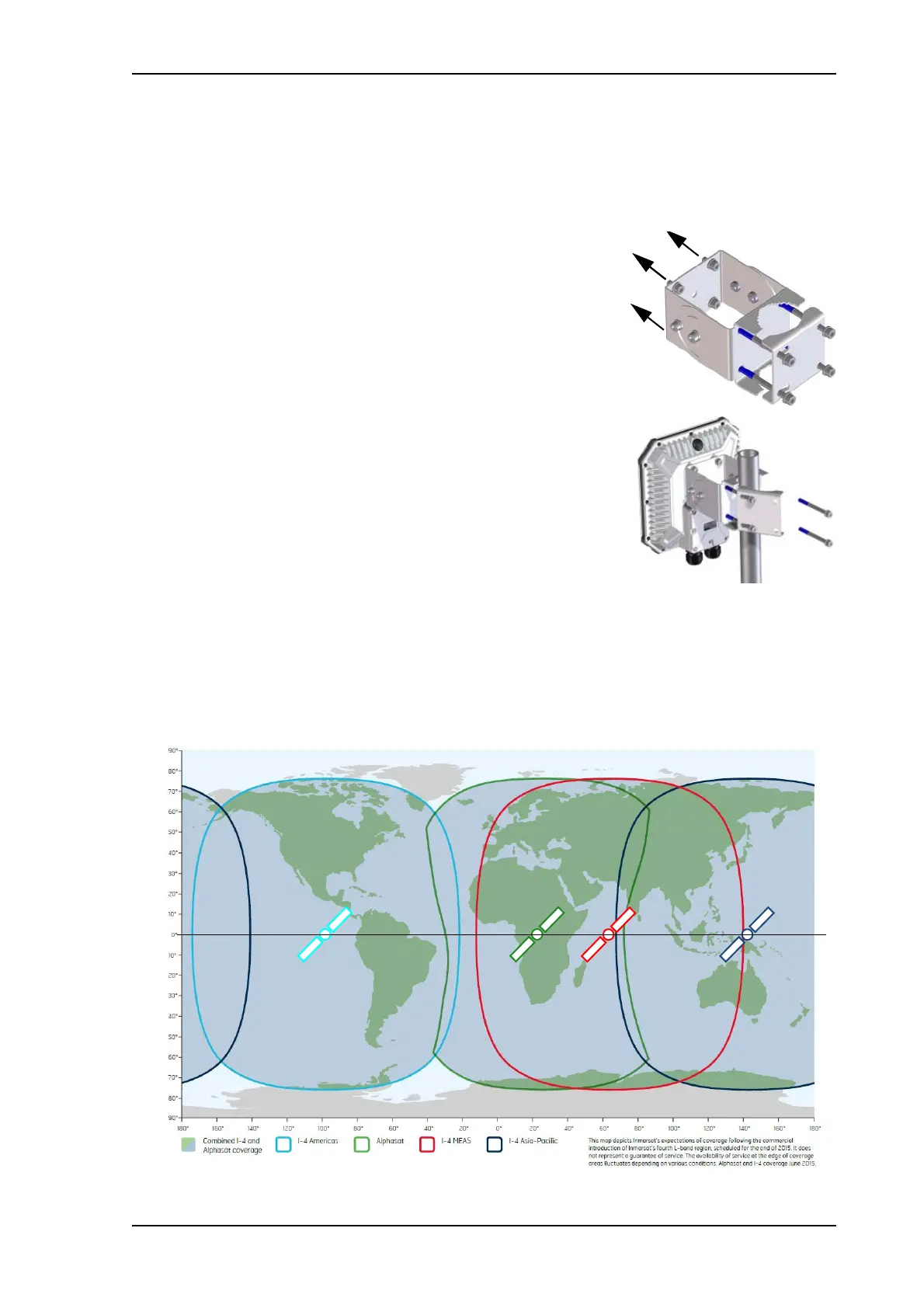
Before pointing the antenna you can use the coverage map below to find your approximate
location in relation to the satellites. Pointing is part of the Installation procedure described in
the next section.
The Inmarsat satellites are positioned above the equator, at the centre of each “footprint”.



 To Next Page